How do I use the Warm Minimalist Microwave Product Photo template?
Choose the primary action to open PicX Studio with the available template settings. Review the model and format, personalize the creative direction, and generate when ready.
A photorealistic premium kitchen appliance scene featuring a modern microwave glowing warmly on a stone countertop.
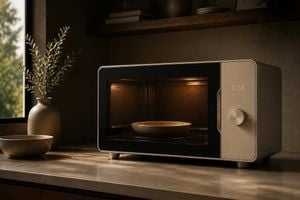
Create a photorealistic cinematic product photograph of a sleek modern countertop microwave oven in a warm minimalist kitchen. The microwave is the single main subject, positioned slightly right of center on a stone countertop, with a rounded rectangular beige-bronze metal body, black glass front door, thin chrome trim, small feet, and a right-side control panel. The control panel has a soft white digital display reading {argument name="timer display" default="0:50"} above one large circular metal dial surrounded by tiny minimal tick marks and plus/minus-style symbols. Through the dark perforated microwave window, show a warm amber interior light illuminating one shallow ceramic bowl centered on the turntable. The surrounding kitchen is calm and upscale: a large window on the left with blurred greenery outside, sunlight casting soft leaf-shaped shadows across the counter, one ceramic vase with leafy branches behind the microwave on the left, one empty ceramic bowl on the counter in the left foreground, and one floating wooden shelf in the background holding two stacked books, one rounded vase, one small plate stack, and a trailing plant at the far right. Use earthy neutral colors, matte textures, soft golden-hour side lighting, shallow depth of field, realistic reflections on glass and metal, subtle film grain, high dynamic range, and a premium appliance-advertising composition. No people, no logos, no extra text beyond the digital timer.
Choose the primary action to open PicX Studio with the available template settings. Review the model and format, personalize the creative direction, and generate when ready.
Yes. You can change the subject, setting, lighting, mood, format, and available model controls before creating your image.
This template is free to open and customize. Generation usage is shown in PicX Studio before you create.
Start with GPT Image 2, which is the model associated with this template. You can compare another compatible model for a different finish.
Follow a topic to a crawlable collection of related PicX Studio templates.