
Retro Manga Helicopter Infiltration
Generates a gritty monochrome sci-fi military manga page showing a helicopter infiltration and clone-like female soldiers inside the aircraft.
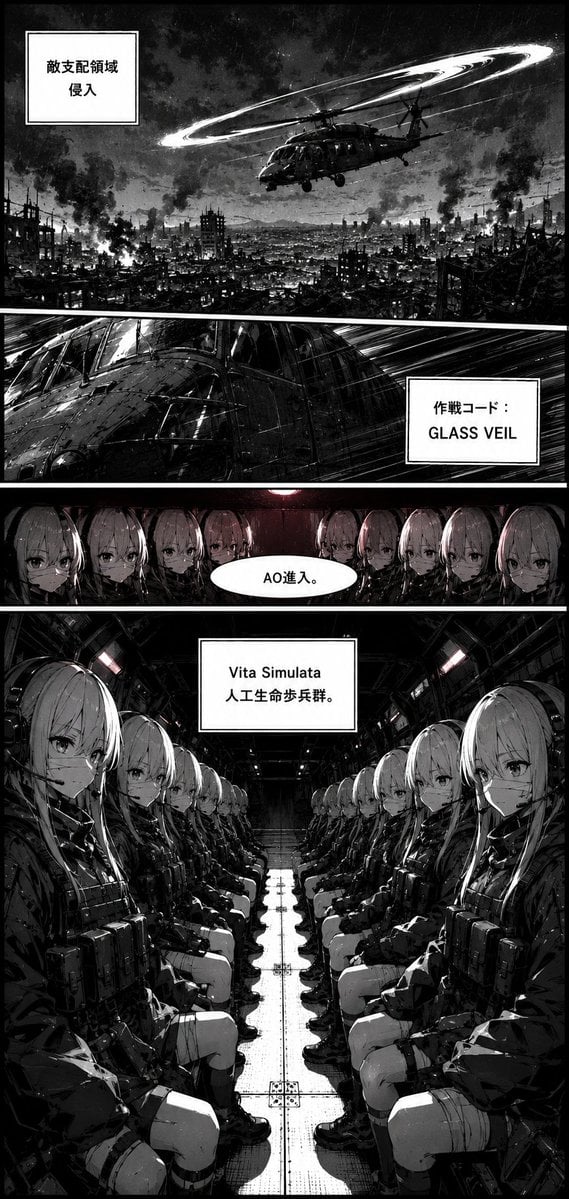
- Prompt included
- Model and format preset
- Free template
The prompt behind this image
Copy the exact prompt behind Retro Manga Helicopter Infiltration, or open it in the studio and make it yours.
Goal: Create a vertical black-and-white manga page in an older military sci-fi style, with thick black panel borders, gritty ink texture, high-contrast screentone shading, flat cinematic compositions, and a slightly retro war-comic atmosphere. Canvas: Tall portrait manga page, roughly 9:16 aspect ratio. Use monochrome grayscale with only very subtle muted red accent lights inside the aircraft. Add weathered paper grain, scratches, smoke, and heavy blacks. Layout: Use exactly 4 horizontal comic panels stacked vertically, separated by thick white gutters and heavy black borders. Panel 1: Wide establishing shot over a devastated urban battlefield at night. A military helicopter flies above a ruined city full of burning buildings, smoke columns, rubble silhouettes, and distant mountains. Above the helicopter is a large glowing circular rotor blur or halo-like light trail. Place one square white narration box at upper left containing the Japanese text 「敵支配領域 侵入」. Panel 2: Narrow action panel showing an extreme close-up of the helicopter fuselage and cockpit from the side, with rain-like speed lines and harsh reflected highlights. Place one white rectangular caption box on the right containing two lines: 「作戦コード:」 and “GLASS VEIL”. Panel 3: Narrow interior panel inside the helicopter, showing exactly 9 visible identical anime-style female android soldiers in a dark row, facing forward with serious expressions. They have long pale hair, tactical collars, and shadowed faces. Add a white oval speech bubble in the center foreground containing 「AO進入。」. Panel 4: Large bottom panel inside the cargo hold of the helicopter, drawn in one-point perspective down the central aisle. Show exactly 16 visible identical female artificial-life soldiers seated in two opposing rows, 8 on the left and 8 on the right. They are young anime women with long {argument name="hair color" default="pale silver-blonde"} hair, calm emotionless eyes, black tactical jackets, chest rigs, gloves, thigh straps, boots, and compact military gear. The foreground soldier on each side is largest, with the rows receding toward the rear door. Overhead lights create small muted red highlights. Place a centered white rectangular narration box near the top reading “Vita Simulata” on the first line and 「人工生命歩兵群。」 on the second line. Subject details: The soldiers are clone-like and uniform, with porcelain pale faces, straight bangs, long hair, and stoic expressions. The helicopter interior is industrial, cramped, metallic, and dark, with rivets, panels, cables, benches, and a reflective central floor track. Visual style: Japanese manga ink illustration, heavy black fills, dense hatching, screentone gradients, dramatic noir lighting, smoke and grit, retro 1980s war-comic influence mixed with modern anime character design. Keep all text crisp, black on white boxes, and preserve the Japanese text exactly as written. Constraints: Use exactly 4 panels, exactly 4 text elements, exactly 9 visible soldiers in panel 3, and exactly 16 visible seated soldiers in panel 4. No color except faint red interior light accents. No watermark, no extra captions, no extra speech bubbles.
How to use Retro Manga Helicopter Infiltration in 3 steps
- 1Upload ImagePNG, JPG or paste
Add your photo
Upload the photo the template builds on. The prompt, model and format are already set.
- 2…a portrait of your subject in softgolden-hour light, 85mm…
Personalize
Edit the subject and creative details for your destination.
- 3Generate
Generate
Press Generate — your image is created in PicX Studio, so you can compare it with the original and refine one variable at a time.
More like this
Templates with the same subject, style or setup. Open one to see its prompt.












Make it yours
Retro Manga Helicopter Infiltration works as-is. These are the safest ways to change it without losing the look.
Change one field
Copy a single group, rewrite it, and generate again so you can see what that field is doing.
Keep the frame, change the subject
Hold the composition and light of Retro Manga Helicopter Infiltration, then swap wardrobe, props or the person for a new take.
| If the result… | Why | Fix |
|---|---|---|
| The result drifts from the preview | Too many fields changed at once. | Reuse Retro Manga Helicopter Infiltration as-is first, then change one group — subject, light, or setting. |
| The model over-stylizes the scene | The prose prompt leaves finish and camera underspecified. | Add one camera or lighting sentence and stay on GPT Image 2. |
More GPT Image 2 templates
Other prompts made for GPT Image 2.

Six VTuber Japanese Logo Sheet

Realistic Portrait of Woman and Deer

The Vista Modular Condo Poster

AI Model Routing Comparison Infographic

2.5D Anime Art Board

Isometric Productivity Desk Scene

New York Double Exposure Poster

Four-Panel AI Landscape Comparison

Japanese Tatami Lifestyle Magazine Cover

NESCAFÉ Coffee Map Poster
More image prompts
Fresh picks from across the catalog.
Structured Prompt for Urban Melancholia Portrait

Ultra-Realistic Portrait with Vintage Camera and Flowers
Fictional Gothic Sci-Fi Game Case Photo

JSON selfie-on-bed prompt for Nano Banana Pro
Backless Top Mirror Selfie Emphasizing Curves
Deconstructed High-Fashion Collage Portrait
AI Influencer in Goth Fashion Portrait
Dark Fantasy Wounded Monk Portrait
Vertical Slice Double Exposure Woman
Cozy Aesthetic Cafe Photography Prompts
Browse template categories
Retro Manga Helicopter Infiltration questions
How do I use the Retro Manga Helicopter Infiltration template?
Add your photo if the template asks for one, edit the prompt if you like — the template's model and format are already selected — and press Generate. Your version opens in PicX Studio.
Can I customize the Retro Manga Helicopter Infiltration template?
Yes. You can change the subject, setting, lighting, mood, format, and available model controls before creating your image.
Is the Retro Manga Helicopter Infiltration template free?
Opening and editing this template is free. Generating uses credits, shown on the Generate button when you are signed in.
Which AI model should I use?
Start with GPT Image 2, which is the model associated with this template. You can compare another compatible model for a different finish.
Looking for something else? Browse all templates.

Your photo, any look
Thousands of ready templates for every top image and video model, from one credit balance.