How do I use the Modest Anime Girl Street Outfit template?
Choose the primary action to open PicX Studio with the available template settings. Review the model and format, personalize the creative direction, and generate when ready.
A full-body anime illustration prompt for a shy bespectacled girl in a simple casual outfit on a sunny residential street.
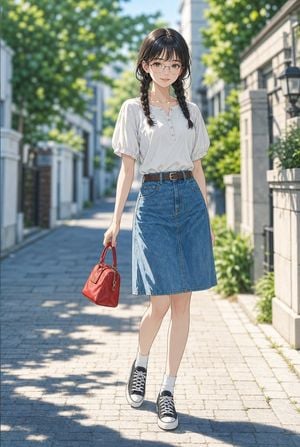
Create a full-body polished anime-style illustration of a modest cute young woman standing on a quiet sunlit residential street. She is centered in the frame, facing the viewer with a gentle shy smile and relaxed posture, one leg slightly forward as if mid-step. The character has {argument name="hair color" default="dark black-brown"} hair with straight bangs and two loose braids falling over her shoulders, soft fair skin, large warm brown eyes, and round thin-framed glasses. Her outfit is simple and understated: a slightly loose {argument name="blouse color" default="white"} short puff-sleeve henley blouse with small front buttons tucked into a high-waisted knee-length blue denim A-line skirt, a narrow brown belt with a small buckle, white ankle socks, and black low-top canvas sneakers with white laces and rubber soles. She holds exactly one accessory: a small glossy {argument name="handbag color" default="red"} handbag by its handle in her left hand. Set the scene on a clean paved sidewalk or alley lined with pale stone walls, greenery, trees, and soft urban buildings in the background. Use bright summer morning sunlight, leafy dappled shadows on the pavement, soft bokeh in the distant background, realistic depth of field, delicate linework, detailed fabric folds, natural highlights on hair and glasses, and a wholesome quiet atmosphere. Vertical composition, portrait aspect ratio, full body visible from head to shoes, no text, no watermark, no extra characters.
Choose the primary action to open PicX Studio with the available template settings. Review the model and format, personalize the creative direction, and generate when ready.
Yes. You can change the subject, setting, lighting, mood, format, and available model controls before creating your image.
This template is free to open and customize. Generation usage is shown in PicX Studio before you create.
Start with GPT Image 2, which is the model associated with this template. You can compare another compatible model for a different finish.
Follow a topic to a crawlable collection of related PicX Studio templates.