How do I use the Charging Two-Headed Hellhound template?
Choose the primary action to open PicX Studio with the available template settings. Review the model and format, personalize the creative direction, and generate when ready.
A gritty monochrome dark fantasy prompt for generating a two-headed mythological hellhound attacking through a forest.
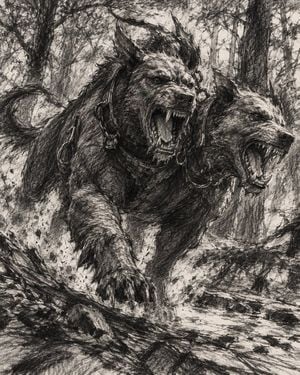
Create a dramatic monochrome fantasy illustration of {argument name="creature name" default="Orthrus"}, a massive two-headed hellhound charging straight toward the viewer through a dense ancient forest. The creature has exactly 2 snarling canine heads: the left head faces forward with jaws wide open, long fangs exposed, tongue visible, ears raised and spiked fur bristling; the right head is slightly behind and turned to the right, also roaring with sharp teeth bared. Give the beast a muscular wolf-like body, thick shaggy black-gray fur, huge clawed front paws lunging over fallen logs, a curling tail visible on the left, and heavy metal collars, rings, and chain links around both necks. Set the scene in a chaotic woodland with tall tree trunks, tangled branches, leaf litter, splintered deadwood, rocks, and dust or debris kicked up under its paws. Use an intense low frontal perspective, close crop, dynamic motion, and a sense of imminent attack. Render in gritty black-and-white ink, charcoal, and graphite crosshatching, with dense scratchy linework, high contrast, rough paper texture, expressive dark shadows, no color, no text, no border, no watermark. Emphasize ferocity, mythological horror, and hand-drawn dark fantasy concept art in a square composition.
Choose the primary action to open PicX Studio with the available template settings. Review the model and format, personalize the creative direction, and generate when ready.
Yes. You can change the subject, setting, lighting, mood, format, and available model controls before creating your image.
This template is free to open and customize. Generation usage is shown in PicX Studio before you create.
Start with GPT Image 2, which is the model associated with this template. You can compare another compatible model for a different finish.
Follow a topic to a crawlable collection of related PicX Studio templates.