How do I use the Neon Flux Cyberpunk Portrait template?
Choose the primary action to open PicX Studio with the available template settings. Review the model and format, personalize the creative direction, and generate when ready.
A striking anime-inspired digital illustration of a cyberpunk woman with crimson-teal hair and neon rim lighting.
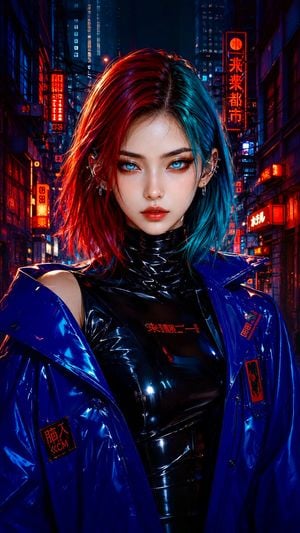
A stylized cyberpunk fashion portrait of a striking young woman with sleek shoulder-length crimson-teal hair, luminous icy-blue eyes, sharp eyeliner, glossy coral lips, and subtle red markings beneath one eye. She faces the camera directly with a calm, confident expression, centered in a tight waist-up composition. She wears a high-gloss black latex turtleneck bodysuit beneath an oversized cobalt-blue vinyl jacket, with metallic ear cuffs and small silver piercings. Behind her is a dense futuristic city alley filled with abstract red-orange neon signage, deep navy architecture, cables, panels, and layered urban details. Dramatic neon rim lighting, saturated red and electric-blue palette, smooth porcelain skin, glossy specular reflections, soft cinematic shadows. Polished anime-inspired digital illustration blended with semi-realistic facial rendering, crisp linework, luxurious fashion-editorial styling, symmetrical composition, shallow depth of field, moody futuristic nightlife atmosphere
Choose the primary action to open PicX Studio with the available template settings. Review the model and format, personalize the creative direction, and generate when ready.
Yes. You can change the subject, setting, lighting, mood, format, and available model controls before creating your image.
This template is free to open and customize. Generation usage is shown in PicX Studio before you create.
Start with GPT Image 2, which is the model associated with this template. You can compare another compatible model for a different finish.
Follow a topic to a crawlable collection of related PicX Studio templates.