How do I use the Glassmorphism Smart UI Kit template?
Choose the primary action to open PicX Studio with the available template settings. Review the model and format, personalize the creative direction, and generate when ready.
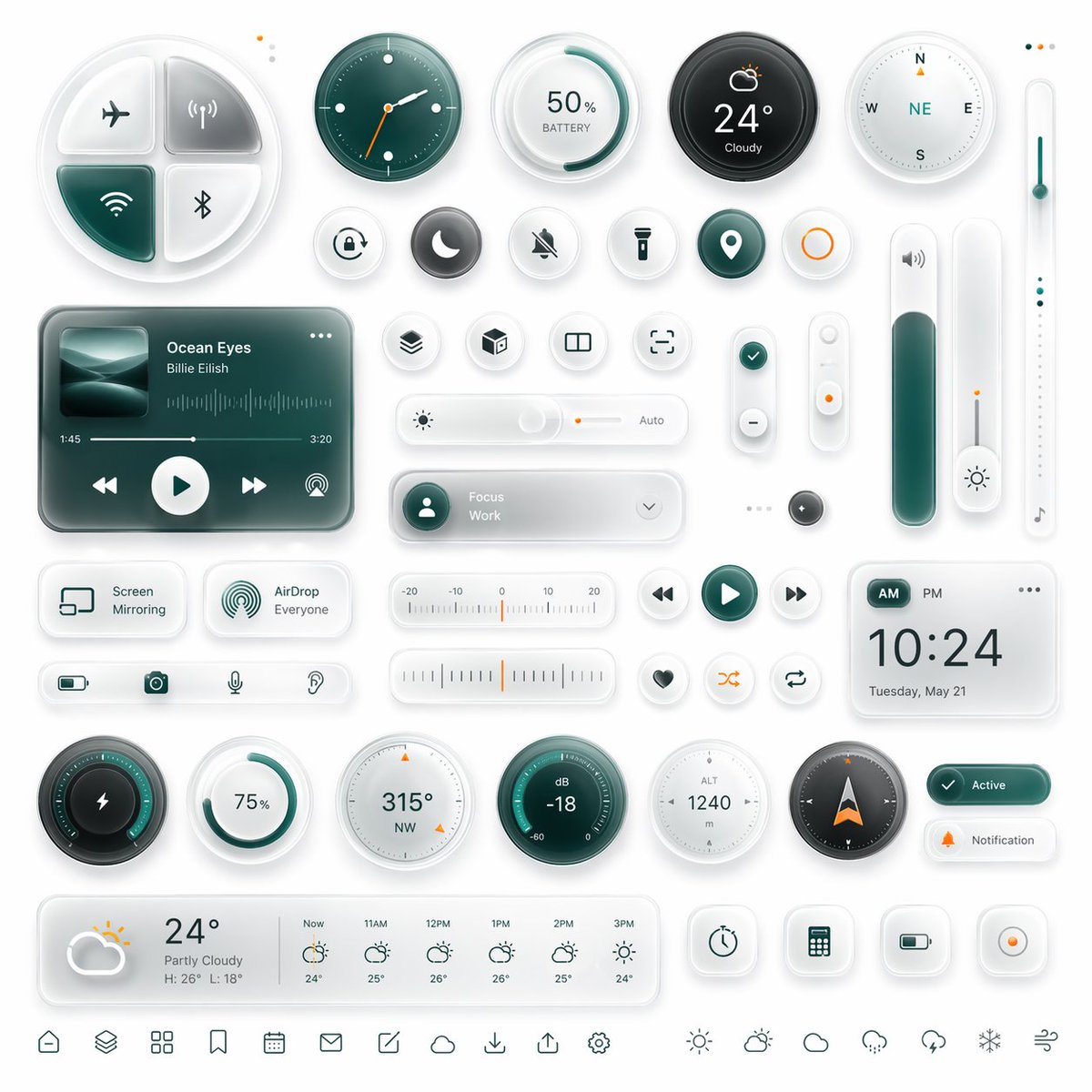
A polished futuristic dashboard interface kit with many glassmorphism widgets, ideal for app UI concept renders, product mockups, and design showcases. (free to use) — Free AI image template on PicX Studio.
{"type":"glassmorphism neumorphic smart dashboard UI kit","style":{"theme":"clean futuristic mobile interface components","background":"soft light gray-white","materials":"frosted glass, translucent acrylic, soft shadows, subtle inner glow, rounded corners, embossed and debossed details","accent color":"{argument name=\"accent color\" default=\"deep teal green\"}","secondary accent":"warm orange","lighting":"soft studio lighting from upper left, gentle ambient reflections, high polish","rendering":"ultra-detailed 3D UI mockup, premium dribbble-style product design"},"layout":{"canvas":"square composition","arrangement":"evenly spaced grid of isolated widgets and controls","density":"information-dense but balanced with generous white space","sections":[{"title":"top row controls","position":"top","count":6,"labels":["4-quadrant connectivity pad","analog clock","50% BATTERY circular gauge","24° Cloudy weather dial","compass","vertical temperature slider"]},{"title":"small circular shortcut buttons","position":"upper middle","count":11,"labels":["alarm","moon","mute bell","flashlight","location pin","orange ring button","layers","cube","split view","focus frame","check icon"]},{"title":"center widgets","position":"middle","count":8,"labels":["music player card","brightness slider with Auto","Focus Work dropdown pill","vertical plus-minus rocker","small vertical toggle with orange dot","tall volume slider","small dark circular button","thin vertical light slider with note icon"]},{"title":"secondary cards and controls","position":"lower middle","count":11,"labels":["Screen Mirroring card","AirDrop Everyone card","bottom utility strip with battery camera microphone hearing icons","horizontal temperature scale","media back button","media play button","media next button","heart button","shuffle button","repeat button","digital clock card"]},{"title":"bottom gauges and status","position":"lower","count":11,"labels":["lightning circular power gauge","75% circular ring","315° NW compass dial","dB -18 meter","ALT 1240 meter","navigation compass arrow","Active status pill","Notification pill","weekly weather forecast card","4 square utility buttons","bottom navigation icon row"]}],"bottom navigation count":13},"objects":{"connectivity pad":{"shape":"large rounded 4-way disc","quadrants":4,"icons":["airplane mode","wireless signal","wifi","bluetooth"],"active quadrants":1},"music player":{"artist":"{argument name=\"artist name\" default=\"Billie Eilish\"}","track":"{argument name=\"song title\" default=\"Ocean Eyes\"}","artwork":"abstract ocean wave image in teal tones","controls":4,"timeline":"1:45 to 3:20","extra":"audio waveform"},"weather main":{"temperature":"{argument name=\"temperature\" default=\"24°\"}","condition":"Cloudy"},"digital clock":{"time":"{argument name=\"clock time\" default=\"10:24\"}","date":"Tuesday, May 21","period toggle":"AM PM"},"forecast":{"current":"24° Partly Cloudy, H: 26° L: 18°","hourly count":6,"hours":["Now","11AM","12PM","1PM","2PM","3PM"]},"utility buttons":{"count":4,"icons":["timer","calculator","battery","record"]}},"color palette":{"count":5,"colors":["white","light gray","deep teal green","dark charcoal","soft orange"]},"camera":{"view":"straight-on top view","framing":"entire UI kit visible edge to edge"}}
Use Glassmorphism Smart UI Kit to plan an AI image around gpt-image-2 generation, themes such as en and gpt-image-2. Match the preview's composition first, then personalize the subject, setting, and mood for your own project.
Use the primary action to load the template settings in PicX Studio.
Adjust the subject and creative details for your destination.
Create the image, compare the result with the preview, and refine one variable at a time.
A continuous mix — similar concepts first, woven with same-model prompts and fresh picks from the catalog.
Choose the primary action to open PicX Studio with the available template settings. Review the model and format, personalize the creative direction, and generate when ready.
Yes. You can change the subject, setting, lighting, mood, format, and available model controls before creating your image.
This template is free to open and customize. Generation usage is shown in PicX Studio before you create.
Start with gpt-image-2, which is the model associated with this template. You can compare another compatible model for a different finish.
Follow a topic to a crawlable collection of related PicX Studio templates.
39,157 public templates available. Verified via the PicX Studio public templates API; refreshed hourly.
A continuous mix — similar concepts first, woven with same-model prompts and fresh picks from the catalog.