How do I use the UFC-Style Women's Fight Poster template?
Choose the primary action to open PicX Studio with the available template settings. Review the model and format, personalize the creative direction, and generate when ready.
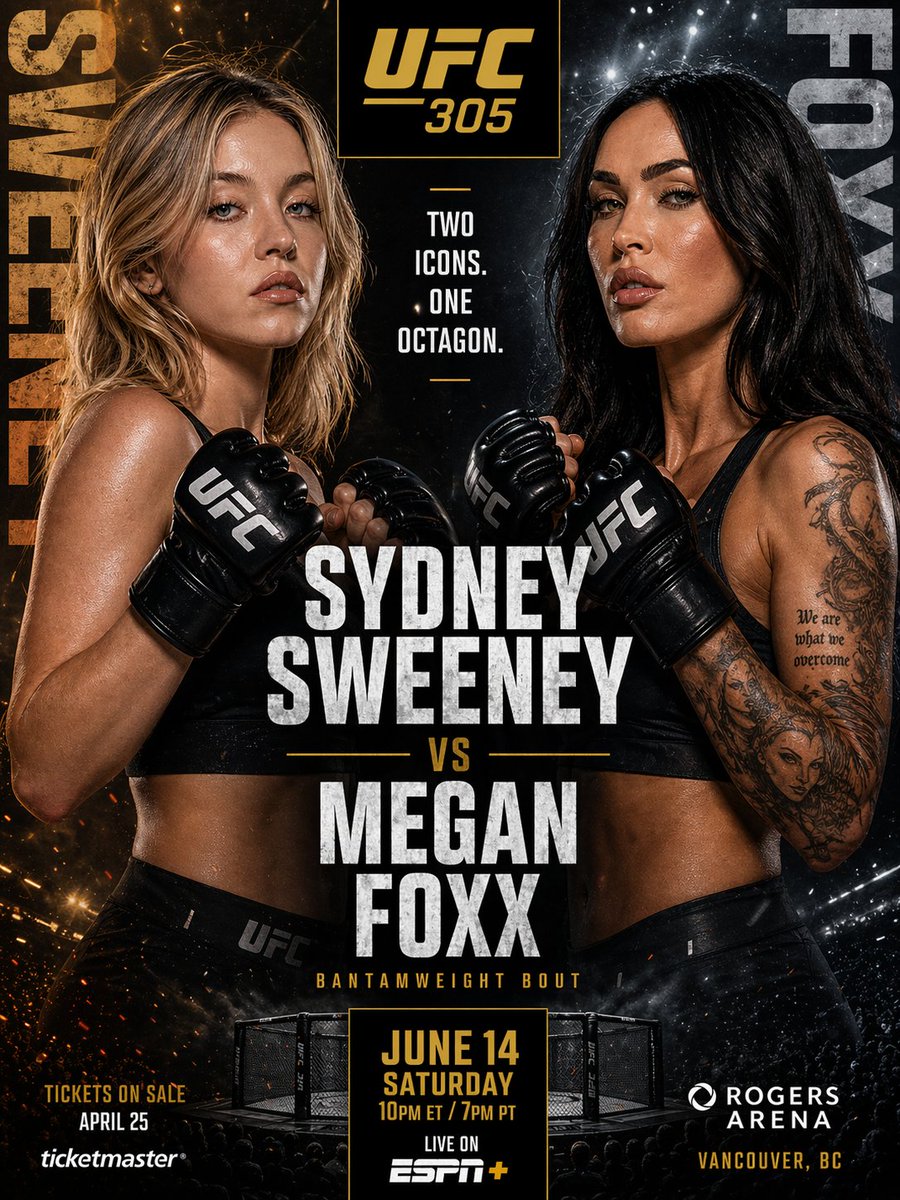
This prompt generates a polished MMA pay-per-view poster featuring two female fighters in a dramatic head-to-head event promotion layout. (free to use) — Free AI image template on PicX Studio.
A dramatic UFC fight-poster style sports promotion for {argument name="event title" default="UFC 305"}, designed as a high-contrast vertical matchup graphic with two female MMA fighters facing inward in orthodox guard poses. The left fighter is a fit blonde woman with shoulder-length messy beach-wave hair, tan skin, a black sports bra, black UFC gloves, and black fight shorts, shown from upper thigh to head, turned slightly right. The right fighter is a fit dark-haired woman with long straight black hair, tan skin, a black sports bra, black UFC gloves, and black fight shorts, shown from upper thigh to head, turned slightly left, with a large detailed black-and-gray tattoo sleeve on her right arm and script tattoo text on the inner upper arm. Both fighters are sweaty, intensely lit, and centered close together with fists raised near chest height. Use a split background: fiery orange sparks and smoke on the left, icy blue-white sparks and haze on the right, with a dark black center seam. At the top center, place a black rectangular logo box with gold trim containing the gold text {argument name="event logo text" default="UFC 305"}. Beneath it, in stacked condensed white uppercase type, add the tagline: "TWO ICONS. ONE OCTAGON." Along the far left edge, place the surname "SWEENEY" vertically in large distressed gold letters; along the far right edge, place the surname "FOXX" vertically in large distressed silver-gray letters. In the center, overlay huge distressed white condensed sans-serif typography with the matchup names stacked exactly as {argument name="left fighter name" default="SYDNEY SWEENEY"} above a small gold "VS" and {argument name="right fighter name" default="MEGAN FOXX"}. Below that, add a small gold subtitle reading "BANTAMWEIGHT BOUT". At the bottom center, show a small realistic UFC octagon cage seen from a slightly elevated front angle, embedded into the poster. In front of the cage, place a black date card with gold trim containing stacked gold text: "JUNE 14", "SATURDAY", "10PM ET / 7PM PT". Below the card, add white text "LIVE ON" and the ESPN+ logo. Bottom left, add small gold and white ticket text reading "TICKETS ON SALE APRIL 25" with the Ticketmaster logo beneath. Bottom right, add the Rogers Arena logo and white text "ROGERS ARENA" with gold text "VANCOUVER, BC" below. Use a glossy premium combat-sports poster finish, cinematic rim lighting, gritty texture overlays, metallic typography, and intense face-off composition.
Use UFC-Style Women's Fight Poster to plan an AI image around gpt-image-2 generation, themes such as en and gpt-image-2. Match the preview's composition first, then personalize the subject, setting, and mood for your own project.
Use the primary action to load the template settings in PicX Studio.
Adjust the subject and creative details for your destination.
Create the image, compare the result with the preview, and refine one variable at a time.
A continuous mix — similar concepts first, woven with same-model prompts and fresh picks from the catalog.

Choose the primary action to open PicX Studio with the available template settings. Review the model and format, personalize the creative direction, and generate when ready.
Yes. You can change the subject, setting, lighting, mood, format, and available model controls before creating your image.
This template is free to open and customize. Generation usage is shown in PicX Studio before you create.
Start with gpt-image-2, which is the model associated with this template. You can compare another compatible model for a different finish.
A continuous mix — similar concepts first, woven with same-model prompts and fresh picks from the catalog.

Follow a topic to a crawlable collection of related PicX Studio templates.

28,404 public templates available. Verified via the PicX Studio public templates API; refreshed hourly.