
Retro Pop Riverbank Key Visual
A precise image-to-image prompt for creating stylish, retro-pop anime key visuals with a focus on negative space and clean compositions.
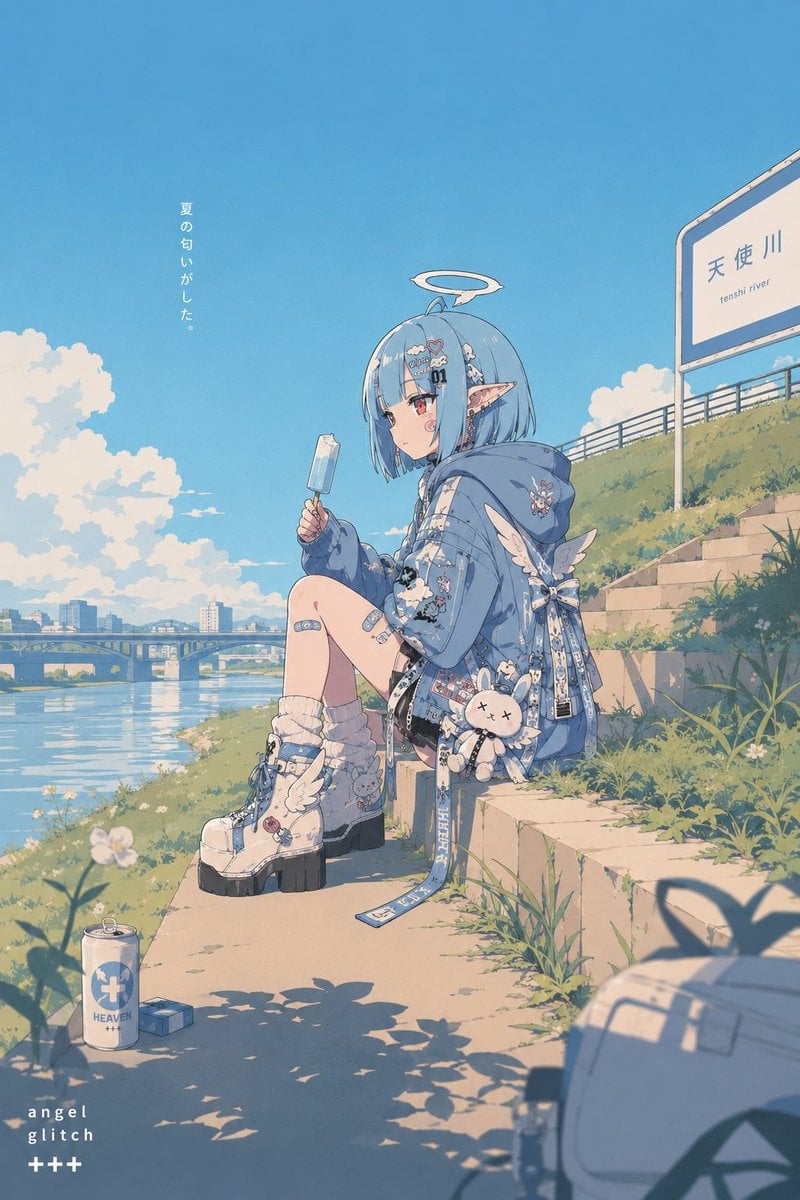
- Prompt included
- Model and format preset
- Free template
The prompt behind this image
Copy the exact prompt behind Retro Pop Riverbank Key Visual, or open it in the studio and make it yours.
Using this character, create a retro x pop key visual. Use the reference image only as a character reference; do not carry over the original image's composition, pose, background, or framing. Flat-leaning anime coloring. A somewhat thick outline. Keep the composition mindful of negative space, without overloading it with information. {argument name="scene setting" default="A riverbank in summer. Sitting on a grassy concrete step, half-eaten ice cream in one hand, gazing absentmindedly at the river."} The composition should have natural depth across three layers: foreground, midground, and background. In the foreground, place minimal elements that add atmosphere and a sense of everyday life. In the midground, place the character as the main focus. In the background, briefly include scenery that conveys the feel and distance of the location. Keep each layer organized so none becomes overloaded with information. Avoid making it too flat and picture-like; compose it so the eye naturally flows toward the depth of the frame. Express the retro feel not through blatant symbols or overtly explanatory devices, but naturally through color palette, atmosphere, composition, sense of distance, and design sensibility. Avoid excessive detailing, high-density AI-illustration look, particle effects, cluttered backgrounds, and harsh, glaring lighting. Make the screen feel organized like a poster — calm and stylish.
How to use Retro Pop Riverbank Key Visual in 3 steps
- 1Upload ImagePNG, JPG or paste
Add your photo
Upload the photo the template builds on. The prompt, model and format are already set.
- 2…a portrait of your subject in softgolden-hour light, 85mm…
Personalize
Edit the subject and creative details for your destination.
- 3Generate
Generate
Press Generate — your image is created in PicX Studio, so you can compare it with the original and refine one variable at a time.
More like this
Templates with the same subject, style or setup. Open one to see its prompt.












Make it yours
Retro Pop Riverbank Key Visual works as-is. These are the safest ways to change it without losing the look.
Change one field
Copy a single group, rewrite it, and generate again so you can see what that field is doing.
Keep the frame, change the subject
Hold the composition and light of Retro Pop Riverbank Key Visual, then swap wardrobe, props or the person for a new take.
| If the result… | Why | Fix |
|---|---|---|
| The result drifts from the preview | Too many fields changed at once. | Reuse Retro Pop Riverbank Key Visual as-is first, then change one group — subject, light, or setting. |
| The model over-stylizes the scene | The prose prompt leaves finish and camera underspecified. | Add one camera or lighting sentence and stay on GPT Image 2. |
More GPT Image 2 templates
Other prompts made for GPT Image 2.

Six VTuber Japanese Logo Sheet

Realistic Portrait of Woman and Deer

The Vista Modular Condo Poster

AI Model Routing Comparison Infographic

2.5D Anime Art Board

Isometric Productivity Desk Scene

New York Double Exposure Poster

Four-Panel AI Landscape Comparison

Japanese Tatami Lifestyle Magazine Cover

NESCAFÉ Coffee Map Poster
More image prompts
Fresh picks from across the catalog.
Image-to-Storyboard prompt
Ethereal Fairy Queen Product Shot
Confused Elf Girl at Pastel Desk
Space Station Video Call UI

Modern Heterogeneous Chinese Font Design
HD Cinematic Bollywood Poster with Dual Image Composition

Hyper-Realistic iPhone Whale Breach Scene

Fantasy Sky Mirror Illustration
Romantic Wedding Couple Photoshoot
Detailed Image Generation Prompt for a Young Asian Woman in a Pink Knit Set
Browse template categories
Retro Pop Riverbank Key Visual questions
How do I use the Retro Pop Riverbank Key Visual template?
Add your photo if the template asks for one, edit the prompt if you like — the template's model and format are already selected — and press Generate. Your version opens in PicX Studio.
Can I customize the Retro Pop Riverbank Key Visual template?
Yes. You can change the subject, setting, lighting, mood, format, and available model controls before creating your image.
Is the Retro Pop Riverbank Key Visual template free?
Opening and editing this template is free. Generating uses credits, shown on the Generate button when you are signed in.
Which AI model should I use?
Start with GPT Image 2, which is the model associated with this template. You can compare another compatible model for a different finish.
Looking for something else? Browse all templates.

Your photo, any look
Thousands of ready templates for every top image and video model, from one credit balance.