How do I use the Samurai Princess Character Sheet template?
Choose the primary action to open PicX Studio with the available template settings. Review the model and format, personalize the creative direction, and generate when ready.
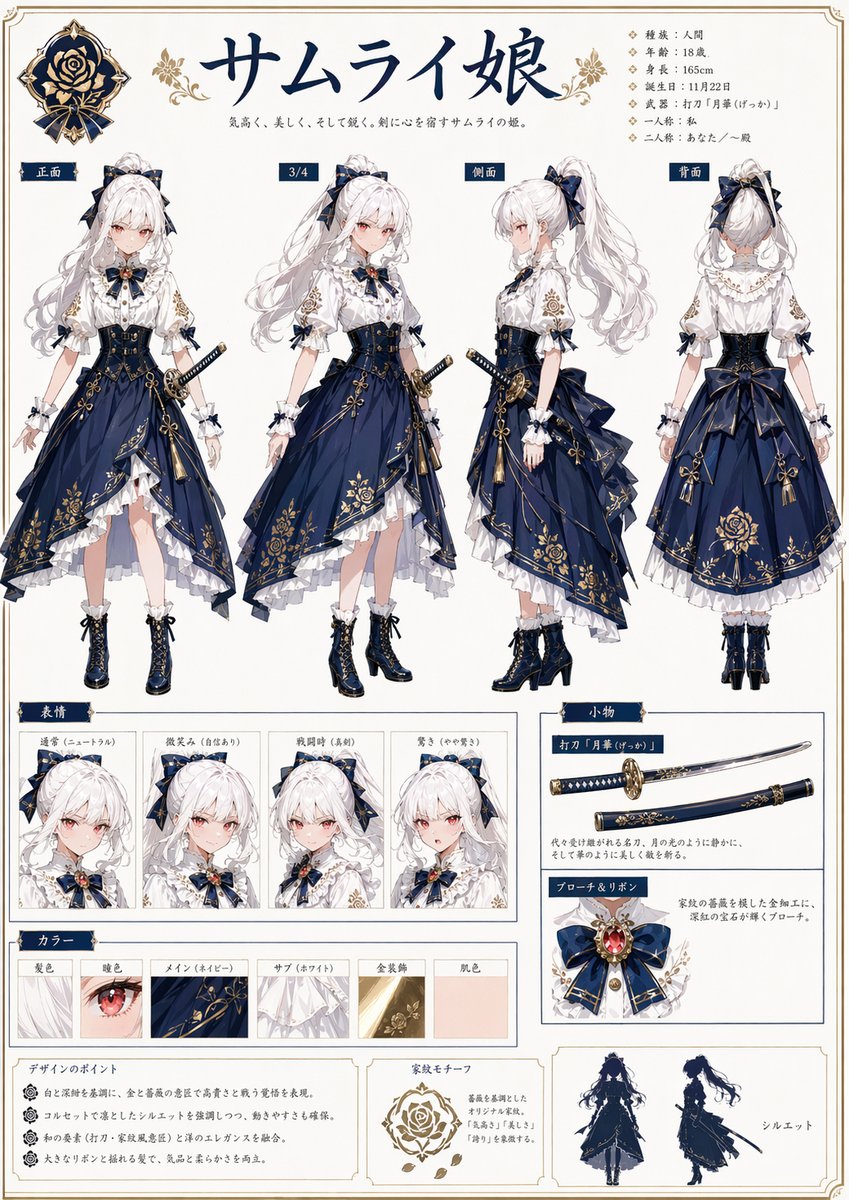
A polished anime reference-sheet prompt for generating a full character design dossier with turnarounds, expressions, color swatches, accessories, and profile details. (free to use) — Free AI image template on PicX Studio.
{"type":"anime character setting sheet","style":"ornate Japanese character design bible page, elegant fantasy samurai aesthetic, clean white background with thin decorative gold border, navy and gold headings, highly polished full-color illustration, refined print-layout composition","subject":{"role":"samurai princess","title":"サムライ姫","tagline":"気高く、美しく、そして強く。剣に心を宿すサムライの姫。","character":{"gender":"female","age":"18","build":"slender and graceful","skin":"fair porcelain","hair":{"color":"{argument name=\"hair color\" default=\"white\"}","style":"very long wavy high ponytail tied with a large navy bow, soft bangs, loose side strands"},"eyes":{"color":"soft crimson pink","shape":"large delicate anime eyes"},"expression":"calm, noble, slightly reserved"},"outfit":{"theme":"Japanese-western fusion formal combat dress","primary colors":["deep navy blue","white","antique gold"],"pieces":["white high-neck ruffled blouse with puff sleeves and gold floral embroidery on the upper arms","large navy ribbon brooch at the collar with a red gem centerpiece and gold ornament","dark navy corset-style waist cincher with gold filigree details and front lacing","asymmetrical layered navy skirt with heavy gold floral and crest-like embroidery","white underskirt with multiple ruffled layers visible at the hem","large structured back bow at the waist","frilled wrist cuffs with small navy ribbon accents","dark navy lace-up ankle boots with gold trim and block heels"],"accessories":["katana worn at the left hip in a navy scabbard with gold fittings","multiple small ribbon bows on sleeves and hair","ornamental tassels hanging from the skirt"]},"crest":{"count":2,"description":"rose-family emblem in navy and gold, one large badge at top left and one motif sample near the bottom center"},"layout":{"sections":[{"title":"main views","position":"upper half","count":4,"labels":["正面","3/4","側面","背面"],"description":"four full-body turnaround views of the same character: front, three-quarter, side, and back"},{"title":"表情","position":"lower left","count":4,"labels":["通常","微笑み","真剣時","驚き"],"description":"four close-up facial expression panels showing neutral, gentle smile, serious battle face, and surprised"},{"title":"カラー","position":"lower middle-left","count":6,"labels":["髪色","瞳色","メイン(ネイビー)","サブ(ホワイト)","金装飾","肌色"],"description":"six rectangular color/material swatches for hair, eye, main fabric, secondary fabric, gold ornament, and skin tone"},{"title":"小物","position":"lower right","count":2,"labels":["打刀『月華』","ブローチとリボン"],"description":"one weapon panel showing the katana horizontally and one accessory panel showing the brooch and ribbon close-up"},{"title":"bottom notes","position":"bottom row","count":3,"labels":["デザインのポイント","家紋モチーフ","シルエット"],"description":"three boxed panels containing design notes text, rose crest explanation, and two navy silhouette figures"}],"sidebar":{"position":"upper right","count":7,"labels":["種類:人間","年齢:18歳","身長:165cm","誕生日:11月22日","武器:打刀『月華(げっか)』","一人称:私","二人称:あなた/〜殿"],"description":"compact vertical profile list in Japanese with diamond bullets"}},"text_language":"Japanese","rendering":"high-detail anime illustration, crisp line art, soft shading, luxurious textile rendering, intricate gold ornamentation, reference-sheet graphic design, balanced spacing, no background scenery"}
Use Samurai Princess Character Sheet to plan an AI image around gpt-image-2 generation, themes such as en and gpt-image-2. Match the preview's composition first, then personalize the subject, setting, and mood for your own project.
Use the primary action to load the template settings in PicX Studio.
Adjust the subject and creative details for your destination.
Create the image, compare the result with the preview, and refine one variable at a time.
A continuous mix — similar concepts first, woven with same-model prompts and fresh picks from the catalog.
Choose the primary action to open PicX Studio with the available template settings. Review the model and format, personalize the creative direction, and generate when ready.
Yes. You can change the subject, setting, lighting, mood, format, and available model controls before creating your image.
This template is free to open and customize. Generation usage is shown in PicX Studio before you create.
Start with gpt-image-2, which is the model associated with this template. You can compare another compatible model for a different finish.
A continuous mix — similar concepts first, woven with same-model prompts and fresh picks from the catalog.
Follow a topic to a crawlable collection of related PicX Studio templates.
39,157 public templates available. Verified via the PicX Studio public templates API; refreshed hourly.