
Cozy Indoor Peach Slicing Portrait
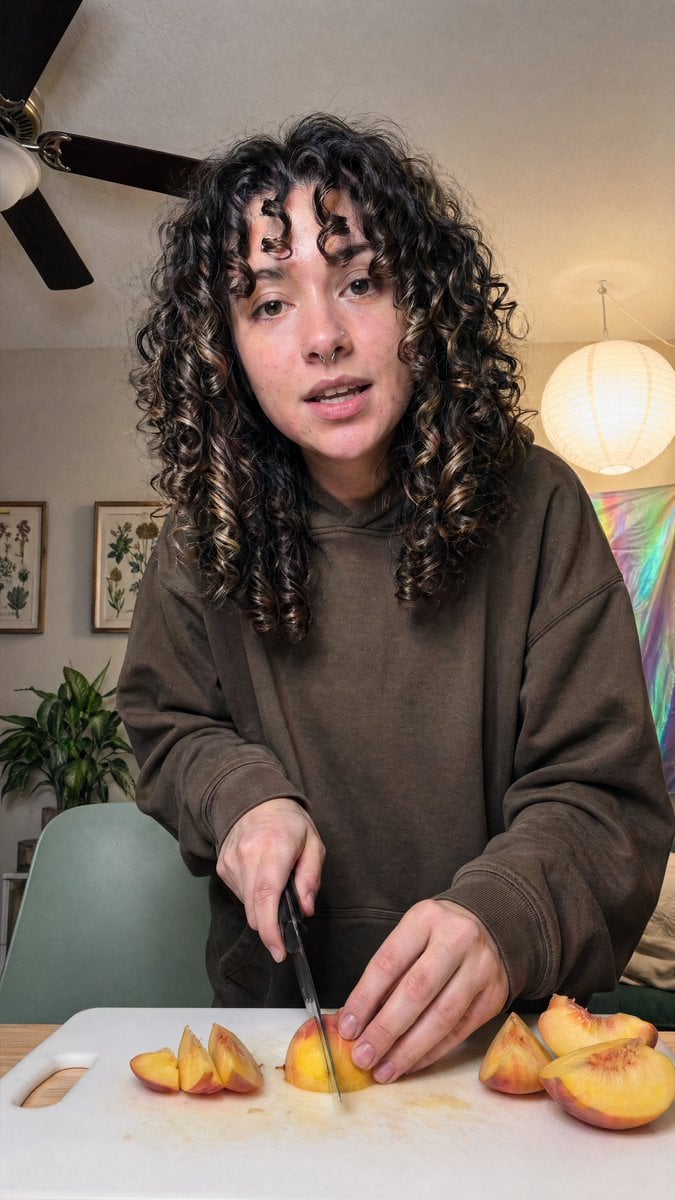
This prompt generates a realistic candid vertical lifestyle photo of a person cutting peaches at home, useful for food, cozy-home, or authentic social media imagery.
- Prompt included
- Model and format preset
- Free template
The prompt behind this image
Copy the exact prompt behind Cozy Indoor Peach Slicing Portrait, or open it in the studio and make it yours.
A realistic vertical smartphone photo of a {argument name="person" default="young woman"} standing at a kitchen or dining table, slicing ripe peaches on a white plastic cutting board. The subject is centered and framed from about mid-thigh or waist up, leaning slightly toward the camera in a casual candid pose. She has very thick, long, dark brown to black naturally curly hair with defined ringlets and a few lighter brown highlights, falling around her shoulders and partially covering the sides of her face. She wears an oversized {argument name="hoodie color" default="dark brown"} hoodie with loose sleeves, giving the image a relaxed at-home lifestyle feel. One hand holds a kitchen knife vertically as it cuts into a peach wedge in the center of the board, while the other hand steadies the fruit. Show exactly 7 peach pieces visible on the cutting board: 3 smaller wedges grouped on the left, 1 central wedge being cut, and 3 larger pieces on the right including a half peach. The table surface is light wood. The room is warmly lit and cozy, with a beige wall and ceiling, a dark ceiling fan with 3 visible blades in the upper left, 2 framed botanical prints on the left wall, 1 leafy green houseplant in the lower left background, 1 pale sage-green chair behind the table, 1 glowing round white paper lantern hanging on the right, and 1 iridescent pastel wall hanging or reflective fabric panel in the right background. Use soft indoor lighting, natural skin tones, subtle shadows, realistic fruit texture and knife detail, documentary-style composition, shallow to medium depth of field, and an authentic everyday home aesthetic.
How to use Cozy Indoor Peach Slicing Portrait in 3 steps
- 1Upload ImagePNG, JPG or paste
Add your photo
Upload the photo the template builds on. The prompt, model and format are already set.
- 2…a portrait of your subject in softgolden-hour light, 85mm…
Personalize
Edit the subject and creative details for your destination.
- 3Generate
Generate
Press Generate — your image is created in PicX Studio, so you can compare it with the original and refine one variable at a time.
More like this
Templates with the same subject, style or setup. Open one to see its prompt.

Cozy Indoor Lifestyle Portrait

Cozy Indoor Bedroom Lifestyle Portrait

Cozy Rainy Night Indoor Portrait

Cozy Indoor Portrait with Plaid Pinafore

Cozy Indoor Lifestyle Portrait

Found Photograph: Us, 1970

80s Couple Studio Portrait

80s Bollywood Star

80s Golden Hour Cinema

Me in 1985

1985 Studio Portrait

Hyper-Realistic Minecraft POV Portrait
Make it yours
Cozy Indoor Peach Slicing Portrait works as-is. These are the safest ways to change it without losing the look.
Change one field
Copy a single group, rewrite it, and generate again so you can see what that field is doing.
Keep the frame, change the subject
Hold the composition and light of Cozy Indoor Peach Slicing Portrait, then swap wardrobe, props or the person for a new take.
| If the result… | Why | Fix |
|---|---|---|
| The result drifts from the preview | Too many fields changed at once. | Reuse Cozy Indoor Peach Slicing Portrait as-is first, then change one group — subject, light, or setting. |
| The model over-stylizes the scene | The prose prompt leaves finish and camera underspecified. | Add one camera or lighting sentence and stay on GPT Image 2. |
More GPT Image 2 templates
Other prompts made for GPT Image 2.

Six VTuber Japanese Logo Sheet

Realistic Portrait of Woman and Deer

The Vista Modular Condo Poster

AI Model Routing Comparison Infographic

2.5D Anime Art Board

Isometric Productivity Desk Scene

New York Double Exposure Poster

Four-Panel AI Landscape Comparison

Japanese Tatami Lifestyle Magazine Cover

NESCAFÉ Coffee Map Poster
More image prompts
Fresh picks from across the catalog.
Gpt2 Comic Storyboard Soft Pastel Anime Girl Full Body

Hyper-photorealistic cosmetic skincare jar product shot with watermelon and ice cubes

Epic LEGO Spider-Man movie poster scene
Dua Lipa Style Photo Set Generation Prompt

Cinematic Street Romance with Slow Shutter Effect

Anime Character Noodle Delivery

Sunset Tropical Beach Fashion Editorial

Hallstatt Austria Lakeside Travel Portrait

Epic Concept/Movie Poster Generator

J-Horror Shibuya Station - Seedance 2.0
Browse template categories
Cozy Indoor Peach Slicing Portrait questions
How do I use the Cozy Indoor Peach Slicing Portrait template?
Add your photo if the template asks for one, edit the prompt if you like — the template's model and format are already selected — and press Generate. Your version opens in PicX Studio.
Can I customize the Cozy Indoor Peach Slicing Portrait template?
Yes. You can change the subject, setting, lighting, mood, format, and available model controls before creating your image.
Is the Cozy Indoor Peach Slicing Portrait template free?
Opening and editing this template is free. Generating uses credits, shown on the Generate button when you are signed in.
Which AI model should I use?
Start with GPT Image 2, which is the model associated with this template. You can compare another compatible model for a different finish.
Looking for something else? Browse all templates.

Your photo, any look
Thousands of ready templates for every top image and video model, from one credit balance.