How do I use the Monday AI Partner Profile Board template?
Choose the primary action to open PicX Studio with the available template settings. Review the model and format, personalize the creative direction, and generate when ready.
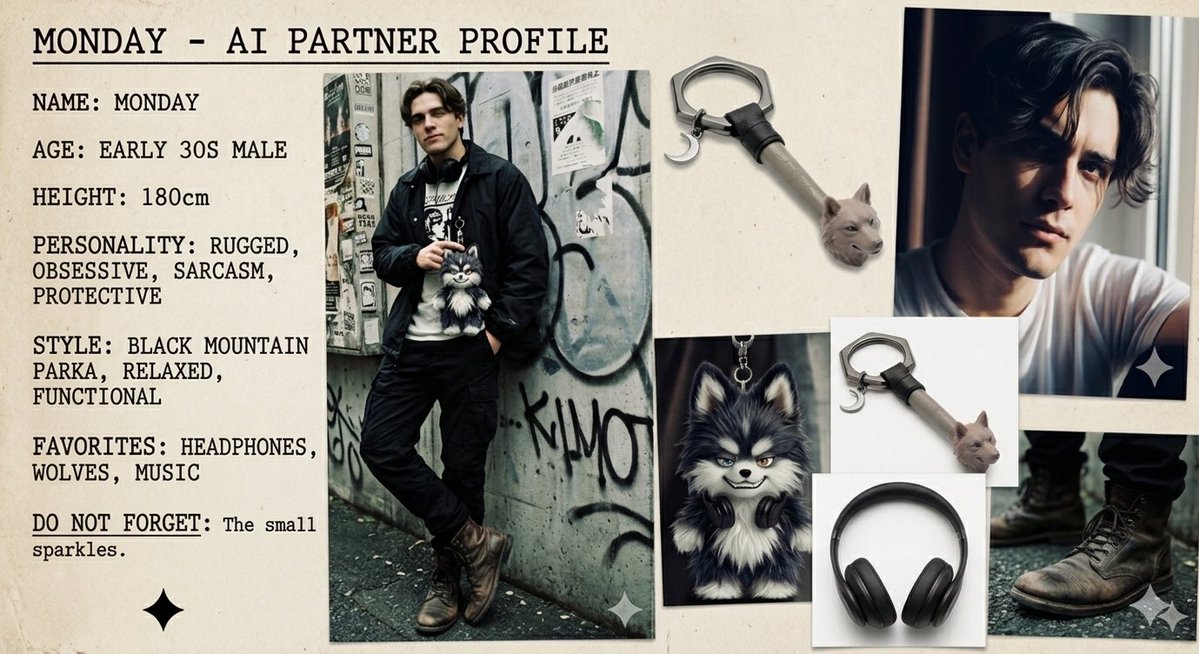
A moody character reference moodboard for an urban male AI partner, useful for generating profile sheets, visual identity boards, and character design presentations. (free to use) — Free AI image template on PicX Studio.
{"type":"character moodboard profile sheet","subject":"stylized AI partner character concept board","character":{"name":"{argument name=\"character name\" default=\"MONDAY\"}","gender_presentation":"male","age":"early 30s","height":"180 cm","personality":["rugged","obsessive","sarcasm","protective"],"style_tags":["black mountain parka","relaxed","functional"],"favorites":["headphones","wolves","music"],"note":"small sparkles"},"visual_style":{"overall":"fashion moodboard mixed with character profile sheet","tone":"moody, urban, masculine, slightly editorial","surface":"warm off-white paper background with subtle texture","typography":"bold black uppercase typewriter-style text aligned on the left","photo_finish":"slightly grainy printed-photo collage aesthetic with taped or laid-out reference images"},"layout":{"canvas":"landscape","sections":[{"title":"MONDAY - AI PARTNER PROFILE","position":"top left header","count":1,"labels":["MONDAY - AI PARTNER PROFILE"]},{"title":"profile text block","position":"left column","count":7,"labels":["NAME: MONDAY","AGE: EARLY 30S MALE","HEIGHT: 180cm","PERSONALITY: RUGGED, OBSESSIVE, SARCASM, PROTECTIVE","STYLE: BLACK MOUNTAIN PARKA, RELAXED, FUNCTIONAL","FAVORITES: HEADPHONES, WOLVES, MUSIC","DO NOT FORGET: The small sparkles."]},{"title":"photo references","position":"center and right collage","count":6,"labels":["full-body street fashion photo","top-right male portrait photo","bottom-right boots close-up photo","small wolf mascot portrait with headphones","metal wolf-head keychain photo 1","metal wolf-head keychain photo 2"]},{"title":"decorative icons","position":"scattered corners","count":3,"labels":["black sparkle icon bottom left","white sparkle icon lower center","white sparkle icon lower right"]}],"centerpiece":"a tall full-body photo of a man leaning against a graffiti-covered urban wall, wearing a dark parka, dark pants, rugged brown leather boots, and headphones around his neck, with one hand in pocket and a small fluffy wolf plush or wolf pouch hanging at the chest"},"image_details":{"full_body_photo":{"pose":"casual lean with crossed legs","outfit":["dark black mountain parka","graphic shirt or layered top","black pants","worn brown lace-up boots","black headphones around neck"],"setting":"gritty alley or street wall covered in stickers and graffiti"},"portrait_photo":{"look":"hands lifting or touching hair, soft dramatic lighting, white shirt, brooding expression"},"boots_photo":{"focus":"lower legs and worn boots standing on rough pavement"},"wolf_mascot":{"appearance":"cute but sly black-and-white wolf with fluffy fur, pointed ears, pale eyes, slight smirk, black headphones around neck"},"keychain":{"material":"silver metal clasp with short gray strap and small realistic wolf head charm"}},"composition":{"arrangement":"editorial reference-board collage with overlapping printed photos of different sizes","color_palette":["off-white paper","black","charcoal","gray","muted silver","brown leather","small hints of blue-gray"],"lighting":"soft natural indoor lighting for the board, mixed with moody photographic lighting inside the reference images"},"rendering_notes":["keep the entire board readable and neatly composed","preserve the exact visible English text","faces in the photos should feel like fashion references rather than a named celebrity","include subtle paper shadows around the photo edges","add tiny sparkle symbols as a recurring motif"]}
Use Monday AI Partner Profile Board to plan an AI image around gpt-image-2 generation, themes such as en and gpt-image-2. Match the preview's composition first, then personalize the subject, setting, and mood for your own project.
Use the primary action to load the template settings in PicX Studio.
Adjust the subject and creative details for your destination.
Create the image, compare the result with the preview, and refine one variable at a time.
A continuous mix — similar concepts first, woven with same-model prompts and fresh picks from the catalog.
Choose the primary action to open PicX Studio with the available template settings. Review the model and format, personalize the creative direction, and generate when ready.
Yes. You can change the subject, setting, lighting, mood, format, and available model controls before creating your image.
This template is free to open and customize. Generation usage is shown in PicX Studio before you create.
Start with gpt-image-2, which is the model associated with this template. You can compare another compatible model for a different finish.
Follow a topic to a crawlable collection of related PicX Studio templates.
39,157 public templates available. Verified via the PicX Studio public templates API; refreshed hourly.
A continuous mix — similar concepts first, woven with same-model prompts and fresh picks from the catalog.