How do I use the Nike advertising poster prompt template?
Choose the primary action to open PicX Studio with the available template settings. Review the model and format, personalize the creative direction, and generate when ready.
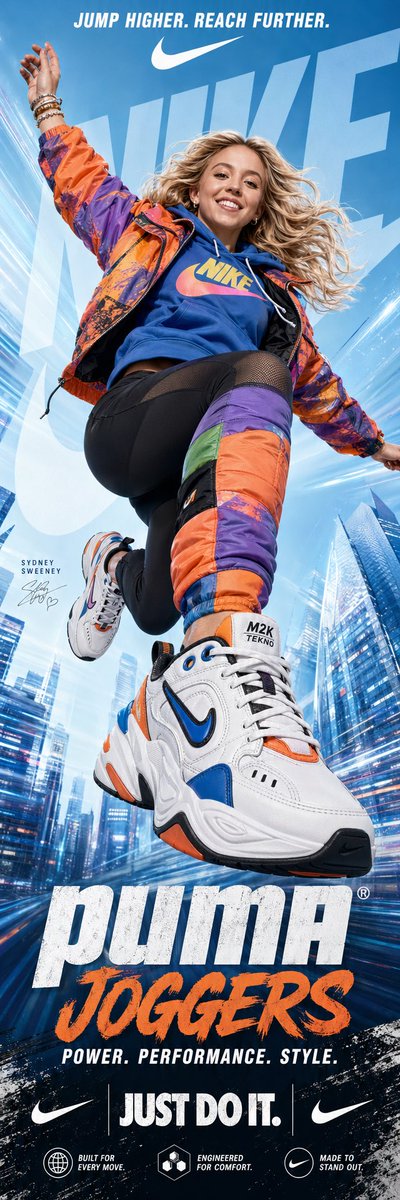
A prompt designed to generate energetic commercial posters featuring specific celebrities and products with a motion-blur aesthetic. (free to use) — Free AI image template on PicX Studio.
A dynamic, vertical advertising poster for {argument name="product" default="Nike Joggers"} featuring {argument name="celebrity" default="Sydney Sweeney"} in a mid-air jump pose. Sydney Sweeney is smiling brightly with her blonde hair flowing dynamically, wearing a vibrant, color-blocked outfit: an {argument name="outfit colors" default="orange and purple"} patterned windbreaker over a blue hoodie with a yellow and pink "NIKE" logo. She wears black athletic leggings with mesh panels and a large, padded, multi-colored (orange, purple, green, blue) leg sleeve on her left leg that matches the jacket. Her footwear is prominent: a massive, highly detailed, chunky Nike M2K Tekno sneaker in white with bold orange, blue, and black accents in the foreground, with a smaller, matching sneaker on her other foot. Her right hand is raised with bracelets. The background is a high-key, stylized light blue gradient, with abstract architectural lines and motion streaks of a city, and a huge, translucent, light blue stylized "NIKE" logo overlapping. The top has text: "JUMP HIGHER. REACH FURTHER." in white with a Nike swoosh. The bottom features large, bold text: "puma”JOGGERS" followed by "POWER. PERFORMANCE. STYLE." The bottom contains more text and logos: "JUST DO IT." and two small Nike swooshes. The entire image has a high-energy, motion-blur-effect aesthetic with graphic textures and a clean, commercial design.
Use Nike advertising poster prompt to plan an AI image around gpt-image-2 generation, themes such as en and gpt-image-2. Match the preview's composition first, then personalize the subject, setting, and mood for your own project.
Use the primary action to load the template settings in PicX Studio.
Adjust the subject and creative details for your destination.
Create the image, compare the result with the preview, and refine one variable at a time.
A continuous mix — similar concepts first, woven with same-model prompts and fresh picks from the catalog.
Choose the primary action to open PicX Studio with the available template settings. Review the model and format, personalize the creative direction, and generate when ready.
Yes. You can change the subject, setting, lighting, mood, format, and available model controls before creating your image.
This template is free to open and customize. Generation usage is shown in PicX Studio before you create.
Start with gpt-image-2, which is the model associated with this template. You can compare another compatible model for a different finish.
Follow a topic to a crawlable collection of related PicX Studio templates.
39,157 public templates available. Verified via the PicX Studio public templates API; refreshed hourly.
A continuous mix — similar concepts first, woven with same-model prompts and fresh picks from the catalog.