
China May Day Rail Travel Infographic
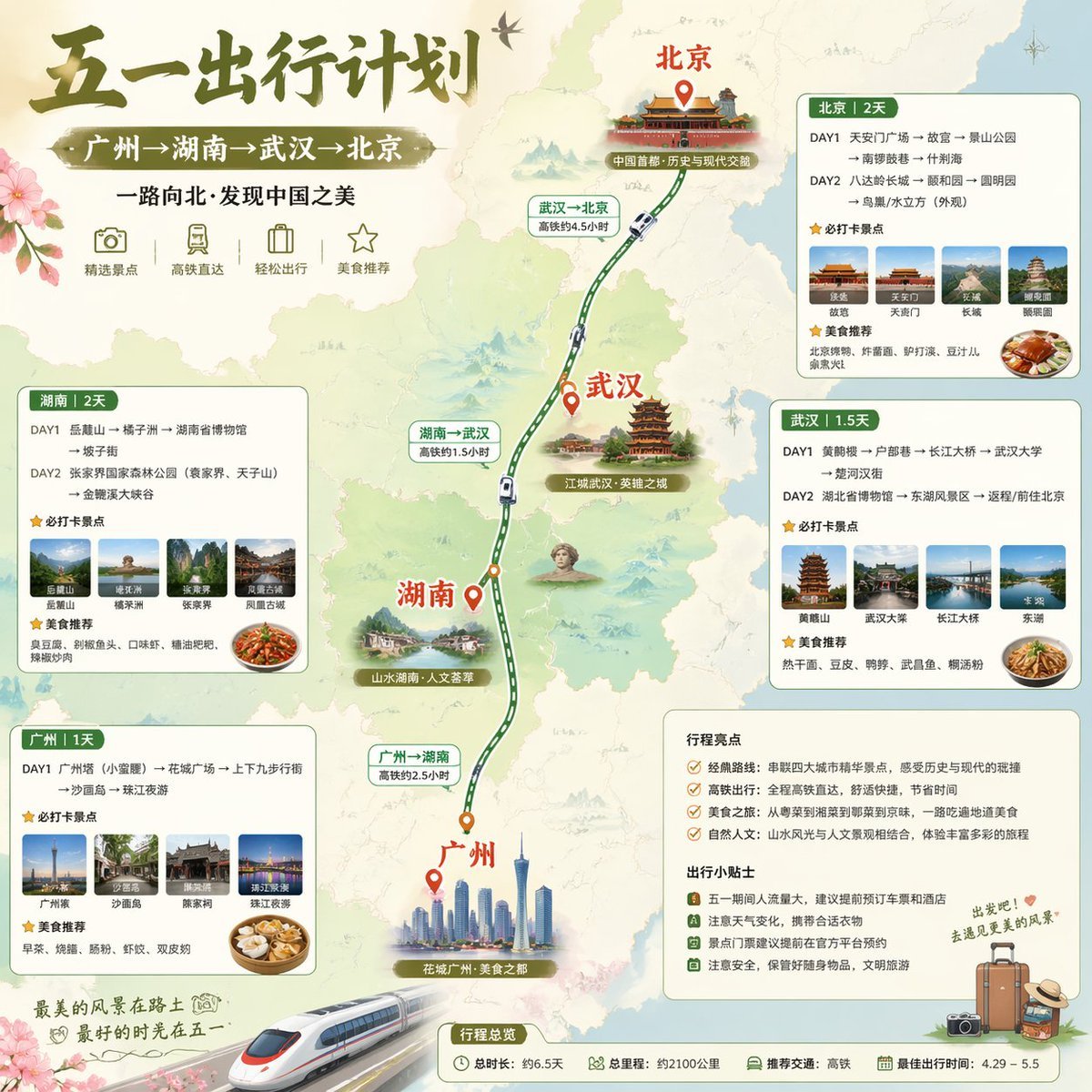
A square Chinese social-media travel poster showing a five-day high-speed-rail itinerary from Guangzhou to Beijing, useful for Xiaohongshu-style trip planning graphics.
- Prompt included
- Model and format preset
- Free template
The prompt behind this image
Copy the exact prompt behind China May Day Rail Travel Infographic, or open it in the studio and make it yours.
Create a polished Xiaohongshu-style Chinese travel infographic poster in a soft watercolor map aesthetic, square format, showing a five-day high-speed-rail travel route through China. Large brush-calligraphy headline at the top left: {argument name="headline text" default="五一出行计划"}. Directly below it, a green ribbon subtitle with white Chinese text: {argument name="route text" default="广州→湖南→武汉→北京"}. Add a smaller line of Chinese text under the subtitle: “一路向北·发现中国之美”. The background is a pale illustrated map of central and northern China in beige and light sage green, with faint mountain textures, soft rivers, and subtle floral decoration in the corners. A vertical curved railway line runs from the bottom center upward to the top center, connecting 4 cities with orange-red location pins and bold red Chinese city names. The 4 cities are, from bottom to top: 广州, 湖南, 武汉, 北京. Along the route, place small white high-speed train icons on the track and 3 green travel-time labels: “广州→湖南 高铁约2.5小时”, “湖南→武汉 高铁约1.5小时”, and “武汉→北京 高铁约4.5小时”. Near each city, include a scenic collage or illustrated landmark cluster: Guangzhou with a modern skyline and Canton Tower; Hunan with green mountains and cultural scenery; Wuhan with Yellow Crane Tower and historic architecture; Beijing with the Forbidden City / imperial palace architecture. Add small scenic tag labels near the city illustrations reading “花城广州·美食之都”, “山水湖南·人文荟萃”, “江城武汉·英雄之城”, and “中国首都·历史与现代交融”. Under the main title, show exactly 4 minimalist icon badges with short Chinese labels, evenly spaced in one row: a camera icon labeled “精选景点”, a train icon labeled “高铁直达”, a suitcase icon labeled “轻松出行”, and a star icon labeled “美食推荐”. Around the map, place 4 rounded rectangular itinerary cards with green headers, cream backgrounds, and photo thumbnails. Each card must contain day-by-day plans, a starred section for recommended attractions, and a starred section for recommended food. The 4 cards are: 1) top right card titled “北京|2天”, with exactly 2 day rows, exactly 4 attraction thumbnails, and 1 food photo; 2) right middle card titled “武汉|1.5天”, with exactly 2 day rows, exactly 4 attraction thumbnails, and 1 food photo; 3) left middle card titled “湖南|2天”, with exactly 2 day rows, exactly 4 attraction thumbnails, and 1 food photo; 4) bottom left card titled “广州|1天”, with exactly 1 day row, exactly 4 attraction thumbnails, and 1 food photo. Fill the itinerary text with compact Chinese travel-plan copy in a practical social-media infographic style. At the lower right, add a rounded notes panel containing exactly 2 sections with green titles: “行程亮点” and “出行小贴士”. Under “行程亮点”, list exactly 4 bullet points with small icon markers. Under “出行小贴士”, list exactly 4 bullet points with small icon markers. Decorate the notes area with a small luggage illustration and a handwritten-style diagonal Chinese phrase in green, such as “出发吧!去感受春天的风景”. At the bottom center, place a small rounded summary bar titled “行程总览”, including exactly 4 summary items with icons: total duration “总时长:约6.5天”, total distance “总里程:约2100公里”, recommended transportation “推荐交通:高铁”, and best travel period “最佳出行时间:4.29 - 5.5”. In the bottom left foreground, place a large sleek white high-speed train angled diagonally upward, partially overlapping the border as a hero element. Add a calligraphic closing slogan near the train in Chinese: “最美的风景在路上 最好的时光在五一”. Use an elegant olive-green, sage, beige, and warm red palette, combining traditional Chinese travel-poster charm with modern infographic clarity, crisp typography, soft shadows, rounded cards, realistic photo inserts, and clean editorial layout.
How to use China May Day Rail Travel Infographic in 3 steps
- 1Upload ImagePNG, JPG or paste
Add your photo
Upload the photo the template builds on. The prompt, model and format are already set.
- 2…a portrait of your subject in softgolden-hour light, 85mm…
Personalize
Edit the subject and creative details for your destination.
- 3Generate
Generate
Press Generate — your image is created in PicX Studio, so you can compare it with the original and refine one variable at a time.
More like this
Templates with the same subject, style or setup. Open one to see its prompt.
![Nano Banana — One Day In [CITY] Travel Route](https://cdn.picxstudio.com/cdn-cgi/image/format=auto,quality=85,fit=scale-down,onerror=redirect,width=3840,metadata=none/uploads/ai_gezgini_travel_d9a86f2e-c1f5-41a8-a4ef-5d96a8a7a023.jpg)
Nano Banana — One Day In [CITY] Travel Route

Japan Travel Brochure Poster

Gpt2 Infographic Edu Visual Alishan One Day Travel Poster
Gpt2 Infographic Edu Visual Good Bath Day Editorial Poster

Miniature Travel Diorama Postcard

Boardwalk Fashion Portrait

Clay Miniature Landmark Travel Diorama

Isometric Process Educational Diorama

Isometric Vehicle Teardown Infographic Template
China Country Profile Infographic
China Divorce Data 3D Infographic

Gpt2 E Commerce Main Image Earbuds E Commerce Infographic
Make it yours
China May Day Rail Travel Infographic works as-is. These are the safest ways to change it without losing the look.
Change one field
Copy a single group, rewrite it, and generate again so you can see what that field is doing.
Keep the frame, change the subject
Hold the composition and light of China May Day Rail Travel Infographic, then swap wardrobe, props or the person for a new take.
| If the result… | Why | Fix |
|---|---|---|
| The result drifts from the preview | Too many fields changed at once. | Reuse China May Day Rail Travel Infographic as-is first, then change one group — subject, light, or setting. |
| The model over-stylizes the scene | The prose prompt leaves finish and camera underspecified. | Add one camera or lighting sentence and stay on GPT Image 2. |
More GPT Image 2 templates
Other prompts made for GPT Image 2.

Six VTuber Japanese Logo Sheet

Realistic Portrait of Woman and Deer

The Vista Modular Condo Poster

AI Model Routing Comparison Infographic

2.5D Anime Art Board

Isometric Productivity Desk Scene

New York Double Exposure Poster

Four-Panel AI Landscape Comparison

Japanese Tatami Lifestyle Magazine Cover

NESCAFÉ Coffee Map Poster
More image prompts
Fresh picks from across the catalog.

Hyper-realistic Luxury Skincare Product Photography

High-Angle Editorial Street-Style Photo
Hopelessly Cluttered Desktop Screen

Cinematic diptych of teenagers on a rooftop

Luis Miguel as K-Pop Star in Gangnam

Epic Narrative Graduation Poster

Children's Book Illustration Prompt

Graphic Recording (GraReco) Prompt for Nano Banana Pro

Nighttime Winter Scene with Strict Face Identity Lock

Split-Screen Chibi Selfie Scrapbook
Browse template categories
China May Day Rail Travel Infographic questions
How do I use the China May Day Rail Travel Infographic template?
Add your photo if the template asks for one, edit the prompt if you like — the template's model and format are already selected — and press Generate. Your version opens in PicX Studio.
Can I customize the China May Day Rail Travel Infographic template?
Yes. You can change the subject, setting, lighting, mood, format, and available model controls before creating your image.
Is the China May Day Rail Travel Infographic template free?
Opening and editing this template is free. Generating uses credits, shown on the Generate button when you are signed in.
Which AI model should I use?
Start with GPT Image 2, which is the model associated with this template. You can compare another compatible model for a different finish.
Looking for something else? Browse all templates.

Your photo, any look
Thousands of ready templates for every top image and video model, from one credit balance.