How do I use the Gen Z Party Photo Collage template?
Choose the primary action to open PicX Studio with the available template settings. Review the model and format, personalize the creative direction, and generate when ready.
A comprehensive prompt for creating a 3x3 photo collage capturing a Gen Z house party vibe with hard flash lighting, disco balls, and various playful poses. Change the subject, setting, or lighting one variable at a time.
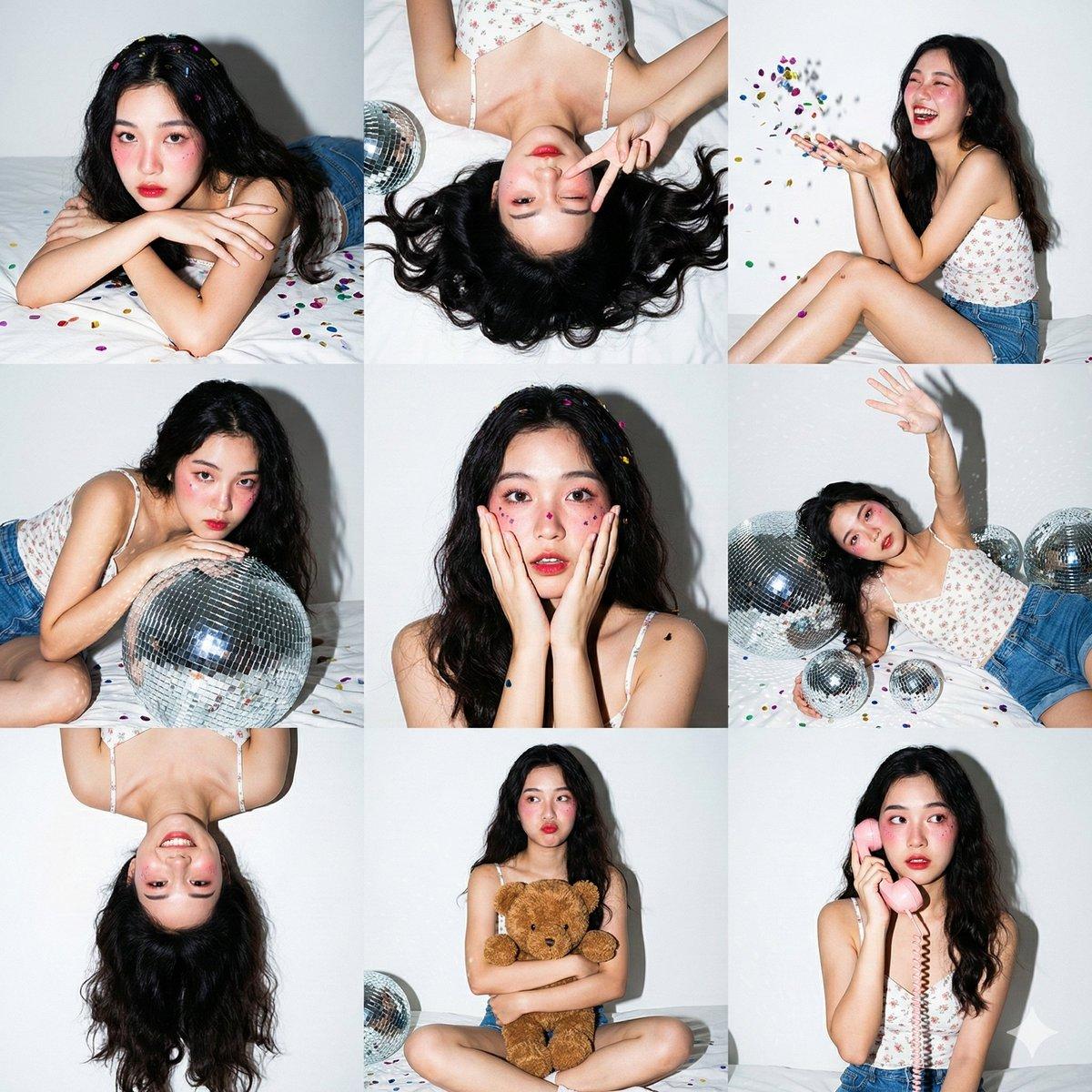
3x3 photo collage, 9 vertical portrait panels in a square grid. Same subject, same outfit, same lighting across all 9 panels. Style: Gen Z home party photoshoot. Direct on-camera hard flash lighting. High contrast, sharp shadows, vibrant colors on white background. Subject: {argument name="subject" default="Young Asian woman, fair skin, long dark wavy hair"}. {argument name="outfit" default="White floral camisole top, blue denim shorts"}. Heavy pink Igari-style blush, red lips, glitter on cheeks. Setting: {argument name="background" default="White wall with taped photos, white bed sheets"}. Silver disco balls in various sizes, colorful metallic confetti everywhere, brown teddy bear, pink retro corded phone. Panel poses: 1 top-left: Lying on stomach, chin on crossed arms, looking at camera. Confetti in hair. 2 top-center: Top-down, lying on back, winking, peace sign near face. Hair fanned out. 3 top-right: Sitting sideways, knees bent, laughing, throwing confetti in the air. 4 middle-left: Leaning over a large silver disco ball, looking intensely at camera. 5 middle-center: Close-up, hands on cheeks in surprised/shy gesture. Confetti on cheeks. 6 middle-right: Lying on back among disco balls, one arm reaching up. 7 bottom-left: Upside-down perspective, playful expression, hair cascading down. 8 bottom-center: Sitting cross-legged, hugging brown teddy bear, slight pout. 9 bottom-right: Sitting up, holding retro phone receiver to ear, looking sideways. Camera: 35mm, f/5.6, 1/200s, ISO 200. Hard flash creates drop shadows on the white wall and specular highlights on disco balls.
Choose the primary action to open PicX Studio with the available template settings. Review the model and format, personalize the creative direction, and generate when ready.
Yes. You can change the subject, setting, lighting, mood, format, and available model controls before creating your image.
This template is free to open and customize. Generation usage is shown in PicX Studio before you create.
Start with GPT Image 2, which is the model associated with this template. You can compare another compatible model for a different finish.
© 2026 PicX Studio. All rights reserved.

Follow a topic to a crawlable collection of related PicX Studio templates.
43,474 public templates available. Verified via the PicX Studio public templates API; refreshed hourly.














![Minimalist Flat Vector Travel Poster — Premium minimalist flat-vector travel poster for {argument name="city name" default="[CITY_NAME]"}, 3:4 vertical format.](https://cms-assets.youmind.com/media/1787917359711_3ug846_HQX205cbMAA6F6S-300x400.jpg)






















![Cinematic 12-Panel Timeline of a Subject's Epic Day — "In the Day of {argument name="subject" default="[SUBJECT]"}": Design a 12-panel (4x3) cinematic tim…](https://pbs.twimg.com/media/G9ltpR5XQAAtZM5.jpg)