
Cyberpunk Anime Character Sheet
A polished anime reference sheet for a branded cyberpunk elf girl character, useful for generating character design turnarounds, outfit details, and graphic identity boards.
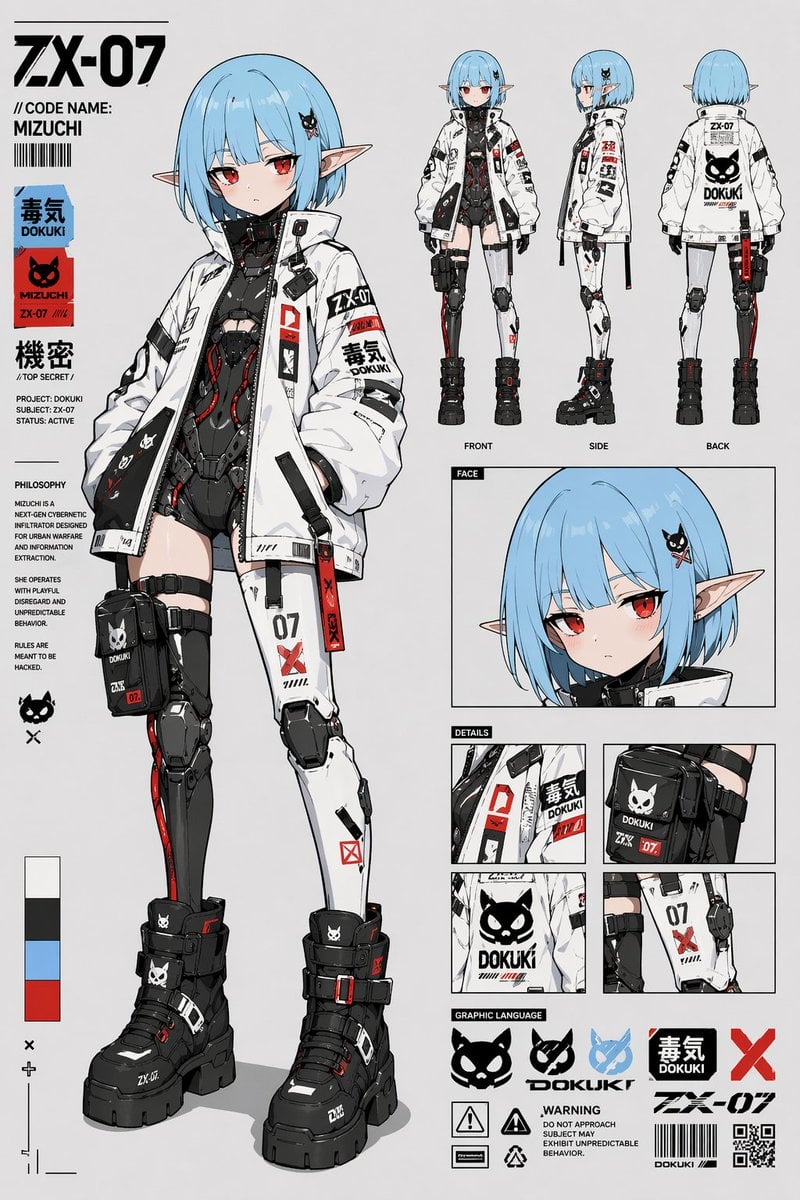
- Prompt included
- Model and format preset
- Free template
The prompt behind this image
Copy the exact prompt behind Cyberpunk Anime Character Sheet, or open it in the studio and make it yours.
- Type
- anime cyberpunk character reference sheet
- Character › Name
- {argument name="character name" default="MIZUCHI"}
- Character › Code
- {argument name="code name" default="ZX-07"}
- Character › Gender Presentation
- androgynous young female
- Character › Species
- elf-like humanoid
- Character › Build
- slim petite body with long legs
- Character › Skin
- pale
- Character › Hair › Color
- {argument name="hair color" default="light blue"}
- Character › Hair › Style
- short bob with straight bangs, slightly curved ends, small black skull hair clip on one side
- Character › Eyes › Color
- {argument name="eye color" default="red"}
- Character › Eyes › Expression
- cool, mildly bored, slightly defiant
- Character › Ears
- very long pointed elf ears
- Outfit › Outerwear
- oversized white techwear jacket with black lining, high collar, many zippers, straps, patches, warning labels, and red accent tags
- Outfit › Bodysuit
- black high-tech armored bodysuit with segmented panels, exposed midriff cutout, cables and red internal glowing accents
- Outfit › Legs
- asymmetrical cybernetic leg design, one darker black mechanical leg and one mostly white armored leg, both with knee protection and printed decals including 07 and red X marks
- Outfit › Bag
- black thigh pouch strapped to one leg with white mascot logo and ZX-07 markings
- Outfit › Footwear
- chunky black platform combat boots with straps, buckles, white tiny mascot logos, and small red accents
- Design › Primary Colors
- white, black, light blue, red
- Design › Style Keywords
- clean anime line art, industrial graphic design, techwear, cybernetic, mascot logo branding, Japanese warning labels, streetwear mecha aesthetic
- Layout › Background
- flat light gray studio background
- Layout › Sections › 0 › Title
- main character
- Layout › Sections › 0 › Position
- left and center
- Layout › Sections › 0 › Count
- 1
- Layout › Sections › 0 › Labels
- full-body standing pose
Raw JSON
{"type":"anime cyberpunk character reference sheet","character":{"name":"{argument name=\"character name\" default=\"MIZUCHI\"}","code":"{argument name=\"code name\" default=\"ZX-07\"}","gender_presentation":"androgynous young female","species":"elf-like humanoid","build":"slim petite body with long legs","skin":"pale","hair":{"color":"{argument name=\"hair color\" default=\"light blue\"}","style":"short bob with straight bangs, slightly curved ends, small black skull hair clip on one side"},"eyes":{"color":"{argument name=\"eye color\" default=\"red\"}","expression":"cool, mildly bored, slightly defiant"},"ears":"very long pointed elf ears"},"outfit":{"outerwear":"oversized white techwear jacket with black lining, high collar, many zippers, straps, patches, warning labels, and red accent tags","bodysuit":"black high-tech armored bodysuit with segmented panels, exposed midriff cutout, cables and red internal glowing accents","legs":"asymmetrical cybernetic leg design, one darker black mechanical leg and one mostly white armored leg, both with knee protection and printed decals including 07 and red X marks","bag":"black thigh pouch strapped to one leg with white mascot logo and ZX-07 markings","footwear":"chunky black platform combat boots with straps, buckles, white tiny mascot logos, and small red accents"},"design":{"primary_colors":["white","black","light blue","red"],"style_keywords":["clean anime line art","industrial graphic design","techwear","cybernetic","mascot logo branding","Japanese warning labels","streetwear mecha aesthetic"]},"layout":{"background":"flat light gray studio background","sections":[{"title":"main character","position":"left and center","count":1,"labels":["full-body standing pose"]},{"title":"turnaround","position":"upper right","count":3,"labels":["FRONT","SIDE","BACK"]},{"title":"portrait","position":"middle right","count":1,"labels":["FACE"]},{"title":"detail closeups","position":"lower right middle","count":4,"labels":["jacket patch detail","thigh pouch detail","back logo detail","leg strap and number detail"]},{"title":"graphic language","position":"bottom right","count":8,"labels":["cat skull logo solid","cat skull logo outline","blue mascot icon","毒気 DOKUKI block logo","red X symbol","warning icon 1","warning icon 2","barcode and QR code marks"]},{"title":"left sidebar text and swatches","position":"far left","count":7,"labels":["ZX-07","// CODE NAME: MIZUCHI","毒気 DOKUKI","MIZUCHI ZX-07","機密 // TOP SECRET /","PHILOSOPHY","4 color swatches"]}],"composition":"large full-body hero figure dominates the left side, smaller orthographic views aligned on the upper right, a face close-up beneath them, four square detail panels below, and a bottom branding strip with logos and warning graphics"},"text_elements":{"headline":"{argument name=\"headline text\" default=\"ZX-07\"}","visible_branding":["MIZUCHI","DOKUKI","ZX-07","毒気","機密","TOP SECRET","FRONT","SIDE","BACK","FACE","DETAILS","GRAPHIC LANGUAGE"],"microcopy_style":"dense faux technical dossier text, barcode labels, caution icons, and brand marks"},"rendering":"high-detail polished anime concept art sheet, crisp thin outlines, flat cel shading with subtle soft gradients, sharp printed typography, professional character design presentation, full body visible from head to boots"}How to use Cyberpunk Anime Character Sheet in 3 steps
- 1Upload ImagePNG, JPG or paste
Add your photo
Upload the photo the template builds on. The prompt, model and format are already set.
- 2…a portrait of your subject in softgolden-hour light, 85mm…
Personalize
Edit the subject and creative details for your destination.
- 3Generate
Generate
Press Generate — your image is created in PicX Studio, so you can compare it with the original and refine one variable at a time.
More like this
Templates with the same subject, style or setup. Open one to see its prompt.

Anime Character Charm Analysis Sheet
Cyberpunk Anime Hero Contact Sheet
Cyberpunk Operative Character Sheet
Cyberpunk Samurai Character Sheet

Cel 2D Finale Fireworks

Cel 2D Garden Maze

Cel 2D Rooftop Concert

Cel 2D Bicycle Coast

Cel 2D Castle Gate

Cel 2D Kitchen Chaos

Cel 2D Carnival Ride

Cel 2D Rainy Bus Stop
Make it yours
Cyberpunk Anime Character Sheet works as-is. These are the safest ways to change it without losing the look.
Swap the setting
Keep the rest of the prompt and replace the location block. The current setting is “flat light gray studio background”.
Change one field
Copy a single group, rewrite it, and generate again so you can see what that field is doing.
Keep the frame, change the subject
Hold the composition and light of Cyberpunk Anime Character Sheet, then swap wardrobe, props or the person for a new take.
| If the result… | Why | Fix |
|---|---|---|
| The result drifts from the preview | Too many fields changed at once. | Reuse Cyberpunk Anime Character Sheet as-is first, then change one group — subject, light, or setting. |
| GPT Image 2 ignores part of the JSON | Some models flatten or skip nested keys. | Keep the same values and paste them as a short paragraph instead. |
More GPT Image 2 templates
Other prompts made for GPT Image 2.

Six VTuber Japanese Logo Sheet

Realistic Portrait of Woman and Deer

The Vista Modular Condo Poster

AI Model Routing Comparison Infographic

2.5D Anime Art Board

Isometric Productivity Desk Scene

New York Double Exposure Poster

Four-Panel AI Landscape Comparison

Japanese Tatami Lifestyle Magazine Cover

NESCAFÉ Coffee Map Poster
More image prompts
Fresh picks from across the catalog.

Hyper-Photorealistic Peach Beverage Ad
Rainy Bus Live-Action Cosplay Still
Cobalt Couture Editorial Portrait
Red Rim Lighting Cinematic Portrait
Cinematic Paper Tear South Asian Portrait
Street Style Squatting Pose with Iced Coffee
Neon Loop Mode Music App Poster
Editorial Close-Up with Purple Hoodie and Book Prompt
Hooded Ice Knight Pose Collage

Generating a Food Infographic for a Hamburger
Browse template categories
Cyberpunk Anime Character Sheet questions
How do I use the Cyberpunk Anime Character Sheet template?
Add your photo if the template asks for one, edit the prompt if you like — the template's model and format are already selected — and press Generate. Your version opens in PicX Studio.
Can I customize the Cyberpunk Anime Character Sheet template?
Yes. You can change the subject, setting, lighting, mood, format, and available model controls before creating your image.
Is the Cyberpunk Anime Character Sheet template free?
Opening and editing this template is free. Generating uses credits, shown on the Generate button when you are signed in.
Which AI model should I use?
Start with GPT Image 2, which is the model associated with this template. You can compare another compatible model for a different finish.
Looking for something else? Browse all templates.

Your photo, any look
Thousands of ready templates for every top image and video model, from one credit balance.