
Hand-Drawn Cron Task Panorama
This generates a pastel hand-drawn single-page infographic poster that maps a cron-task workflow with six labeled modules, counts, icons, and connecting arrows for productivity or automation overviews.
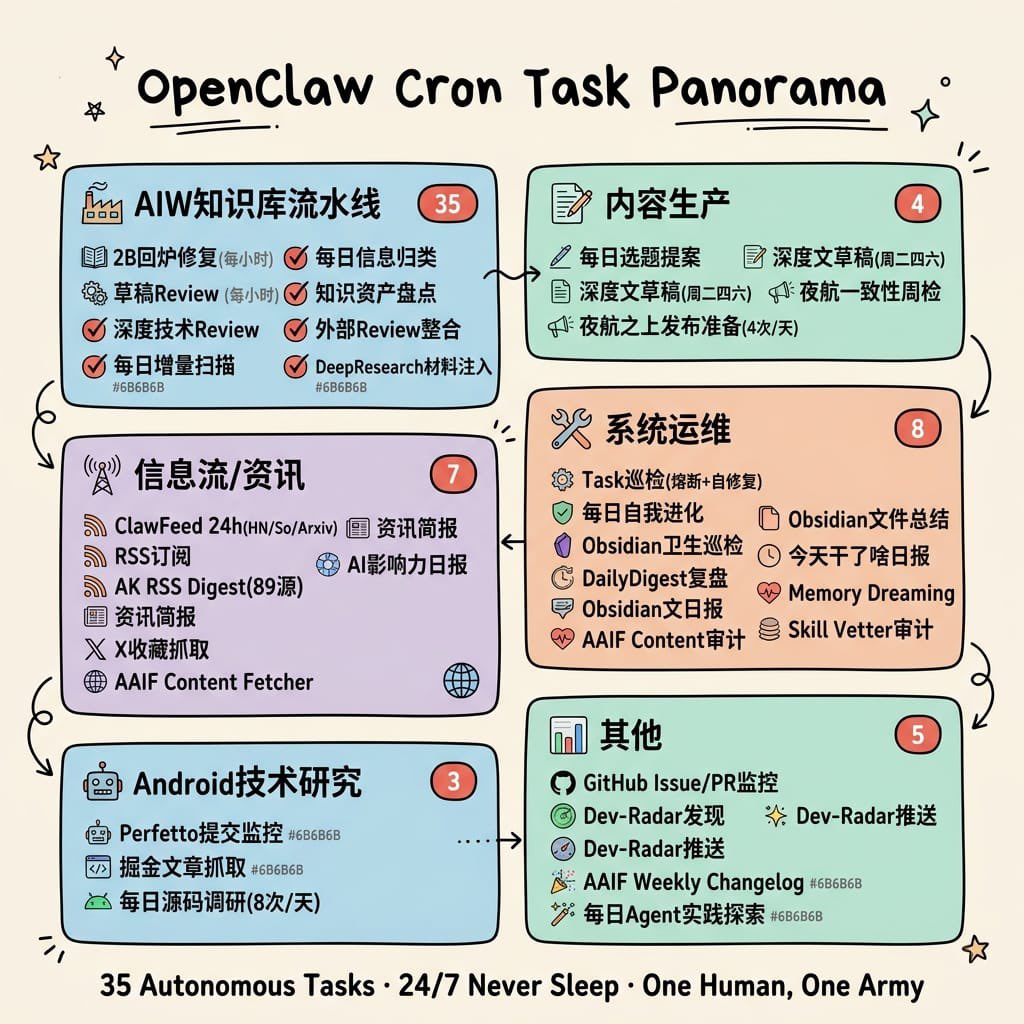
- Prompt included
- Model and format preset
- Free template
The prompt behind this image
Copy the exact prompt behind Hand-Drawn Cron Task Panorama, or open it in the studio and make it yours.
- Type
- hand-drawn educational infographic poster
- Topic
- cron task ecosystem overview
- Style › Overall
- clean single-page visual summary in a hand-drawn educational infographic style
- Style › Background
- warm cream paper texture (#F5F0E8)
- Style › Linework
- black outlines with slight hand-drawn wobble
- Style › Rendering
- flat pastel rounded cards, no realism, colors do not completely fill outlines, generous whitespace, small doodle decorations like stars, sparkles, underlines, and tiny arrows
- Style › Typography
- bold large hand-drawn title at top center, bold keywords inside sections, smaller warm-gray annotations
- Title › Text
- {argument name="headline text" default="OpenClaw Cron Task Panorama"}
- Title › Position
- top center
- Title › Style
- large bold hand-drawn black lettering with short underline accents
- Layout › Structure
- 6 rounded rectangular modules arranged in two columns and three rows, connected by hand-drawn curved arrows showing workflow progression
- Layout › Sections › 0 › Title
- AIW知识库流水线
- Layout › Sections › 0 › Position
- top left
- Layout › Sections › 0 › Color
- light blue #A8D8EA
- Layout › Sections › 0 › Count
- 6
- Layout › Sections › 0 › Badge
- 35
- Layout › Sections › 0 › Items
- 2日内修复(每小时), 草稿Review (每小时), 深度技术Review, 每日增量扫描, 每日信息归类, 知识资产盘点, 外部Review整合, DeepResearch材料注入
- Layout › Sections › 1 › Title
- 内容生产
- Layout › Sections › 1 › Position
- top right
- Layout › Sections › 1 › Color
- mint green #B5E5CF
- Layout › Sections › 1 › Count
- 4
- Layout › Sections › 1 › Badge
- 4
- Layout › Sections › 1 › Items
- 每日选题提案, 深度文章稿[周二-周六], 深度文章摘要[周二-四], 夜航一致性周检, 夜航之上发布准日(4次/天)
- Layout › Sections › 2 › Title
- 信息流/资讯
Raw JSON
{"type":"hand-drawn educational infographic poster","topic":"cron task ecosystem overview","style":{"overall":"clean single-page visual summary in a hand-drawn educational infographic style","background":"warm cream paper texture (#F5F0E8)","linework":"black outlines with slight hand-drawn wobble","rendering":"flat pastel rounded cards, no realism, colors do not completely fill outlines, generous whitespace, small doodle decorations like stars, sparkles, underlines, and tiny arrows","typography":"bold large hand-drawn title at top center, bold keywords inside sections, smaller warm-gray annotations"},"title":{"text":"{argument name=\"headline text\" default=\"OpenClaw Cron Task Panorama\"}","position":"top center","style":"large bold hand-drawn black lettering with short underline accents"},"layout":{"structure":"6 rounded rectangular modules arranged in two columns and three rows, connected by hand-drawn curved arrows showing workflow progression","sections":[{"title":"AIW知识库流水线","position":"top left","color":"light blue #A8D8EA","count":6,"badge":"35","items":["2日内修复(每小时)","草稿Review (每小时)","深度技术Review","每日增量扫描","每日信息归类","知识资产盘点","外部Review整合","DeepResearch材料注入"]},{"title":"内容生产","position":"top right","color":"mint green #B5E5CF","count":4,"badge":"4","items":["每日选题提案","深度文章稿[周二-周六]","深度文章摘要[周二-四]","夜航一致性周检","夜航之上发布准日(4次/天)"]},{"title":"信息流/资讯","position":"middle left","color":"lavender #D5C6E0","count":7,"badge":"7","items":["ClawFeed 24h(HN/So/Arxiv)","RSS订阅","AK RSS Digest(89源)","资讯简报","AI影响力日报","X 收藏抓取","AAIF Content Fetcher"]},{"title":"系统运维","position":"middle right","color":"light peach #F4C7AB","count":8,"badge":"8","items":["Task巡检(播新+自修复)","每日自我进化","Obsidian卫生巡检","DailyDigest复盘","Obsidian文日报","AAIF Content审计","Obsidian文件总结","今天干了啥日报","Memory Dreaming","Skill Vetter审计"]},{"title":"Android技术研究","position":"bottom left","color":"light blue #A8D8EA","count":3,"badge":"3","items":["Perfetto提交监控","掘金文章抓取","每日源码调研(8次/天)"]},{"title":"其他","position":"bottom right","color":"mint green #B5E5CF","count":5,"badge":"5","items":["GitHub Issue/PR监控","Dev-Radar发现","Dev-Radar推送","AAIF Weekly Changelog","每日Agent实践探索"]}],"connectors":["top left to top right","top right down to middle right","middle right to middle left","middle left down to bottom left","bottom left to bottom right","middle right down toward bottom right"],"decorations":{"corner_doodles_count":6,"types":["star","sparkle","short hatch marks","tiny curved lines"]}},"icons":{"section_icons":6,"examples":["factory for knowledge pipeline","document and pencil for content production","antenna/wifi for information flow","wrench and screwdriver for system operations","robot for Android research","bar chart for others"],"item_icons":"each bullet has a small simple icon such as checkmark, book, magnifier, shield, clock, heart, globe, RSS, GitHub mark, or pencil"},"footer":{"text":"{argument name=\"footer quote\" default=\"35 Autonomous Tasks · 24/7 Never Sleep · One Human, One Army\"}","position":"bottom center","style":"bold centered black summary line"},"color_customization":{"primary_card_palette":"{argument name=\"card palette\" default=\"pastel blue, mint green, lavender, and peach\"}","accent":"{argument name=\"accent color\" default=\"coral red\"}","paper":"{argument name=\"paper background\" default=\"warm cream paper texture\"}"}}How to use Hand-Drawn Cron Task Panorama in 3 steps
- 1Upload ImagePNG, JPG or paste
Add your photo
Upload the photo the template builds on. The prompt, model and format are already set.
- 2…a portrait of your subject in softgolden-hour light, 85mm…
Personalize
Edit the subject and creative details for your destination.
- 3Generate
Generate
Press Generate — your image is created in PicX Studio, so you can compare it with the original and refine one variable at a time.
More like this
Templates with the same subject, style or setup. Open one to see its prompt.
Simple Hand-Drawn Koala Mascot

Hand-Drawn Doodle Grid Poster

Hand-drawn Breakfast Journal Aesthetic Poster
Hand-Drawn Tomato Egg Recipe Infographic
Surreal Studio Photography with Hand-Drawn Doodle

Minimal Hand-Drawn Sketch Watercolor Portrait
Whimsical Hand-Drawn Teacups
Hand-Drawn Izakaya Manga Page
Hand-drawn Hermes Agent Poster
Hand-drawn Infographic Card Prompt
Interactive Hand-Drawn Doodle Art
Hand-Drawn Character Sticker Sheet Prompt
Make it yours
Hand-Drawn Cron Task Panorama works as-is. These are the safest ways to change it without losing the look.
Swap the setting
Keep the rest of the prompt and replace the location block. The current setting is “warm cream paper texture (#F5F0E8)”.
Change one field
Copy a single group, rewrite it, and generate again so you can see what that field is doing.
Keep the frame, change the subject
Hold the composition and light of Hand-Drawn Cron Task Panorama, then swap wardrobe, props or the person for a new take.
| If the result… | Why | Fix |
|---|---|---|
| The result drifts from the preview | Too many fields changed at once. | Reuse Hand-Drawn Cron Task Panorama as-is first, then change one group — subject, light, or setting. |
| GPT Image 2 ignores part of the JSON | Some models flatten or skip nested keys. | Keep the same values and paste them as a short paragraph instead. |
More GPT Image 2 templates
Other prompts made for GPT Image 2.

Six VTuber Japanese Logo Sheet

Realistic Portrait of Woman and Deer

The Vista Modular Condo Poster

AI Model Routing Comparison Infographic

2.5D Anime Art Board

Isometric Productivity Desk Scene

New York Double Exposure Poster

Four-Panel AI Landscape Comparison

Japanese Tatami Lifestyle Magazine Cover

NESCAFÉ Coffee Map Poster
More image prompts
Fresh picks from across the catalog.
Sci-Fi Movie Poster Generator
Nano Banana Pro Fitness Editorial Grid Prompt (Yellow Activewear, Identity Locked)
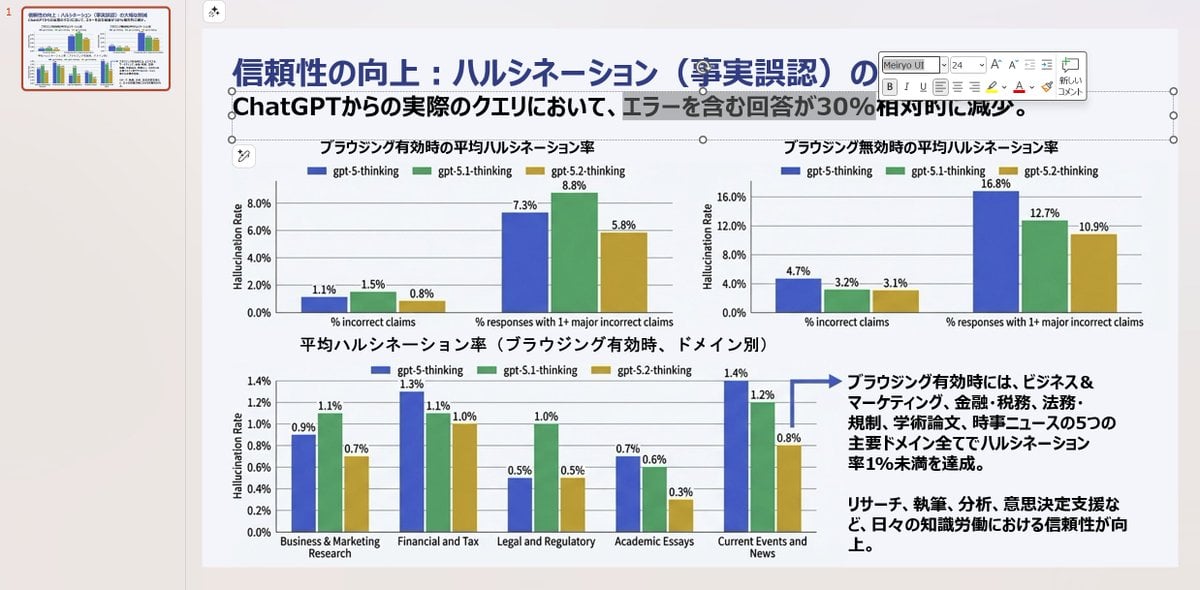
Convert Image to Editable PowerPoint Slide Prompt
Black and White Identity Swap Grid (4x4)
Triptych Composition Prompt for Abstract Fashion Editorial
Modern Geometric Polygon Portrait
Editorial Mirror Selfie with Detailed Identity Lock
Hyper-Realistic Intimate Close-Up Portrait
Awkward Stacked NFT Family Portrait
Stormy Icelandic Fisherman Portrait
Browse template categories
Hand-Drawn Cron Task Panorama questions
How do I use the Hand-Drawn Cron Task Panorama template?
Add your photo if the template asks for one, edit the prompt if you like — the template's model and format are already selected — and press Generate. Your version opens in PicX Studio.
Can I customize the Hand-Drawn Cron Task Panorama template?
Yes. You can change the subject, setting, lighting, mood, format, and available model controls before creating your image.
Is the Hand-Drawn Cron Task Panorama template free?
Opening and editing this template is free. Generating uses credits, shown on the Generate button when you are signed in.
Which AI model should I use?
Start with GPT Image 2, which is the model associated with this template. You can compare another compatible model for a different finish.
Looking for something else? Browse all templates.

Your photo, any look
Thousands of ready templates for every top image and video model, from one credit balance.