
Detailed Medical Anatomy Infographic
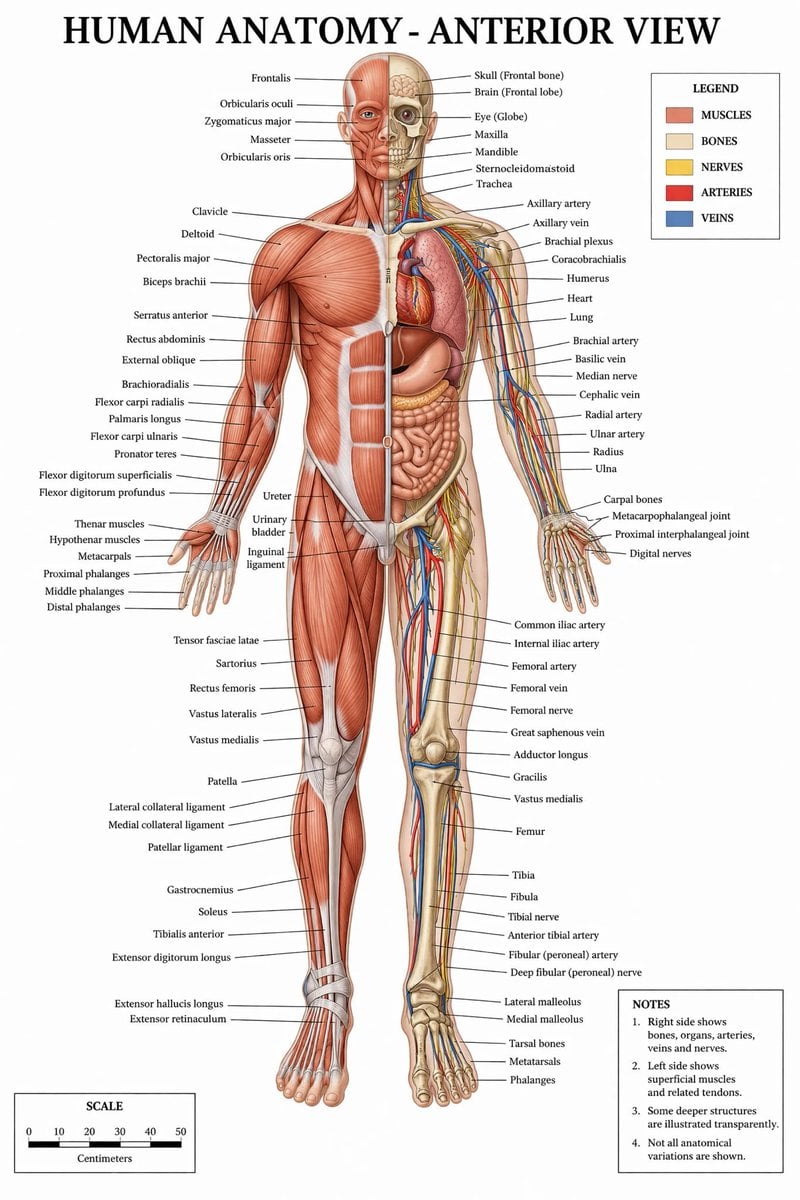
Generates a highly detailed, labeled medical illustration of human anatomy with a split-view of muscles and internal structures, complete with a legend and scale.
- Prompt included
- Model and format preset
- Free template
The prompt behind this image
Copy the exact prompt behind Detailed Medical Anatomy Infographic, or open it in the studio and make it yours.
- Type
- medical infographic poster
- Title
- {argument name="main title" default="HUMAN ANATOMY - ANTERIOR VIEW"}
- Subject › Description
- Full-body {argument name="subject type" default="male human figure"}, anterior view, split vertically down the midline.
- Subject › Viewer Left Side
- {argument name="left side focus" default="superficial muscles"}
- Subject › Viewer Right Side
- {argument name="right side focus" default="bones, internal organs, arteries, veins, and nerves"}
- Subject › Style
- {argument name="color palette" default="clinical medical textbook colors"}
- Layout › Centerpiece
- The anatomical figure stands centrally, arms slightly away from the body, palms facing forward.
- Layout › Labeling System
- Thin black leader lines connect anatomical structures to text labels arranged neatly on the left and right margins.
- Layout › Label Counts › Head And Neck
- 12
- Layout › Label Counts › Torso And Arms
- 29
- Layout › Label Counts › Hands
- 10
- Layout › Label Counts › Pelvis And Legs
- 34
- Layout › Label Counts › Feet
- 5
- Layout › Panels › 0 › Title
- LEGEND
- Layout › Panels › 0 › Position
- top-right
- Layout › Panels › 0 › Count
- 5
- Layout › Panels › 0 › Items › 0 › Color
- red/brown
- Layout › Panels › 0 › Items › 0 › Label
- MUSCLES
- Layout › Panels › 0 › Items › 1 › Color
- beige
- Layout › Panels › 0 › Items › 1 › Label
- BONES
- Layout › Panels › 0 › Items › 2 › Color
- yellow
- Layout › Panels › 0 › Items › 2 › Label
- NERVES
- Layout › Panels › 0 › Items › 3 › Color
- red
- Layout › Panels › 0 › Items › 3 › Label
- ARTERIES
Raw JSON
{
  "type": "medical infographic poster",
  "title": "{argument name=\"main title\" default=\"HUMAN ANATOMY - ANTERIOR VIEW\"}",
  "subject": {
    "description": "Full-body {argument name=\"subject type\" default=\"male human figure\"}, anterior view, split vertically down the midline.",
    "viewer_left_side": "{argument name=\"left side focus\" default=\"superficial muscles\"}",
    "viewer_right_side": "{argument name=\"right side focus\" default=\"bones, internal organs, arteries, veins, and nerves\"}",
    "style": "{argument name=\"color palette\" default=\"clinical medical textbook colors\"}"
  },
  "layout": {
    "centerpiece": "The anatomical figure stands centrally, arms slightly away from the body, palms facing forward.",
    "labeling_system": "Thin black leader lines connect anatomical structures to text labels arranged neatly on the left and right margins.",
    "label_counts": {
      "head_and_neck": 12,
      "torso_and_arms": 29,
      "hands": 10,
      "pelvis_and_legs": 34,
      "feet": 5
    },
    "panels": [
      {
        "title": "LEGEND",
        "position": "top-right",
        "count": 5,
        "items": [
          {"color": "red/brown", "label": "MUSCLES"},
          {"color": "beige", "label": "BONES"},
          {"color": "yellow", "label": "NERVES"},
          {"color": "red", "label": "ARTERIES"},
          {"color": "blue", "label": "VEINS"}
        ]
      },
      {
        "title": "NOTES",
        "position": "bottom-right",
        "count": 4,
        "items": [
          "1. Right side shows bones, organs, arteries, veins and nerves.",
          "2. Left side shows superficial muscles and related tendons.",
          "3. Some deeper structures are illustrated transparently.",
          "4. Not all anatomical variations are shown."
        ]
      },
      {
        "title": "SCALE",
        "position": "bottom-left",
        "count": 6,
        "description": "A horizontal bar scale with 6 numeric markers (0, 10, 20, 30, 40, 50) labeled 'Centimeters'."
      }
    ]
  }
}Reference images included
Detailed Medical Anatomy Infographic needs input media to work. They load alongside the prompt when you open it in the studio.
How to use Detailed Medical Anatomy Infographic in 3 steps
- 1Upload ImagePNG, JPG or paste
Add your photo
Upload the photo the template builds on. The prompt, model and format are already set.
- 2…a portrait of your subject in softgolden-hour light, 85mm…
Personalize
Edit the subject and creative details for your destination.
- 3Generate
Generate
Press Generate — your image is created in PicX Studio, so you can compare it with the original and refine one variable at a time.
More like this
Templates with the same subject, style or setup. Open one to see its prompt.

Japan Travel Brochure Poster

Isometric Process Educational Diorama

Isometric Vehicle Teardown Infographic Template
Medical Anatomy Visualization Poster

Gpt2 E Commerce Main Image Earbuds E Commerce Infographic

Gpt2 Infographic Edu Visual Alishan One Day Travel Poster

Gpt2 Infographic Edu Visual Ethnographic Plate for Tibetan Ceremonial Hat

Gpt2 Infographic Edu Visual Earth Signs Zodiac Character Poster

Gpt2 Infographic Edu Visual Water Signs Zodiac Character Poster

Gpt2 Infographic Edu Visual Ink Wash Tribute Poster for Chen Uen

Gpt2 Infographic Edu Visual Vintage Claude Shannon Infographic Poster

Gpt2 Infographic Edu Visual Taoist Three Souls Seven Po Poster
Make it yours
Detailed Medical Anatomy Infographic works as-is. These are the safest ways to change it without losing the look.
Change one field
Copy a single group, rewrite it, and generate again so you can see what that field is doing.
Keep the frame, change the subject
Hold the composition and light of Detailed Medical Anatomy Infographic, then swap wardrobe, props or the person for a new take.
| If the result… | Why | Fix |
|---|---|---|
| The result drifts from the preview | Too many fields changed at once. | Reuse Detailed Medical Anatomy Infographic as-is first, then change one group — subject, light, or setting. |
| GPT Image 2 ignores part of the JSON | Some models flatten or skip nested keys. | Keep the same values and paste them as a short paragraph instead. |
More GPT Image 2 templates
Other prompts made for GPT Image 2.

Six VTuber Japanese Logo Sheet

Realistic Portrait of Woman and Deer

The Vista Modular Condo Poster

AI Model Routing Comparison Infographic

2.5D Anime Art Board

Isometric Productivity Desk Scene

New York Double Exposure Poster

Four-Panel AI Landscape Comparison

Japanese Tatami Lifestyle Magazine Cover

NESCAFÉ Coffee Map Poster
More image prompts
Fresh picks from across the catalog.

Korean Idol Photocard Grid Collage

3D Layered Paper-Cut Chibi Art

Giant Animal in City Scene Prompt (Fox + West Lake)

Dark Fantasy Wounded Monk Portrait

Chinese AI Evolution Infographic Poster
Fantasy RPG Character Sprite Sheet

Hyper-Realistic 3D Simulation Prompt: Melting Hourglass

High-Aesthetic 2026 Vision Board Collage

Photorealistic Portrait Prompt of a Woman at a European Café

DUMBO Bridge Desktop Wallpaper
Browse template categories
Detailed Medical Anatomy Infographic questions
How do I use the Detailed Medical Anatomy Infographic template?
Add your photo if the template asks for one, edit the prompt if you like — the template's model and format are already selected — and press Generate. Your version opens in PicX Studio.
Can I customize the Detailed Medical Anatomy Infographic template?
Yes. You can change the subject, setting, lighting, mood, format, and available model controls before creating your image.
Is the Detailed Medical Anatomy Infographic template free?
Opening and editing this template is free. Generating uses credits, shown on the Generate button when you are signed in.
Which AI model should I use?
Start with GPT Image 2, which is the model associated with this template. You can compare another compatible model for a different finish.
Looking for something else? Browse all templates.

Your photo, any look
Thousands of ready templates for every top image and video model, from one credit balance.