How do I use the Fictional Anime Movie Review Page template?
Choose the primary action to open PicX Studio with the available template settings. Review the model and format, personalize the creative direction, and generate when ready.
Generates a dark-mode Japanese movie database screenshot with a cyberpunk anime poster, fictional staff, cast, ratings, and review feed. Change the subject, setting, or lighting one variable at a time.
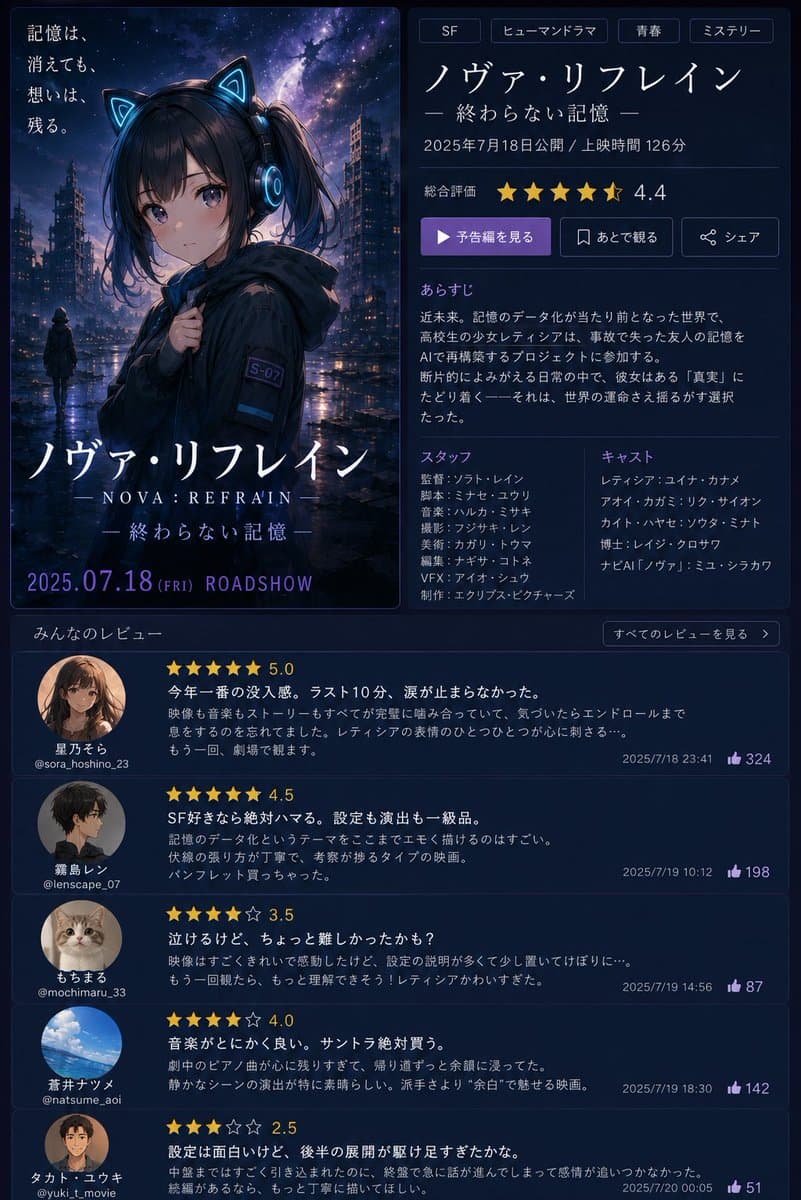
Goal: Create a fictional Japanese movie information page and poster for an anime sci-fi mystery film titled {argument name="movie title" default="ノヴァ・リフレイン"}, with the subtitle {argument name="subtitle" default="終わらない記憶"}. The design should look like a polished streaming/movie review website screenshot paired with theatrical key art. Canvas: Vertical 3:4 composition, dark navy interface, approximately 768×1024. Use a two-column top layout and a full-width review feed below. Overall mood is futuristic, rainy, emotional, and cinematic. Top-left poster: A tall theatrical anime poster with rounded corners and a thin blue border. Show a rainy cyberpunk city at night under a starry purple-blue galaxy sky. In the foreground is a teenage anime girl wearing a black hooded jacket, glowing cyan cat-ear headphones, dark twin-tail hair, and a small sleeve patch reading “S-07”. Her face is deliberately obscured by a soft square gray blur censor block. A small distant figure stands in the wet street behind her. Add Japanese tagline text at upper left: “記憶は、消えても、想いは、残る。” At the bottom of the poster, display the large title “ノヴァ・リフレイン”, beneath it “— NOVA: REFRAIN —”, then “— 終わらない記憶 —”, and at the very bottom “2025.07.18 (FRI) ROADSHOW” in purple-blue lettering. Top-right movie details panel: Use a dark card with subtle borders and clean Japanese UI typography. Include exactly 4 genre tags at the top: “SF”, “ヒューマンドラマ”, “青春”, “ミステリー”. Below them show the title “ノヴァ・リフレイン” and subtitle “— 終わらない記憶 —”. Add the release line “2025年7月18日公開 / 上映時間 126分”. Show overall rating with exactly 5 gold star icons, the last star half-filled, and numeric rating “4.4”. Include exactly 3 action buttons: a purple play button labeled “予告編を見る”, an outlined bookmark button labeled “あとで観る”, and an outlined share button labeled “シェア”. Synopsis section: Add heading “あらすじ” and a short Japanese synopsis about a near-future world where memory data has become normal, a high school girl named レティシア tries to restore the lost memories of a friend after an accident, and discovers a hidden “truth” that could alter the fate of the world. Staff and cast section: Use two columns. Staff column title “スタッフ” with exactly 8 fictional staff lines: “監督:ソフト・レイン”, “脚本:ミサセ・ユウリ”, “音楽:ハルカ・ミサキ”, “撮影:フジサキ・レン”, “美術:カガリ・トウマ”, “編集:ナギサ・コトネ”, “VFX:アイオ・シュウ”, “制作:エクリプス・ピクチャーズ”. Cast column title “キャスト” with exactly 6 fictional cast lines: “レティシア:ユイナ・カナメ”, “アイオ:カガミ・リク”, “カイト:ハヤセ・ソウタ”, “博士:レイジ・クロサワ”, “ナビAI「ノヴァ」:ミユ・シラカワ”, plus one additional short fictional name if needed to fill spacing. Do not use real celebrity names. Review feed: Below the top panels, create a section titled “みんなのレビュー” with a small button on the right reading “すべてのレビューを見る”. Include exactly 5 review cards stacked vertically, each with a circular avatar, reviewer display name, handle, gold star rating, bold Japanese review title/body, timestamp, and purple thumbs-up count. Reviews are: 1. Avatar: anime girl portrait. Name “星乃そら”, handle “@sora_hoshino_23”, rating “5.0” with 5 gold stars, title “今年一番の没入感。ラスト10分、涙が止まらなかった。” timestamp “2025/7/18 23:41”, likes “324”. 2. Avatar: dark-haired anime boy side profile. Name “霧島レン”, handle “@lenscape_07”, rating “4.5”, title “SF好きなら絶対ハマる。設定も演出も一級品。” timestamp “2025/7/19 10:12”, likes “198”. 3. Avatar: cute cat photo. Name “もちまる”, handle “@mochimaru_33”, rating “3.5”, title “泣けるけど、ちょっと難しかったかも?” timestamp “2025/7/19 14:56”, likes “87”. 4. Avatar: blue sky and clouds photo. Name “蒼井ナツメ”, handle “@natsume_aoi”, rating “4.0”, title “音楽がとにかく良い。サントラ絶対買う。” timestamp “2025/7/19 18:30”, likes “142”. 5. Avatar: anime portrait with face softly blurred. Name “タカト・ユウキ”, handle “@yuki_t_movie”, rating “2.5”, title “設定は面白いけど、後半の展開が駆け足すぎたかな。” timestamp “2025/7/20 00:05”, likes “51”. Visual style: High-quality anime key visual combined with a modern dark-mode Japanese cinema database UI. Use neon cyan and purple accents, soft glow, rainy reflections, thin dividers, rounded cards, crisp legible Japanese text, gold stars, and a premium sci-fi drama atmosphere. Keep all names fictional and avoid real staff or cast.
Choose the primary action to open PicX Studio with the available template settings. Review the model and format, personalize the creative direction, and generate when ready.
Yes. You can change the subject, setting, lighting, mood, format, and available model controls before creating your image.
This template is free to open and customize. Generation usage is shown in PicX Studio before you create.
Start with GPT Image 2, which is the model associated with this template. You can compare another compatible model for a different finish.
© 2026 PicX Studio. All rights reserved.

Follow a topic to a crawlable collection of related PicX Studio templates.
43,474 public templates available. Verified via the PicX Studio public templates API; refreshed hourly.















![Minimalist Flat Vector Travel Poster — Premium minimalist flat-vector travel poster for {argument name="city name" default="[CITY_NAME]"}, 3:4 vertical format.](https://cms-assets.youmind.com/media/1787917359711_3ug846_HQX205cbMAA6F6S-300x400.jpg)





























![Cinematic Pure Joy Splashing Prompt — Cinematic Frames, Pure Joy
{argument name="subject" default="[SUBJECT]"} splashing in {argument name="water type" d](https://pbs.twimg.com/media/G-6zluMW8AA67AK.jpg)





![Weighted Prompt for 3D Pop-Up Comic Diorama — Render_Target =
( Open_Book_3D_Pop_Up_Diorama * 2.0 ) +
( Inferred_3D_Environment_[COMIC_SERIES] *…](https://pbs.twimg.com/media/HELicgVaMAAdi5r.jpg)
