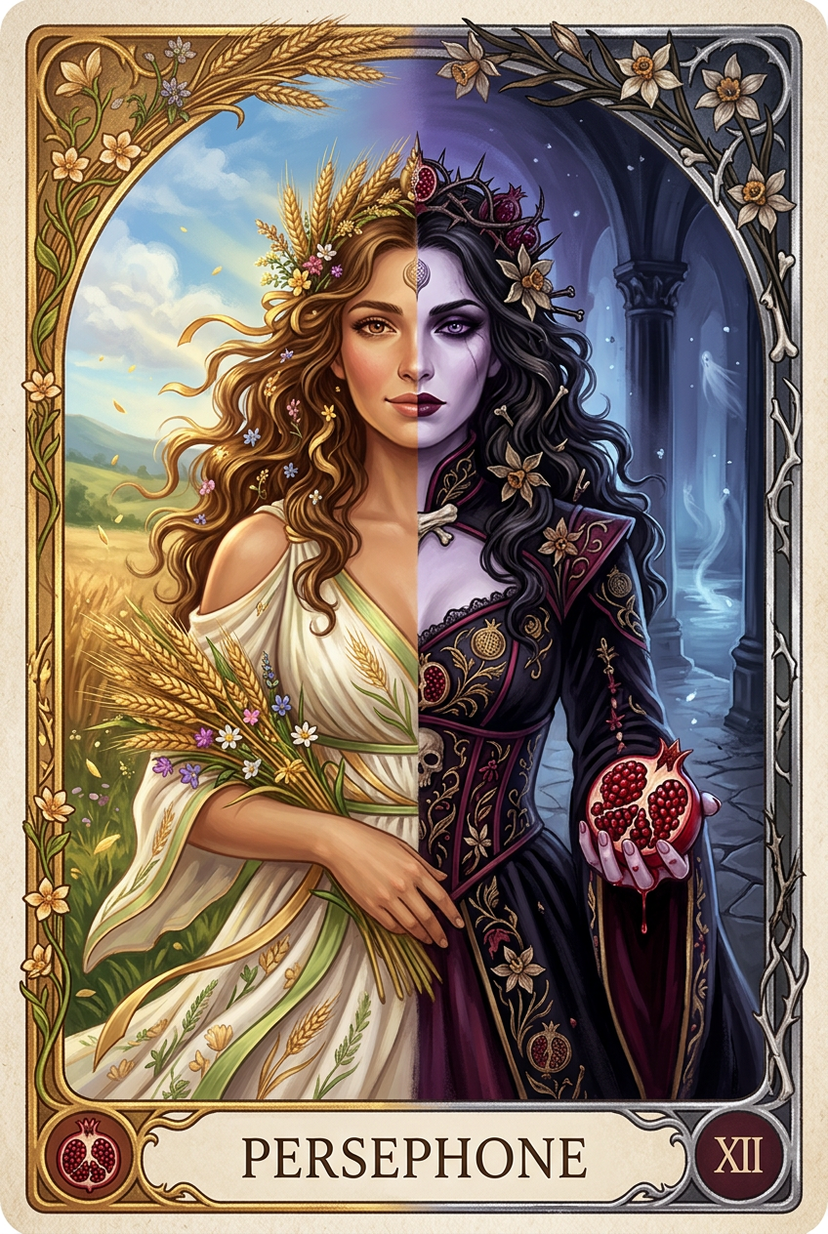
Persephone deity card
{'subject': {'primary': {'description': 'Persephone depicted as a dual-natured deity in vertical split composition tarot card format. Left half shows Spring Maiden Persephone radiating warmth and life. Right half shows Queen of the Underworld Persephone radiating cold deathly power. Both halves share the same face at center, seamlessly merging two aspects of one goddess.', 'age': 'Timeless divine duality, youthful on spring side, ancient and knowing on underworld side', 'expression': {'spring_half': 'Gentle serene smile, warm honey-brown eyes full of life and compassion, soft youthful radiance, rosy cheeks', 'underworld_half': 'Solemn penetrating gaze, deep violet eye cold with ancient authority, pale deathly stillness, no warmth', 'center_merge': 'Expression transitions seamlessly at the midline, one face carrying both emotions simultaneously'}, 'hair': {'spring_half': {'color': 'Rich warm dark hazel with golden sun-kissed highlights', 'style': 'Flowing soft curls adorned with wheat sheaves, tiny wildflowers, and golden ribbons, hair appears wind-blown and alive'}, 'underworld_half': {'color': 'Deep black with cold dark hazel undertones', 'style': 'Heavier dramatic curls intertwined with blackened asphodel stems, dried narcissus flowers, and dark bone pins, hair falls heavy and still'}}, 'body': {'type': 'Divine hourglass silhouette with natural proportions.', 'skin_spring': 'Warm sun-kissed olive with golden undertone, healthy living glow, visible warmth', 'skin_underworld': 'Cool ethereal pale with lavender undertone, marble-like luminosity, faint ghostly veins at temple', 'skin_transition': 'Skin tone shifts gradually at the center midline, warm blending into cool'}, 'clothing': {'spring_gown_left': {'type': 'Flowing Grecian chiton with floral draping', 'color': 'Soft ivory white with pale gold and spring green accents', 'details': 'Light linen and silk fabric, embroidered wheat sheaf patterns in gold thread, living wildflowers woven into fabric folds, bare shoulder visible, fabric feels airy and weightless'}, 'underworld_gown_right': {'type': 'Heavy ceremonial velvet gown with structured bodice', 'color': 'Deep midnight black with plum and crimson accents', 'details': 'Rich velvet with tarnished gold embroidered pomegranate and skull motifs, dried asphodel and narcissus flowers sewn into hem, high collar with bone clasps, fabric feels heavy and ancient'}, 'center_transition': 'Fabrics merge at midline where white linen darkens and thickens into black velvet, flowers transition from living blooms to dried dead specimens'}, 'face': {'type': 'Classical oval goddess proportions, single face shared between both halves', 'makeup_spring': 'Minimal natural enhancement, dewy skin, soft peach lips, subtle golden shimmer on cheekbone', 'makeup_underworld': 'Dramatic dark smoky eye, deep berry-stained lips, pale matte porcelain skin, kohl-lined'}}, 'seasonal_elements': {'spring_side': {'flowers': 'Living wheat sheaves in golden bundles, wildflowers blooming in pinks and whites and yellows, green vines with new leaves unfurling, butterflies and bees hovering', 'atmosphere': 'Warm golden sunlight, pollen motes floating, sense of growth and renewal'}, 'underworld_side': {'flowers': 'Pale grey-white asphodels with ghostly luminescence, dried and wilting narcissus flowers with curling brown petals, blackened thorny vines with dead leaves, skeletal seed pods', 'atmosphere': 'Cold blue-violet ethereal glow, drifting ash particles, sense of stillness and endings'}, 'center_merge_zone': {'description': 'Where both halves meet at exact center, flowers are captured mid-transformation: petals half-alive and half-decayed, colors bleeding between warm gold and cold violet, wheat stalks turning to bone, narcissus flowers caught between bloom and death, a single pomegranate split open at the exact center with one half showing fresh red seeds and the other showing dried darkened seeds'}}}, 'composition': {'shot_type': 'Full body vertical tarot card composition with ornate border', 'aspect_ratio': '2:3 vertical portrait tarot card proportions', 'positioning': 'Persephone centered, body perfectly bisected by vertical midline, spring elements flowing left, underworld elements flowing right', 'split_line': 'Exact vertical center divide, not harsh but organically blending through the transformation zone', 'border': {'type': 'Ornate tarot card border frame', 'top': 'Arched header with card title area, decorated with intertwined wheat sheaves and asphodel branches meeting at center', 'sides': 'Left border has living vine and flower motifs in gold and green, right border has bone and thorn motifs in tarnished silver and black', 'bottom': 'Card name plate area reading PERSEPHONE in elegant serif font, flanked by pomegranate symbols, Roman numeral designation', 'overall': 'Border itself transitions from warm gold tones on left to cool tarnished silver on right'}}, 'accessories': {'crown': {'spring_half': 'Wreath of living wheat sheaves and wildflowers, golden grain catching warm light', 'underworld_half': 'Crown of blackened pomegranate thorns with dark garnet gemstones and dried asphodel woven in', 'transition': 'Crown merges at forehead center where wheat stalks become thorns and living flowers become dried'}, 'held_objects': {'spring_hand_left': 'Holding a bundle of fresh wheat sheaves with a few wildflowers, grain heads heavy and golden', 'underworld_hand_right': 'Holding a split pomegranate with glowing ruby seeds visible, juice like dark blood on pale fingers'}, 'jewelry': {'spring_side': 'Delicate gold chain necklace with tiny flower pendant, simple and elegant', 'underworld_side': 'Heavy tarnished gold choker with pomegranate ruby pendant and skull charm, dark and ornate'}}, 'background': {'spring_half': 'Sunlit meadow with rolling green hills, blue sky with white clouds, distant wheat fields golden in sunlight, warm atmosphere with visible sun rays', 'underworld_half': 'Dark cavernous Underworld with obsidian columns, River Styx visible in far distance with ghostly glow, faint spirits drifting, cold stone architecture', 'center_transition': 'Meadow ground gradually cracks and darkens into stone, sky fades from blue through twilight purple into cavern darkness, horizon line shifts from sunlit to torch-lit'}, 'photography': {'camera_style': 'Gothic Fantasy Tarot Card illustration style with rich painterly detail, ornamental border work, mystical symbolic imagery in the tradition of major arcana tarot art', 'angle': 'Perfectly frontal symmetrical, no perspective distortion, flat iconic plane', 'texture': 'Rich painted texture with gold leaf accents on border and highlights, visible brushwork on fabrics, jewel-like saturation on gemstones and fruits, card stock texture visible at edges', 'color_palette': {'spring_side': 'Warm golds, ivory whites, spring greens, soft pinks, honey ambers, sunlit yellows', 'underworld_side': 'Deep blacks, rich plums, cold violets, crimson pomegranate reds, tarnished silvers, bone whites', 'transition': 'Colors bleed and merge at center creating brief twilight palette of muted purples and fading golds'}}, 'lighting': {'spring_half': 'Warm golden sunlight from upper left, casting soft shadows, golden hour warmth, pollen catching light', 'underworld_half': 'Cool ethereal blue-violet glow from below and right, ghostfire ambient light, supernatural cold luminescence', 'center_merge': 'Both light sources meet and create a brief neutral twilight zone where warm and cool cancel each other into soft silver', 'supernatural': 'Pomegranate seeds glow with inner crimson light, asphodel flowers emit faint ghostly luminescence, wheat sheaves have subtle golden aura'}, 'mood': {'primary': 'The eternal duality of Persephone: life and death, spring and winter, maiden and queen, coexisting in one divine being', 'emotional_tone': 'Bittersweet beauty of cyclical existence, joy of spring inseparable from sorrow of descent, hope and loss forever intertwined', 'art_movement': 'Gothic Fantasy Tarot illustration with mythological symbolism, seasonal transformation as divine truth', 'symbolism': 'Wheat represents Demeter and the upper world harvest, asphodels represent the Underworld meadows of the dead, narcissus represents the flower of her abduction and fate, pomegranate represents her binding to the Underworld and her power within it'}}







![Scandinavian Folk-Art Depiction — A Scandinavian folk-art depiction of {argument name="subject" default="[SUBJECT]"}, using minimal shapes, soft pastel hues, st](https://pbs.twimg.com/media/G8IcLdWbYAA8J33.jpg)







![Cinematic Night Mountain Storyboard — Create a 16:9 night mountain army-run cinematic storyboard sheet image.
[SUBJECT]
A modern-minimal production board for R](https://cms-assets.youmind.com/media/1782205411507_p7fxct_HLbwGTGXcAEXFRv-300x169.jpg)






![Minimalist Flat Vector Travel Poster — Premium minimalist flat-vector travel poster for {argument name="city name" default="[CITY_NAME]"}, 3:4 vertical format.](https://cms-assets.youmind.com/media/1787917359711_3ug846_HQX205cbMAA6F6S-300x400.jpg)







































![42-advertising-style-food-photography-templ — Advertising-style food photography of [subject 1] arranged on a rustic table, with [subject 2] float…](/_next/image?url=https%3A%2F%2Fcdn.picxstudio.com%2Fuploads%2Fpost42_img0_fe356757-16bf-4f83-b449-5f91d6178a11.jpg&w=828&q=100)