How do I use the Gothic Anime Girl with Black Roses template?
Choose the primary action to open PicX Studio with the available template settings. Review the model and format, personalize the creative direction, and generate when ready.
This prompt generates a dramatic red-and-black gothic anime portrait, ideal for character art, profile images, or dark fantasy illustration concepts. Change the subject, setting, or lighting one variable at a time.
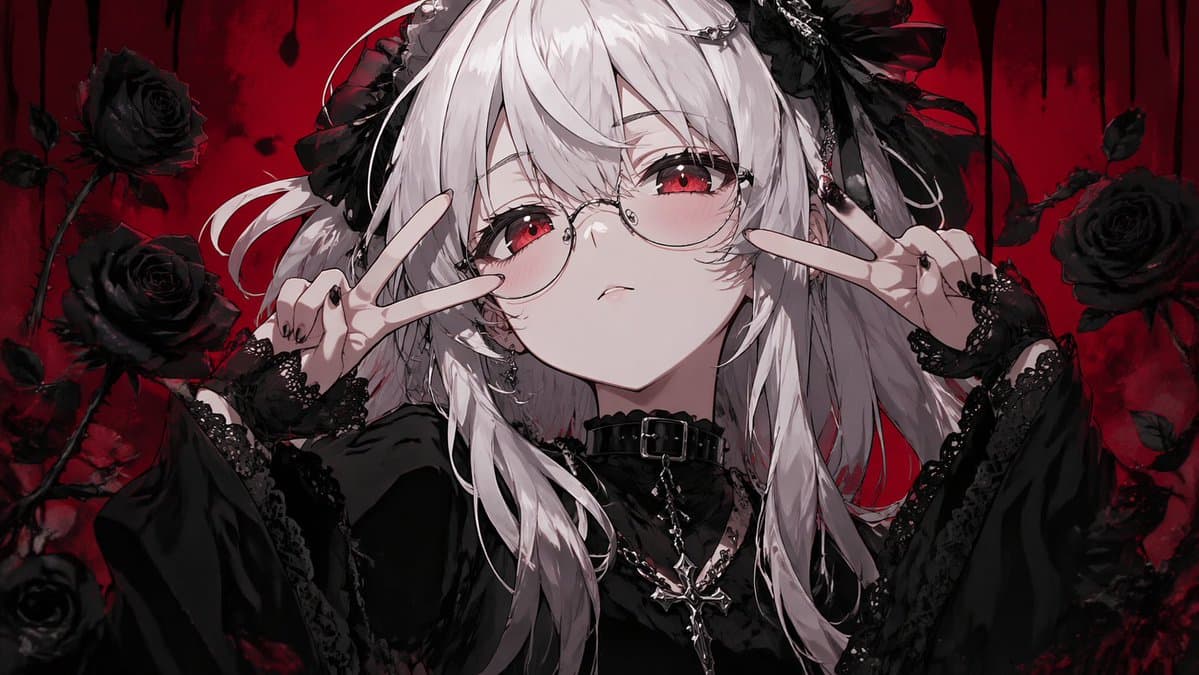
A dark anime gothic portrait of a {argument name="character type" default="young woman"} shown from the chest up, centered in the frame, with long layered {argument name="hair color" default="silver-white"} hair in messy twin tails and loose strands falling over the shoulders. She wears two large black ribbon-and-lace hair ornaments, a black gothic dress with voluminous sleeves and delicate lace trim, black lace fingerless gloves, and a black leather choker with a buckle. Around her neck are 2 layered silver chain necklaces, one ending in a prominent cross pendant. Both hands are raised near her face making peace signs, one on each side, with black painted nails and a slightly playful, edgy pose. The background is a rich blood-red gradient with a dark, moody atmosphere, decorated with 5 visible black roses on thorny stems around the figure and dripping black shapes along the top edge, creating a dramatic gothic horror aesthetic. Use high-detail anime illustration, sharp linework, soft dramatic shading, glossy black fabrics, pale skin, strong red-and-black contrast, symmetrical composition, close-up framing, and an elegant but ominous mood.
Choose the primary action to open PicX Studio with the available template settings. Review the model and format, personalize the creative direction, and generate when ready.
Yes. You can change the subject, setting, lighting, mood, format, and available model controls before creating your image.
This template is free to open and customize. Generation usage is shown in PicX Studio before you create.
Start with GPT Image 2, which is the model associated with this template. You can compare another compatible model for a different finish.
© 2026 PicX Studio. All rights reserved.

Follow a topic to a crawlable collection of related PicX Studio templates.
43,474 public templates available. Verified via the PicX Studio public templates API; refreshed hourly.





















![Minimalist Flat Vector Travel Poster — Premium minimalist flat-vector travel poster for {argument name="city name" default="[CITY_NAME]"}, 3:4 vertical format.](https://cms-assets.youmind.com/media/1787917359711_3ug846_HQX205cbMAA6F6S-300x400.jpg)
































![Candid 2026 Japanese Calendar Prompt — [テーマ]参照画像の人物をモデルとした、{argument name="年" default="2026年"}{argument name="期間" default="4月~9月"}の{argument name="月数" default="](https://cms-assets.youmind.com/media/1777022523492_228788_HGk_U6CbkAARWMV.jpg)