How do I use the Studio Portrait With Strawberry Ice Cream template?
Choose the primary action to open PicX Studio with the available template settings. Review the model and format, personalize the creative direction, and generate when ready.
This prompt generates a sleek celebrity-style studio portrait of a dark-haired woman holding a strawberry ice cream cone in front of her face, ideal for editorial beauty or pop-culture imagery. Change the subject, setting, or lighting one variable at a time.
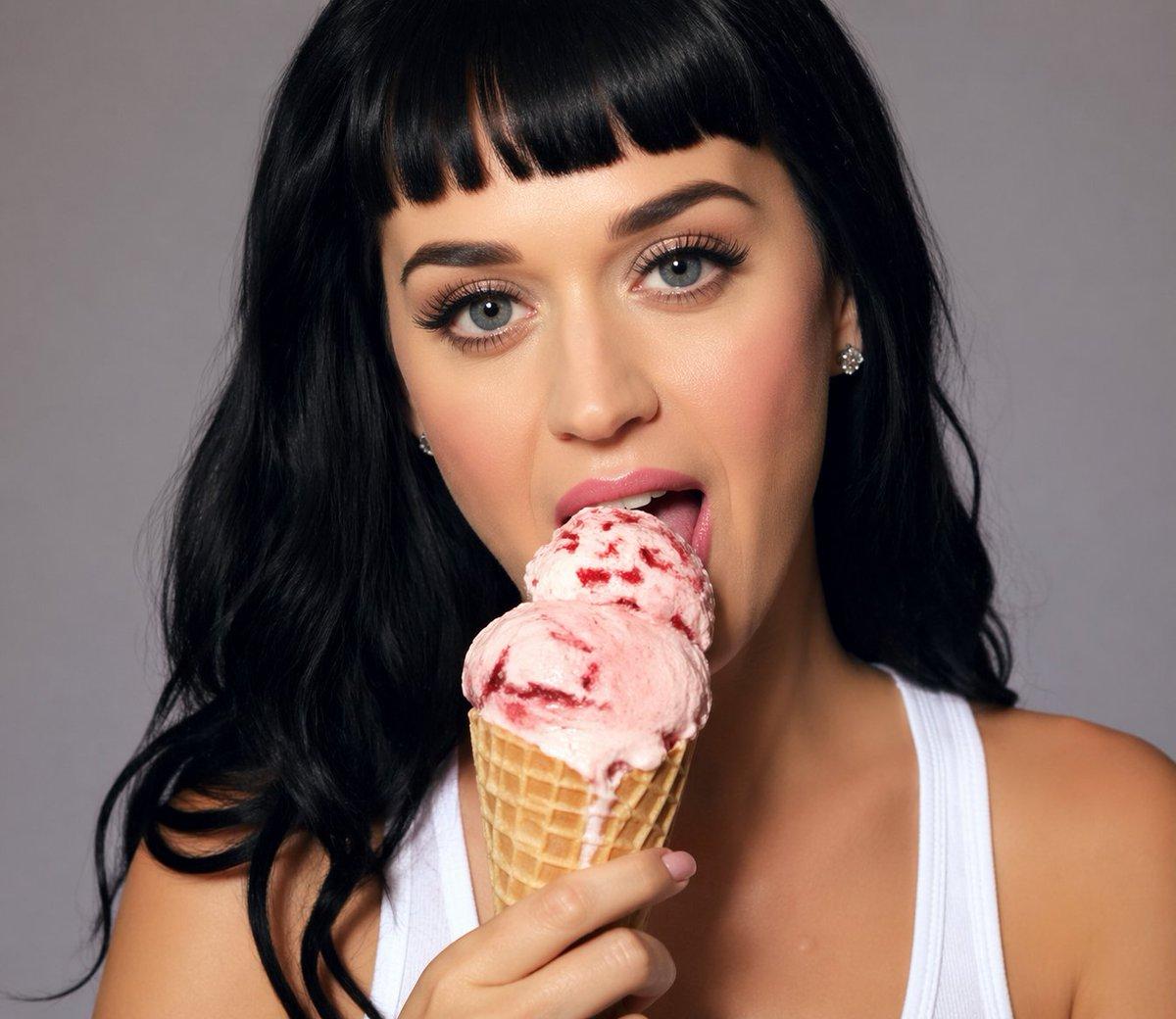
A polished studio portrait of a glamorous pop-star-like woman from the chest up, centered against a smooth neutral gray backdrop. She has {argument name="hair color" default="jet black"} long loose wavy hair with a middle part, glossy shine, and soft volume falling over both shoulders. Her face is mostly hidden behind the ice cream cone she is holding up in front of her mouth and lower face, creating a playful fashion-editorial composition. She wears a white ribbed tank top with wide straps and a single visible sparkling stud earring. In her hand is 1 waffle cone topped with 1 large scoop of pink strawberry ice cream with dark red berry swirls and slight melting texture. Warm, flattering beauty lighting, soft shadows, realistic skin tones, high-end celebrity portrait photography, crisp focus on the hand, cone, hair, and shoulders, minimal background, subtly sensual and chic mood, vertical crop.
Choose the primary action to open PicX Studio with the available template settings. Review the model and format, personalize the creative direction, and generate when ready.
Yes. You can change the subject, setting, lighting, mood, format, and available model controls before creating your image.
This template is free to open and customize. Generation usage is shown in PicX Studio before you create.
Start with GPT Image 2, which is the model associated with this template. You can compare another compatible model for a different finish.
© 2026 PicX Studio. All rights reserved.

Follow a topic to a crawlable collection of related PicX Studio templates.
43,474 public templates available. Verified via the PicX Studio public templates API; refreshed hourly.














![Pisa Tower Ice Cream Perspective Prompt — [인물] 이미지 1, 이미지 2참조
[인물의 포즈 및 표정]
{argument name="장소" default="피사의 사탑"}을 배경으로 서서 고개를 약간 좌측 상단으로 든…](https://cms-assets.youmind.com/media/1781256079703_7auvsx_HKK4k_iaMAAYs0h.jpg)


![Minimalist Flat Vector Travel Poster — Premium minimalist flat-vector travel poster for {argument name="city name" default="[CITY_NAME]"}, 3:4 vertical format.](https://cms-assets.youmind.com/media/1787917359711_3ug846_HQX205cbMAA6F6S-300x400.jpg)