How do I use the Candid Classroom Friends Snapshot template?
Choose the primary action to open PicX Studio with the available template settings. Review the model and format, personalize the creative direction, and generate when ready.
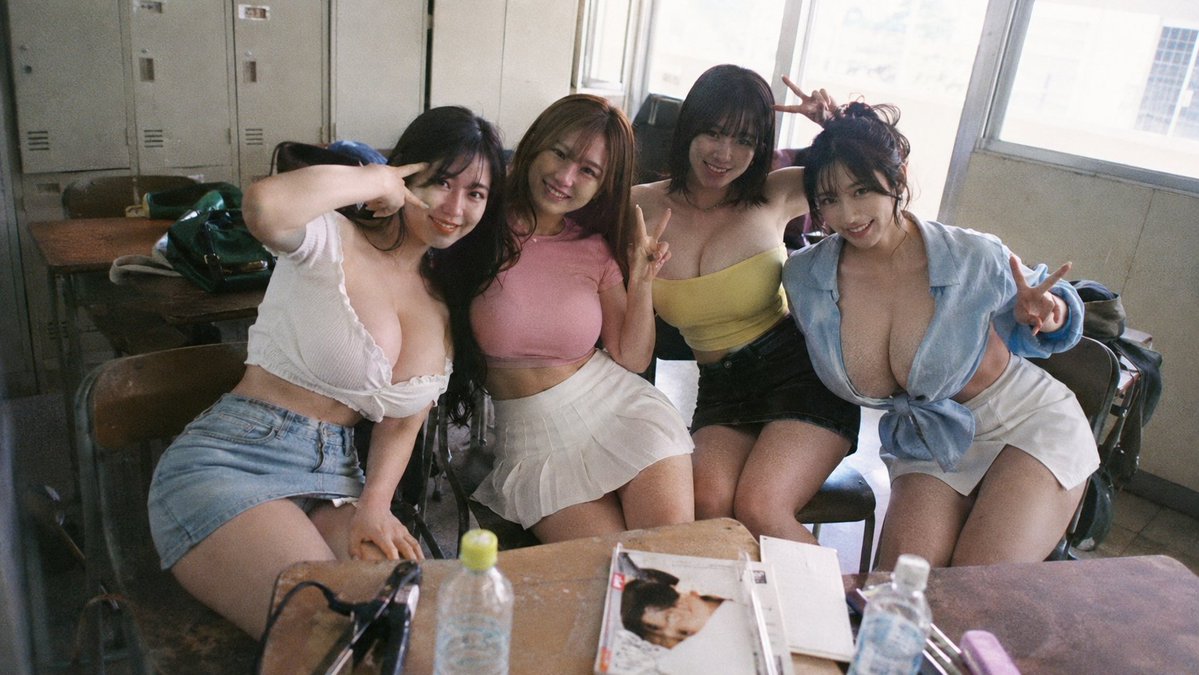
Generates a realistic film-style group photo of four adult friends posing casually in a cluttered classroom with privacy-blurred faces. (free to use) — Free AI image template on PicX Studio.
Create a realistic candid 35mm film photograph of {argument name="number of friends" default="four"} adult women posing together in an old classroom, seated close behind wooden school desks in front of tall sunlit windows and gray metal lockers. The mood is casual, like a snapshot taken during a break, with soft natural daylight, slight wide-angle perspective, visible film grain, muted colors, and a slightly messy environment with chairs, bags, notebooks, magazines, plastic water bottles, and stationery scattered on the desks in the foreground. Count the four people from left to right: 1) a woman leaning in with long dark hair, a white short-sleeve crop top with ruffled neckline, and a light blue denim mini skirt, raising one hand near her head; 2) a woman with medium brown hair wearing a fitted {argument name="center outfit color" default="pink"} crop top and a white pleated mini skirt, making a peace sign; 3) a woman with short dark bob hair wearing a pale yellow strapless crop top and a black mini skirt, raising a peace sign behind the group; 4) a woman with hair tied up wearing an open light blue shirt tied at the waist over a low neckline and a white mini skirt, making a peace sign. Pose them shoulder-to-shoulder in a friendly group-photo composition, facing the camera, with their faces intentionally covered by square pixelated mosaic blur blocks for privacy. Use a Japanese schoolroom or clubroom atmosphere, worn wooden desks, metal locker cabinets, large windows with bright overexposed exterior light, realistic skin texture, natural body proportions, casual styling, and an authentic disposable-camera look. Avoid glamour studio lighting; make it feel like an unpolished real-life snapshot.
Use Candid Classroom Friends Snapshot to plan an AI image around gpt-image-2 generation, themes such as en and gpt-image-2. Match the preview's composition first, then personalize the subject, setting, and mood for your own project.
Use the primary action to load the template settings in PicX Studio.
Adjust the subject and creative details for your destination.
Create the image, compare the result with the preview, and refine one variable at a time.
A continuous mix — similar concepts first, woven with same-model prompts and fresh picks from the catalog.
Choose the primary action to open PicX Studio with the available template settings. Review the model and format, personalize the creative direction, and generate when ready.
Yes. You can change the subject, setting, lighting, mood, format, and available model controls before creating your image.
This template is free to open and customize. Generation usage is shown in PicX Studio before you create.
Start with gpt-image-2, which is the model associated with this template. You can compare another compatible model for a different finish.
Follow a topic to a crawlable collection of related PicX Studio templates.
39,157 public templates available. Verified via the PicX Studio public templates API; refreshed hourly.
A continuous mix — similar concepts first, woven with same-model prompts and fresh picks from the catalog.