How do I use the Candid Nightclub Curb Scene template?
Choose the primary action to open PicX Studio with the available template settings. Review the model and format, personalize the creative direction, and generate when ready.
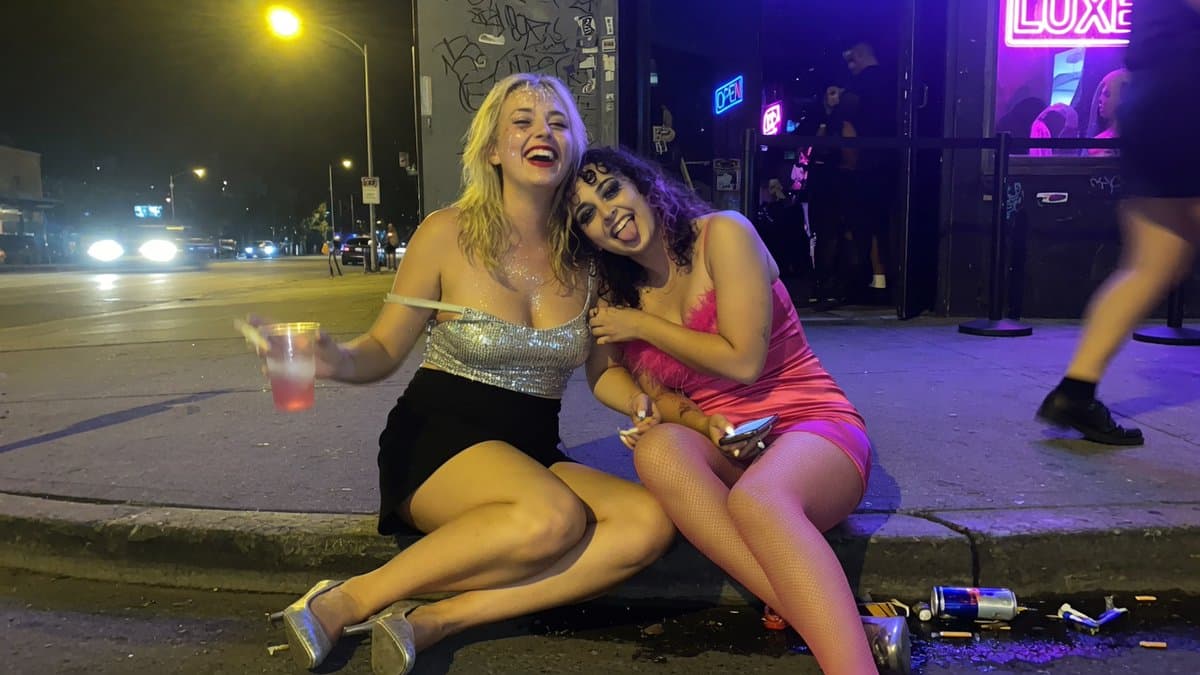
Generates a photorealistic late-night urban party snapshot of two anonymized women sitting on a curb outside a neon nightclub. (free to use) — Free AI image template on PicX Studio.
Create a gritty, candid flash-photography street scene at night outside a neon-lit nightclub on an urban sidewalk. Two young women sit closely together on the curb in the foreground with their faces deliberately anonymized by soft square blur blocks. The left woman has {argument name="left woman's hair color" default="blonde wavy shoulder-length hair"}, wears a sparkly silver sequined strapless crop top, a short black skirt, and clear platform heels, sitting cross-legged and holding a clear plastic cup with a red drink. The right woman has {argument name="right woman's hair color" default="dark curly hair"}, wears a hot-pink satin mini dress with fuzzy pink trim, pink fishnet tights, and heels, leaning into her friend while holding a smartphone and a cigarette. The scene includes a wet-looking curb and asphalt gutter with spilled liquid, cigarette butts, a crushed can, a plastic cup, and small street debris. In the background, show a city street with bright car headlights, a yellow streetlamp glow, graffiti-covered walls, a black nightclub entrance with bouncers and patrons, queue stanchions, an electric-blue OPEN sign, and a large magenta neon sign reading {argument name="neon sign text" default="LUXE"}. Use strong mixed lighting: purple and pink neon from the club, warm sodium streetlight, harsh phone-camera flash on the subjects, deep night shadows, realistic lens noise, slight motion blur on a passerby at the far right, wide-angle smartphone composition, documentary party-after-hours mood, photorealistic, unpolished, high detail.
Use Candid Nightclub Curb Scene to plan an AI image around gpt-image-2 generation, themes such as en and gpt-image-2. Match the preview's composition first, then personalize the subject, setting, and mood for your own project.
Use the primary action to load the template settings in PicX Studio.
Adjust the subject and creative details for your destination.
Create the image, compare the result with the preview, and refine one variable at a time.
A continuous mix — similar concepts first, woven with same-model prompts and fresh picks from the catalog.
Choose the primary action to open PicX Studio with the available template settings. Review the model and format, personalize the creative direction, and generate when ready.
Yes. You can change the subject, setting, lighting, mood, format, and available model controls before creating your image.
This template is free to open and customize. Generation usage is shown in PicX Studio before you create.
Start with gpt-image-2, which is the model associated with this template. You can compare another compatible model for a different finish.
A continuous mix — similar concepts first, woven with same-model prompts and fresh picks from the catalog.
Follow a topic to a crawlable collection of related PicX Studio templates.
36,410 public templates available. Verified via the PicX Studio public templates API; refreshed hourly.