How do I use the Two Fantasy Anime Heroines Portrait template?
Choose the primary action to open PicX Studio with the available template settings. Review the model and format, personalize the creative direction, and generate when ready.
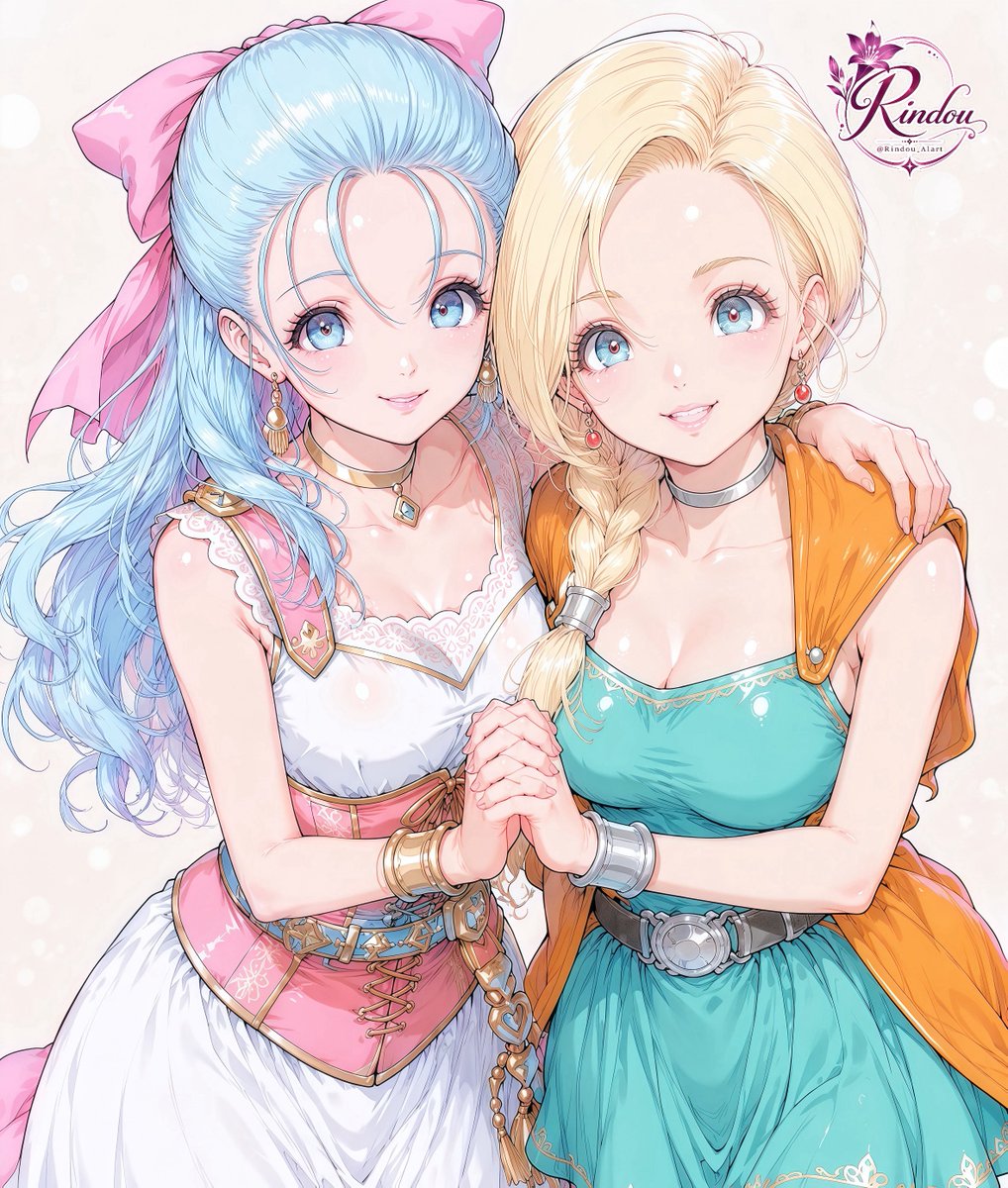
Generates a soft JRPG-style anime portrait of two affectionate fantasy heroines with detailed outfits and censored face blocks. (free to use) — Free AI image template on PicX Studio.
Create a polished fantasy anime illustration of two young women standing close together in a warm, affectionate pose, cropped from upper thighs to above the head on a soft cream pastel background with faint glowing bokeh. There are exactly 2 characters: the left character has {argument name="left character hair color" default="very long pale blue hair"} styled in flowing waves with a huge pink bow, a pink-and-white frilled dress with lace neckline, corset waist, gold trim, small shoulder details, bracelets, and a blue gemstone choker; the right character has {argument name="right character hair color" default="long blonde hair"} with a thick side braid, a teal sleeveless dress with delicate gold embroidery, a black belt with a large silver round buckle, silver choker and bracelets, and an orange shawl draped over her shoulders. Their bodies lean inward, the left woman’s arm rests around the right woman’s shoulder, and their hands are clasped together at the center of the image in an intimate friendship pose. Add exactly 2 opaque rectangular face-covering blocks: one muted lavender-pink rectangle over the left character’s face and one pale peach rectangle over the right character’s face, both aligned vertically and obscuring the facial features. Use highly detailed glossy anime rendering, clean line art, luminous skin highlights, intricate hair strands, soft watercolor shading, and fantasy JRPG character-design styling. Add a small decorative purple floral signature-style logo in the upper-right corner reading {argument name="logo text" default="Rindou"}, with tiny handle-like text beneath it. Keep the composition vertical, bright, elegant, and centered, with no extra characters or additional text.
Use Two Fantasy Anime Heroines Portrait to plan an AI image around gpt-image-2 generation, themes such as en and gpt-image-2. Match the preview's composition first, then personalize the subject, setting, and mood for your own project.
Use the primary action to load the template settings in PicX Studio.
Adjust the subject and creative details for your destination.
Create the image, compare the result with the preview, and refine one variable at a time.
A continuous mix — similar concepts first, woven with same-model prompts and fresh picks from the catalog.
Choose the primary action to open PicX Studio with the available template settings. Review the model and format, personalize the creative direction, and generate when ready.
Yes. You can change the subject, setting, lighting, mood, format, and available model controls before creating your image.
This template is free to open and customize. Generation usage is shown in PicX Studio before you create.
Start with gpt-image-2, which is the model associated with this template. You can compare another compatible model for a different finish.
Follow a topic to a crawlable collection of related PicX Studio templates.
39,157 public templates available. Verified via the PicX Studio public templates API; refreshed hourly.
A continuous mix — similar concepts first, woven with same-model prompts and fresh picks from the catalog.