How do I use the Whimsical Ladybug and Bee Village Scene template?
Choose the primary action to open PicX Studio with the available template settings. Review the model and format, personalize the creative direction, and generate when ready.
This prompt generates a cinematic 3D animated-style image of two cute insects meeting in an enchanted woodland village, ideal for storybook art or family-friend
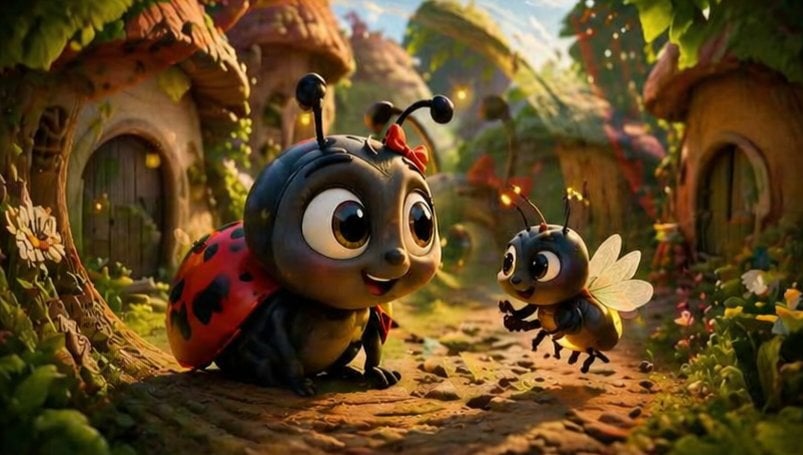
A heartwarming stylized 3D animated forest village scene at golden hour, showing 2 adorable insect characters meeting on a cobblestone path between tiny mushroom-roof cottages. In the left foreground, a cute {argument name="main insect type" default="ladybug"} crouches low with an oversized glossy black head, huge expressive brown eyes, a small smiling mouth, short antennae with rounded tips, and a tiny {argument name="accessory color" default="red"} bow near one antenna. Its shell is bright {argument name="shell color" default="red"} with distinct black spots, and its body is dark charcoal black with soft rounded limbs. In the right midground, a cheerful small {argument name="second insect type" default="bee"} hovers slightly above the ground facing the larger insect, with a similarly oversized head, big sparkling eyes, delicate translucent wings, tiny antennae, and little forelegs lifted as if speaking excitedly. The setting is an enchanted bug-sized woodland hamlet with 3 visible cottages, rounded wooden doors, curved stone walls, moss, vines, flowers, and leafy plants framing the path. Warm cinematic sunlight filters through the trees from the upper right, creating glowing rim light, soft bokeh, and floating firefly-like particles. Use a shallow depth of field, low camera angle at insect eye level, rich autumn-green and golden tones, highly detailed textures, soft global illumination, whimsical family-film mood, Pixar-like stylized realism, and a subtle dreamy double-exposure feel with faint overlapping light or ghosted highlights in parts of the frame.
Choose the primary action to open PicX Studio with the available template settings. Review the model and format, personalize the creative direction, and generate when ready.
Yes. You can change the subject, setting, lighting, mood, format, and available model controls before creating your image.
This template is free to open and customize. Generation usage is shown in PicX Studio before you create.
Start with GPT Image 2, which is the model associated with this template. You can compare another compatible model for a different finish.
Follow a topic to a crawlable collection of related PicX Studio templates.