How do I use the Anime School Festival Bass Performance template?
Choose the primary action to open PicX Studio with the available template settings. Review the model and format, personalize the creative direction, and generate when ready.
This prompt generates a polished anime-style concert scene of a schoolgirl bassist performing live onstage with a correctly left-handed instrument, ideal for fan-art-like music and festival illustrations. Change the subject, setting, or lighting one variable at a time.
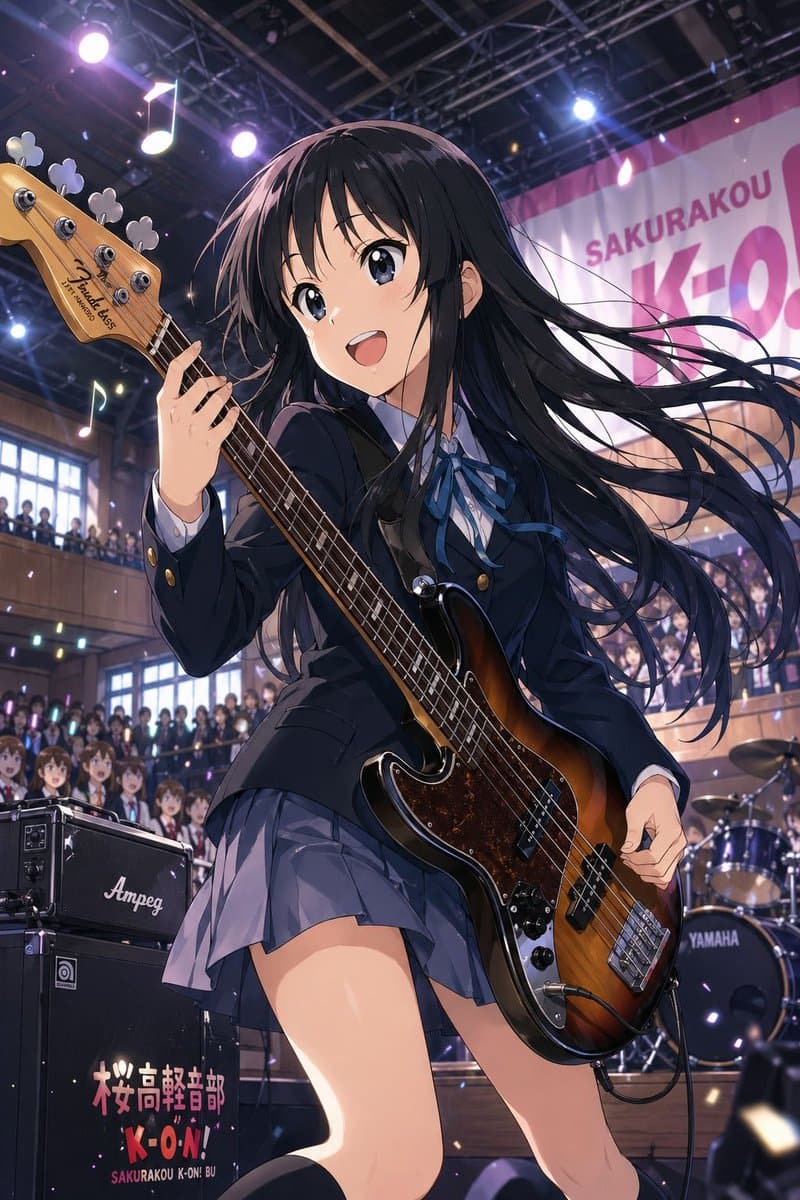
A dynamic anime concert illustration of {argument name="character" default="Mio Akiyama-inspired high school bassist"} performing onstage at a school festival, shown from a dramatic low angle in a full-body near-portrait composition. She is a beautiful teenage girl with very long straight {argument name="hair color" default="black"} hair whipping sideways in the motion of the performance, wearing a dark navy Japanese school uniform with a fitted blazer, white shirt, blue ribbon bow, and pleated gray-blue skirt. Her expression should be cool, serious, and focused. She is playing a sunburst electric bass guitar with a tortoiseshell pickguard, and it must be a true {argument name="instrument orientation" default="left-handed bass guitar"}, with the neck extending to the left side of the image and her fretting hand positioned accordingly. The stage setting is an indoor school auditorium packed with students on the ground floor and balcony, with bright concert spotlights, ceiling trusses, floating music-note decorations, and confetti-like glowing particles in the air. Behind her is a large banner reading {argument name="banner text" default="SAKURAKOU K-ON"}. At the left foreground is a black amplifier stack with the logo “Ampeg” and the text {argument name="amp text" default="桜高軽音部 K-ON! SAKURAKOU K-ON! BU"}, and in the right background a drum kit with visible “YAMAHA” branding. Emphasize energetic live-performance motion, glossy instrument reflections, detailed crowd depth, dramatic stage lighting in purple and white, and polished high-end anime illustration quality, SFW.
Choose the primary action to open PicX Studio with the available template settings. Review the model and format, personalize the creative direction, and generate when ready.
Yes. You can change the subject, setting, lighting, mood, format, and available model controls before creating your image.
This template is free to open and customize. Generation usage is shown in PicX Studio before you create.
Start with GPT Image 2, which is the model associated with this template. You can compare another compatible model for a different finish.
© 2026 PicX Studio. All rights reserved.

Follow a topic to a crawlable collection of related PicX Studio templates.
43,474 public templates available. Verified via the PicX Studio public templates API; refreshed hourly.

















![Minimalist Flat Vector Travel Poster — Premium minimalist flat-vector travel poster for {argument name="city name" default="[CITY_NAME]"}, 3:4 vertical format.](https://cms-assets.youmind.com/media/1787917359711_3ug846_HQX205cbMAA6F6S-300x400.jpg)





























![New Year's Day Special: Four-Panel Puzzle for 2026 Blessing — [关键:保持精确的面部特征,保留原始脸部结构,图中角色与上传参考图完全一致] 高级摄影棚2x2宫格写真。左上格(海军蓝背景):人物穿海军蓝色制服风连衣裙,金色纽扣装饰,复古卷发配蓝色贝雷帽和珍珠耳](https://pbs.twimg.com/media/G9V-MszakAEAIBw.jpg)