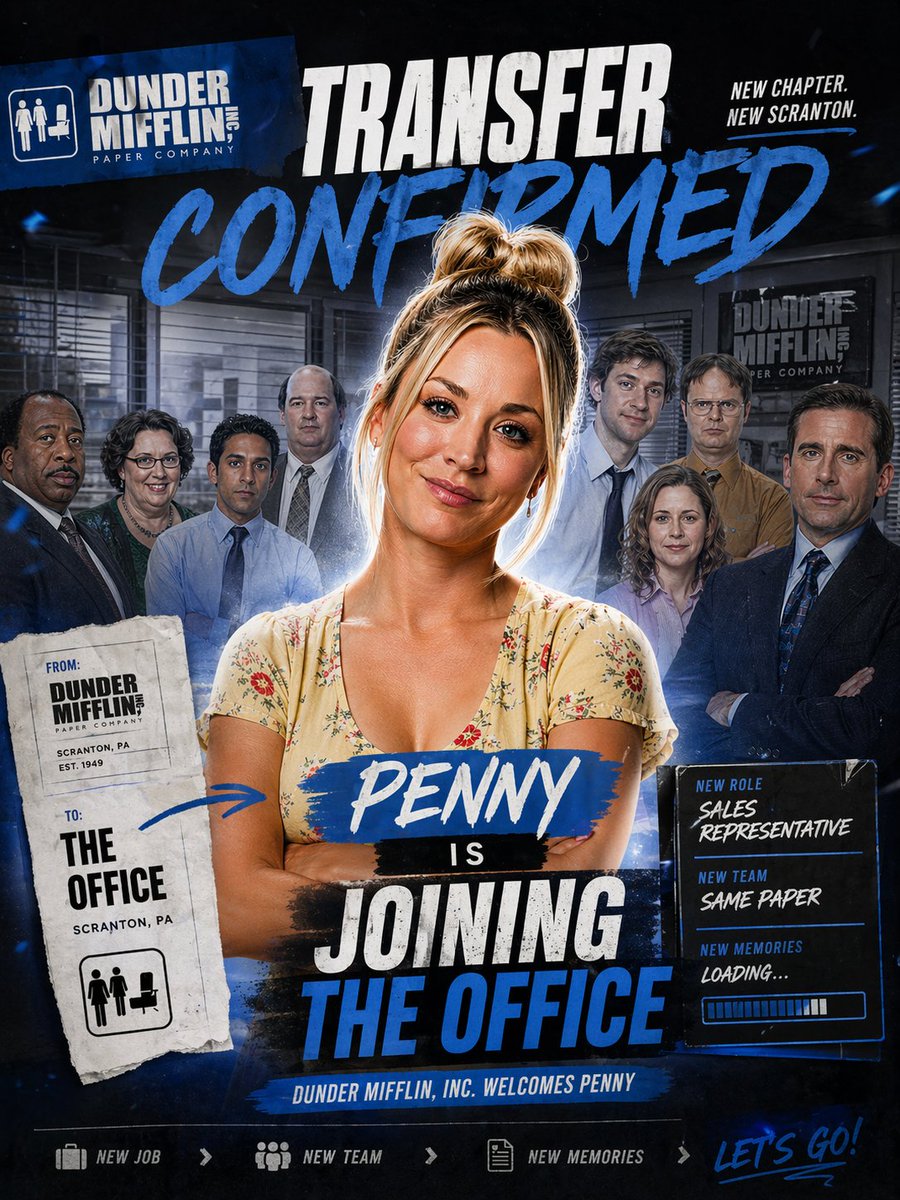
How do I use the Pink Office Transfer Announcement Poster template?
Choose the primary action to open PicX Studio with the available template settings. Review the model and format, personalize the creative direction, and generate when ready.
A scrapbook-style pink workplace announcement poster featuring a central female employee and her office team, ideal for parody promos, character edits, or celebratory transfer announcements. Change the subject, setting, or lighting one variable at a time.

A glossy, feminine scrapbook-style office announcement poster inspired by a sitcom workplace promo, in a vertical 2:3 composition. The scene shows 1 central woman standing in front of a group of 7 office coworkers inside a warm beige office with venetian blinds, desks, and a visible Dunder Mifflin-style wall sign in the background. The central woman has blonde hair in a messy high bun, a light pink floral V-neck dress, folded arms, and a confident, celebratory pose. Behind her, the 7 coworkers are arranged in a loose semicircle, wearing office attire in muted blues, browns, black, and lavender. Build the image as a mixed-media collage with torn paper, taped notes, brush-lettered headlines, glitter textures, flowers, and pink-and-gold accents. At the top left, place a pink rectangular company card with a white office icon and the text “DUNDER MIFFLIN, INC” and “PAPER COMPANY”. Across the upper center, place a large torn-paper headline reading “TRANSFER CONFIRMED” in expressive brush lettering, with “TRANSFER” in hot pink and “CONFIRMED” in black, plus pink underline strokes and a hand-drawn heart. At the top right, pin a small off-white note card with a pink pushpin and pink tape reading “NEW CHAPTER. NEW SCRANTON.” Near the lower center, layer a bold title made of 4 stacked text strips: “{argument name="character name" default="PENNY"}” on a pink paint-stroke banner, “IS” on a small white strip with 2 tiny hearts, “JOINING” on a gold brush-stroke banner, and “THE OFFICE” on a pale pink strip. On the lower left, hang a tall pink transfer tag clipped with a gold paperclip, reading “FROM DUNDER MIFFLIN, INC PAPER COMPANY / SCRANTON, PA / EST. 1949” and below that “TO THE OFFICE / SCRANTON, PA”, with a pink women-and-desk restroom-style icon at the bottom. On the lower right, place a pink note card with 3 labeled sections: “NEW ROLE” with “{argument name="job title" default="Sales Representative"}”, “NEW TEAM” with “{argument name="team text" default="Same Paper"}”, and “NEW MEMORIES” with “{argument name="memories text" default="Let’s make some!"}”, each accented with small pink hearts. Along the bottom center, add a pink ribbon strip reading “DUNDER MIFFLIN, INC. WELCOMES {argument name="character name" default="PENNY"}♡”. Beneath that, include 3 small icon-and-text items in one row: sparkle icon with “NEW JOB”, group icon with “NEW TEAM”, and heart icon with “NEW MEMORIES”. At the bottom right, add large handwritten pink script saying “LET’S GO!”. Decorate the corners with pink peonies, tiny white filler flowers, torn paper edges, soft glitter dust, and subtle gold foil flecks. Use a warm rosy palette with blush pink, cream, gold, and black, with polished poster compositing, soft glam lighting, and a cheerful celebratory mood.
Choose the primary action to open PicX Studio with the available template settings. Review the model and format, personalize the creative direction, and generate when ready.
Yes. You can change the subject, setting, lighting, mood, format, and available model controls before creating your image.
This template is free to open and customize. Generation usage is shown in PicX Studio before you create.
Start with GPT Image 2, which is the model associated with this template. You can compare another compatible model for a different finish.
© 2026 PicX Studio. All rights reserved.

Follow a topic to a crawlable collection of related PicX Studio templates.
43,474 public templates available. Verified via the PicX Studio public templates API; refreshed hourly.






![clean-minimalist-player-editorial-poster — A professional sports graphic design poster of [Player Name], designed in a clean, modern, and minimalist editorial s](/_next/image?url=https%3A%2F%2Fcdn.picxstudio.com%2Fuploads%2Fmeigen_5524a0a10196_94b81982-ef58-45e9-8d49-9b017a7f26cb.jpg&w=828&q=100)

![Cartoon TV Show Poster Pack — A bold Cartoon Network-style promotional poster for [SHOW], featuring the main characters in a flat 2D illustrated style with thic](/_next/image?url=https%3A%2F%2Fcdn.picxstudio.com%2Fuploads%2Fimg0_107064d3-b797-488a-a32e-d75dea9d3b4c.jpg&w=828&q=100)
![vertical-football-star-campaign-poster — Create a vertical 9:16 high-resolution football star campaign poster.
Player: [Player Name]
Player concept: [football](/_next/image?url=https%3A%2F%2Fcdn.picxstudio.com%2Fuploads%2Fmeigen_996a192156cb_45d1d198-bb81-4272-be3f-df0eda9f0a74.jpg&w=828&q=100)





![Japan Travel Brochure Poster — Create a vertical vintage travel-brochure infographic poster titled “[COUNTRY/DESTINATION]: [TAGLINE]”, using a warm parchment-pa](/_next/image?url=https%3A%2F%2Fcdn.picxstudio.com%2Fuploads%2Fp0_982bf820-bb34-4c43-8a6d-42d799d7282b.jpg&w=828&q=100)








![Minimalist Flat Vector Travel Poster — Premium minimalist flat-vector travel poster for {argument name="city name" default="[CITY_NAME]"}, 3:4 vertical format.](https://cms-assets.youmind.com/media/1787917359711_3ug846_HQX205cbMAA6F6S-300x400.jpg)



















![Neon X-Ray Photorealistic Scan — Neon X-Ray Photorealistic {argument name="object" default="[OBJECT]"} shown as glowing X-ray scan ag…](https://pbs.twimg.com/media/HA-QQVdbcAAz3E1.jpg)