How do I use the Luxury Fashion Editorial Split-Screen template?
Choose the primary action to open PicX Studio with the available template settings. Review the model and format, personalize the creative direction, and generate when ready.
A premium fashion campaign prompt for a split-screen layout featuring a character in an oversized power suit with consistent identity and architectural studio b
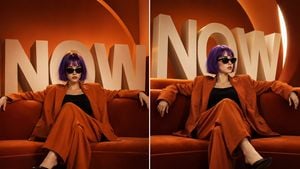
Create a luxury fashion editorial split-screen campaign featuring the same girl from the reference image, preserving her exact identity, facial structure, freckles, {argument name="hairstyle" default="short blunt purple bob haircut with bangs"}, soft expression, youthful appearance, and overall aesthetic. Generate two side-by-side premium editorial shots of the same character seated on a {argument name="furniture" default="plush burnt-orange velvet sofa"}. In both images, she sits confidently with both arms stretched across the backrest and legs elegantly crossed, projecting calm authority, effortless confidence, and minimalist luxury. She wears an {argument name="outfit" default="oversized burnt-orange power suit"} with premium textured fabric, a fitted black top underneath, sleek black designer cat-eye sunglasses, and minimal jewelry. Keep her signature purple bob hairstyle unchanged (do not tie the hair), with natural freckles, porcelain skin, glossy lips, and subtle high-fashion editorial makeup. The background is a seamless rich orange luxury studio featuring gigantic 3D matte ivory letters spelling "NOW" wrapping behind her, combined with elegant architectural curves, geometric layers, and soft shadows for depth. Use a monochromatic orange color palette with premium branding aesthetics. The left image is perfectly centered and symmetrical, looking directly toward the camera with a commanding magazine-cover composition. The right image is captured from a slightly angled perspective, with her head turned slightly to the side while maintaining the same relaxed pose, creating subtle variation between both frames. Cinematic lighting with a large soft key light, warm rim lighting, realistic reflections on the sunglasses, luxurious velvet textures, premium fabric detail, realistic skin rendering, HDR, ray tracing, global illumination, ultra-clean composition, generous negative space, Vogue, COS, Jacquemus, Zara Studio campaign aesthetic, commercial luxury advertising, hyper-realistic, photorealistic, 8K, IMAX quality, masterpiece, award-winning fashion photography, razor-sharp focus.
Choose the primary action to open PicX Studio with the available template settings. Review the model and format, personalize the creative direction, and generate when ready.
Yes. You can change the subject, setting, lighting, mood, format, and available model controls before creating your image.
This template is free to open and customize. Generation usage is shown in PicX Studio before you create.
Start with GPT Image 2, which is the model associated with this template. You can compare another compatible model for a different finish.
Follow a topic to a crawlable collection of related PicX Studio templates.