How do I use the Monochrome Marionette Manga Cover template?
Choose the primary action to open PicX Studio with the available template settings. Review the model and format, personalize the creative direction, and generate when ready.
A dramatic black-and-white manga album-cover prompt for an elegant male marionette performer entwined in puppet strings.
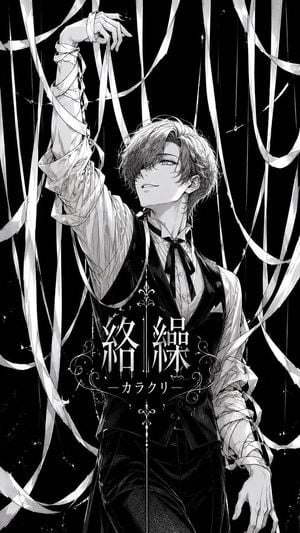
Create a vertical monochrome manga-style album cover featuring {argument name="character name" default="Karakuri"}, a beautiful young male marionette performer standing in a dark theatrical void, surrounded by long white puppet strings and ribbon-like binding strips. The character is centered in a dramatic three-quarter pose from thighs upward: slim elegant body, wavy medium-length {argument name="hair color" default="silver-gray"} hair sweeping over one eye, soft confident smile, refined eyes looking upward toward his raised hand. His left arm reaches high above his head with delicate fingers bent like a puppeteer or puppet, while the sleeve and forearm are wrapped in many thin bands; his right arm hangs lower at the side, also tangled and bandaged by strings. Outfit: formal Victorian-inspired stage costume with a white pleated dress shirt, black waistcoat, black bow tie or ribbon tie, high-waisted dark trousers, subtle pocket square, glossy black fabric highlights, ornate but not cluttered. Surround him with exactly 18 prominent visible white ribbons/strings: 6 vertical taut strings descending from the top, 5 wide curling ribbon strips looping across the top and sides, 4 diagonal strips crossing the body area, and 3 lower sweeping ribbons near the bottom edge. Make the ribbons feel like he is willingly playing with and becoming entangled in them, not trapped in fear. Use high-contrast black-and-white ink, detailed shoujo manga linework, screentone shading, fine hatching, glossy highlights, elegant gothic poster composition, distressed speckled black background, and sharp white negative-space ribbons. Add ornate centered title typography over the lower torso: large Japanese title text {argument name="main title text" default="絡繰"} in white, with a thin vertical divider line and symmetrical filigree flourishes; below it add the smaller subtitle {argument name="subtitle text" default="— カラクリ —"}. Keep the design like a polished music jacket cover, no color except grayscale, no extra characters, no watermark, no English text unless supplied in the title fields.
Choose the primary action to open PicX Studio with the available template settings. Review the model and format, personalize the creative direction, and generate when ready.
Yes. You can change the subject, setting, lighting, mood, format, and available model controls before creating your image.
This template is free to open and customize. Generation usage is shown in PicX Studio before you create.
Start with GPT Image 2, which is the model associated with this template. You can compare another compatible model for a different finish.
Follow a topic to a crawlable collection of related PicX Studio templates.