How do I use the Playful Little Monster Siblings template?
Choose the primary action to open PicX Studio with the available template settings. Review the model and format, personalize the creative direction, and generate when ready.
A whimsical watercolor collage illustration of two toddler siblings as joyful little monsters surrounded by summer toys and chaotic family-life motifs.
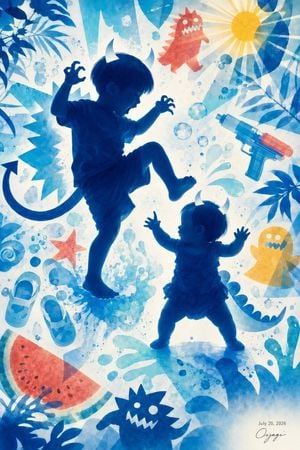
Create a vertical whimsical family-life illustration in translucent watercolor and paper-cut collage style, showing two small children as deep cobalt-blue silhouettes transformed into playful little monsters. The older child, about {argument name="older child age" default="3 years old"}, is large on the left-center, barefoot, wearing a short-sleeve shirt and shorts, one knee lifted high as if stomping or dancing, mouth open in a roar, both hands raised like claws, with two small white devil horns and a long curled monster tail extending left. The younger child, about {argument name="younger child age" default="almost 1 year old"}, stands lower right, much smaller, barefoot, wearing a frilly romper, arms raised, looking up at the older child, also with two small white horns. Use a bright backlit white-to-aqua background filled with energetic blue splashes, bubbles, paint droplets, jagged comic burst shapes, and tropical leaf silhouettes around the edges. Include exactly 8 distinct playful surrounding objects: 1 red spiky cartoon monster near the upper center-right, 1 yellow sun with long rays in the upper right, 1 blue-and-orange water pistol on the right, 1 yellow ghost monster at mid-right, 1 red starfish at lower left-center, 1 pair of light blue toddler shoes at lower left, 1 watermelon slice in the bottom left corner, and 1 dark blue spiky monster head near the bottom center. Add leafy shadows in dark blue at the top left, top right, right edge, and bottom left for a summery outdoor feeling. Keep the children mostly silhouette-like but with soft rim light and readable profiles; make the overall mood chaotic, joyful, tender, and nostalgic. Add a small handwritten artist signature and date {argument name="date text" default="July 20, 2026"} in the bottom right. No other text, no photorealism, no harsh outlines, no extra children.
Choose the primary action to open PicX Studio with the available template settings. Review the model and format, personalize the creative direction, and generate when ready.
Yes. You can change the subject, setting, lighting, mood, format, and available model controls before creating your image.
This template is free to open and customize. Generation usage is shown in PicX Studio before you create.
Start with GPT Image 2, which is the model associated with this template. You can compare another compatible model for a different finish.
Follow a topic to a crawlable collection of related PicX Studio templates.