How do I use the Retro Anime Friday Poster template?
Choose the primary action to open PicX Studio with the available template settings. Review the model and format, personalize the creative direction, and generate when ready.
Generates a colorful 1980s-style anime poster featuring a blue-haired girl, bold Friday lettering, and Memphis pop graphics.
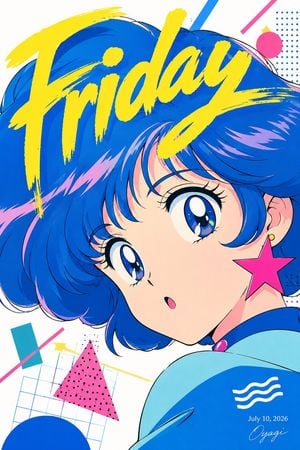
Create a vibrant 1980s retro anime poster of a cute young anime girl in close-up, turned over her shoulder and looking toward the viewer with a surprised small open mouth. She has {argument name="hair color" default="electric cobalt blue with pink highlights"}, a short fluffy bob with sweeping bangs and dramatic windblown volume, huge glossy blue eyes with long lashes, pale peach skin, and a large hot-pink star earring on one visible ear. She wears a futuristic rounded jacket or shoulder piece in cyan and deep blue with a small pink button detail, and a white three-wave emblem on the lower right. Across the top, overlay the word {argument name="headline text" default="Friday"} in enormous bright yellow dry-brush script, tilted diagonally and partially covering her hair. Use a clean white background filled with 1980s Memphis design accents: exactly 7 visible decorative elements including a blue dotted square in the upper right, a hot-pink circle near the top right, a diagonal blue stripe near the top edge, a diagonal pink stripe near the top edge, a teal rectangle with a diagonal pink line on the left, a pink triangle with black dots near the lower left center, and a large blue circle cropped at the bottom left over a pale blue grid. Add small yellow stars and fine geometric line accents around the lower-left area. In the bottom right, include small white date text {argument name="date text" default="July 10, 2026"} and a delicate cursive signature {argument name="signature" default="Oyagi"}. Style should be crisp cel-shaded Japanese anime, glossy highlights, bold black linework, saturated cyan/blue/magenta/yellow palette, poster-like vertical composition, high-energy pop graphic design, no photorealism, no extra characters, no watermark beyond the signature.
Choose the primary action to open PicX Studio with the available template settings. Review the model and format, personalize the creative direction, and generate when ready.
Yes. You can change the subject, setting, lighting, mood, format, and available model controls before creating your image.
This template is free to open and customize. Generation usage is shown in PicX Studio before you create.
Start with GPT Image 2, which is the model associated with this template. You can compare another compatible model for a different finish.
Follow a topic to a crawlable collection of related PicX Studio templates.