How do I use the Silver-Haired Battle Maid template?
Edit the prompt in the box under the preview — the template's model and format are already selected — and press Generate. Your version appears right on this page.
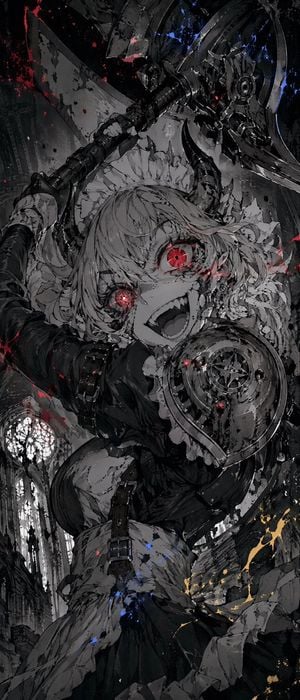
A cinematic dark fantasy anime illustration prompt for generating a silver-haired armored maid charging with a giant mechanical lance in a ruined gothic battlefield.

This template uses your photo — add one with the + button.
Create a dramatic vertical anime-style dark fantasy action illustration of a {argument name="character type" default="silver-haired battle maid"} charging directly toward the viewer through a ruined gothic city. Use an extreme low-angle, dynamic foreshortened perspective: her enormous mechanical lance/cannon dominates the foreground from the lower left, pointing outward, with complex metal barrels, armor plating, vents, glowing heat seams, smoke, and sparks. The character has long wind-swept {argument name="hair color" default="silver-gray"} hair, pale skin, sharp golden eyes, a focused serious expression, and a frilled maid headdress. She wears a black-and-white Victorian maid dress fused with battle armor: puff sleeves, white apron, layered torn skirt, corset-like bodice, armored gauntlets, thigh armor, knee guards, and heavy boots. In her other hand she carries one large round metal shield on the right side of the composition. The background is a devastated cathedral-like urban battlefield with towering broken arches, jagged spires, shattered walls, drifting ash, explosions, steam clouds, wet reflective cobblestones, and orange embers cutting through a mostly monochrome gray palette. Emphasize motion, debris, smoke trails, splashing dust, and cinematic impact. Style should feel like highly detailed Japanese concept art with painterly brushwork, intricate mechanical design, gritty textures, muted charcoal grays, bright white smoke, small orange spark highlights, and no text or watermark. Use a {argument name="aspect ratio" default="vertical 2:3"} composition, high detail, dramatic lighting, atmospheric depth, and intense battlefield energy.
Create a dramatic vertical anime-style dark fantasy action illustration of a {argument name="character type" default="silver-haired battle maid"} charging directly toward the viewer through a ruined gothic city. Use an extreme low-angle, dynamic foreshortened perspective: her enormous mechanical lance/cannon dominates the foreground from the lower left, pointing outward, with complex metal barrels, armor plating, vents, glowing heat seams, smoke, and sparks. The character has long wind-swept {argument name="hair color" default="silver-gray"} hair, pale skin, sharp golden eyes, a focused serious expression, and a frilled maid headdress. She wears a black-and-white Victorian maid dress fused with battle armor: puff sleeves, white apron, layered torn skirt, corset-like bodice, armored gauntlets, thigh armor, knee guards, and heavy boots. In her other hand she carries one large round metal shield on the right side of the composition. The background is a devastated cathedral-like urban battlefield with towering broken arches, jagged spires, shattered walls, drifting ash, explosions, steam clouds, wet reflective cobblestones, and orange embers cutting through a mostly monochrome gray palette. Emphasize motion, debris, smoke trails, splashing dust, and cinematic impact. Style should feel like highly detailed Japanese concept art with painterly brushwork, intricate mechanical design, gritty textures, muted charcoal grays, bright white smoke, small orange spark highlights, and no text or watermark. Use a {argument name="aspect ratio" default="vertical 2:3"} composition, high detail, dramatic lighting, atmospheric depth, and intense battlefield energy.
Edit the prompt in the box under the preview — the template's model and format are already selected — and press Generate. Your version appears right on this page.
Yes. You can change the subject, setting, lighting, mood, format, and available model controls before creating your image.
Opening and editing this template is free. Generating uses credits, shown on the Generate button when you are signed in.
Start with GPT Image 2, which is the model associated with this template. You can compare another compatible model for a different finish.
Follow a topic to a crawlable collection of related PicX Studio templates.