How do I use the Surreal Fashion Magazine Editorial Collage template?
Choose the primary action to open PicX Studio with the available template settings. Review the model and format, personalize the creative direction, and generate when ready.
Generates a modern surrealistic magazine cover aesthetic featuring a floral collage over a beauty portrait with geometric pastel backgrounds.
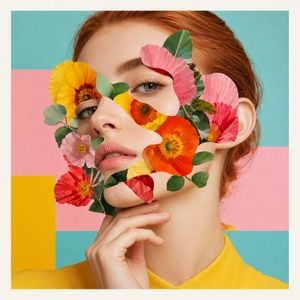
Modern editorial collage portrait, surreal fashion magazine cover aesthetic, close-up beauty portrait of a young woman with fair luminous skin and {argument name="hair color" default="copper-red hair"} pulled back neatly, three-quarter face angle, calm serious expression, soft pink lips, natural eyebrows, delicate facial features, one hand gently touching her chin. Her face is partially covered with abstract paper-cut collage shapes, layered with {argument name="overlay elements" default="bright yellow, orange, pink, and red flowers"} across the eyes, cheeks, nose, and mouth area, small green leaves mixed into the floral mask, sharp clean cutout edges, realistic skin texture combined with graphic collage elements. Flat pastel geometric background with {argument name="background palette" default="soft turquoise, pastel pink, bright yellow, and white border blocks"}, bright yellow garment visible at shoulder level, soft studio lighting, minimal shadows, polished high-end fashion photography, pastel pop art color palette, fresh feminine surreal artistic mood, premium editorial print quality, ultra-detailed, clean composition, square format. Negative prompt: text, letters, numbers, logo, watermark, magazine title, caption, typography, signature, extra face, distorted eyes, deformed hand, messy collage edges, blurry, low resolution, harsh shadows, overexposed skin, bad anatomy, duplicate face, unnatural fingers.
Choose the primary action to open PicX Studio with the available template settings. Review the model and format, personalize the creative direction, and generate when ready.
Yes. You can change the subject, setting, lighting, mood, format, and available model controls before creating your image.
This template is free to open and customize. Generation usage is shown in PicX Studio before you create.
Start with GPT Image 2, which is the model associated with this template. You can compare another compatible model for a different finish.
Follow a topic to a crawlable collection of related PicX Studio templates.