How do I use the Monochrome Celestial Prince Character template?
Choose the primary action to open PicX Studio with the available template settings. Review the model and format, personalize the creative direction, and generate when ready.
A detailed black-and-white manga full-body standing character design for an elegant celestial prince or magician.
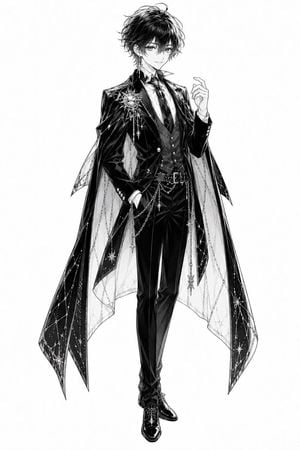
Create a full-body monochrome manga character standing pose on a clean white background: a beautiful young male prince or magician, slim and tall, with tousled short {argument name="hair color" default="black"} hair, soft confident eyes, a faint elegant smile, and delicate bishounen facial features. He wears an ornate black formal suit with a glossy tailcoat, fitted vest, white dress shirt, patterned tie, slim trousers, polished black dress shoes, belt, and decorative chain accessories. Add a dramatic translucent cape or mantle split into long pointed panels, decorated with starry constellation lines, sparkling stars, dangling chains, and celestial charms; include one large sun-and-star brooch on the left chest and long ornate earrings. Pose him facing forward in a relaxed aristocratic stance: one hand in his trouser pocket and the other raised lightly near his chest with graceful fingers. Render as high-detail black-and-white Japanese manga line art with rich ink shading, crosshatching, glossy highlights on fabric, intricate jewelry details, ethereal fantasy fashion, clean silhouette, no color, no text, no background objects.
Choose the primary action to open PicX Studio with the available template settings. Review the model and format, personalize the creative direction, and generate when ready.
Yes. You can change the subject, setting, lighting, mood, format, and available model controls before creating your image.
This template is free to open and customize. Generation usage is shown in PicX Studio before you create.
Start with GPT Image 2, which is the model associated with this template. You can compare another compatible model for a different finish.
Follow a topic to a crawlable collection of related PicX Studio templates.