How do I use the GPT Image 2 Space Porthole template?
Choose the primary action to open PicX Studio with the available template settings. Review the model and format, personalize the creative direction, and generate when ready.
A photorealistic sci-fi promotional scene showing a spacecraft porthole view of a planet embossed with GPT Image 2 text.
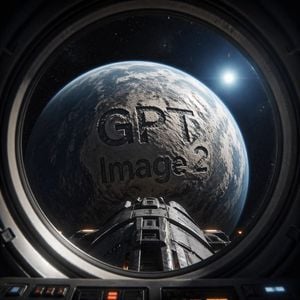
Create a cinematic photorealistic sci-fi view from inside a spacecraft cockpit or round observation window, looking out through a thick dark metal circular porthole at a huge Earth-like rocky planet filling most of the frame. The planet surface is gray-blue and cratered/textured with clouds and rim lighting, and the words “{argument name="main text" default="GPT"}” and “{argument name="subtitle text" default="Image 2"}” appear as enormous dark engraved/embossed letters across the planet’s face, integrated into the terrain with shadows and realistic depth. A futuristic spacecraft nose or docking module extends from the bottom center toward the planet, with dark segmented metal panels and small warm orange lights. The surrounding space is black with fine stars, and a bright white sun or star glows at the upper right with lens flare. Frame the scene through the circular porthole with visible cockpit controls and panels along the bottom edge, strong high-contrast lighting, realistic reflections on glass, ultra-detailed 3D render, dramatic space exploration mood, square composition, no extra text, no watermark.
Choose the primary action to open PicX Studio with the available template settings. Review the model and format, personalize the creative direction, and generate when ready.
Yes. You can change the subject, setting, lighting, mood, format, and available model controls before creating your image.
This template is free to open and customize. Generation usage is shown in PicX Studio before you create.
Start with GPT Image 2, which is the model associated with this template. You can compare another compatible model for a different finish.
Follow a topic to a crawlable collection of related PicX Studio templates.