
Exploded Transparent Artificial Heart
A cinematic bioengineering product visualization of a transparent artificial heart with exploded components and technical callout labels.
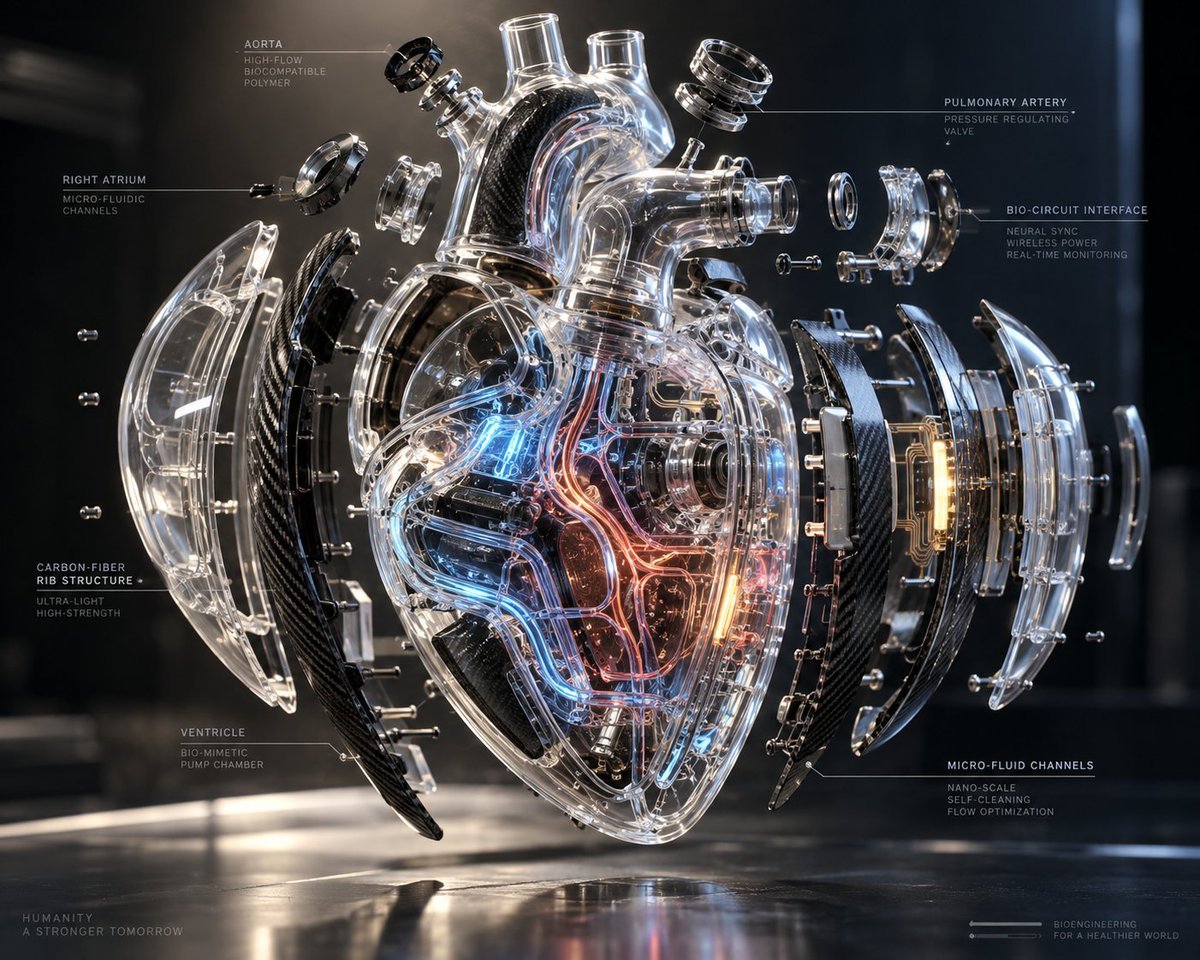
- Prompt included
- Model and format preset
- Free template
The prompt behind this image
Copy the exact prompt behind Exploded Transparent Artificial Heart, or open it in the studio and make it yours.
Goal: Create a hyper-realistic futuristic medical engineering visualization of an exploded transparent artificial human heart, presented like a premium bioengineering product render with technical callouts. Canvas: 4:3 horizontal image, dark laboratory background, glossy black reflective floor, cinematic rim lighting, shallow depth of field, cool blue highlights and warm amber internal glow. The heart floats centered above the floor with a soft reflection beneath it. Main subject: A transparent biomechanical anatomical heart labeled as {argument name="device concept" default="next-generation bioengineered artificial heart"}. The central heart body is made of clear glass-like biocompatible polymer, with visible internal tubes, valves, microfluidic channels, circuit traces, miniature mechanical pumps, red and blue glowing vascular pathways, and amber illuminated electronic modules. Use realistic refraction, caustics, chrome screws, polished metal rings, and black carbon-fiber structural components. Exploded layout: Show exactly 13 major separated component groups around the central heart: 1 central transparent heart chamber; 2 left outer clear curved shell; 3 left black carbon-fiber rib panel; 4 left inner transparent curved support layer; 5 upper-left aorta connector ring assembly; 6 upper central transparent aorta and vessel towers; 7 upper-right pulmonary artery connector ring assembly; 8 right-side cylindrical port and interface rings; 9 right black carbon-fiber rib panel; 10 right transparent circuit-interface module with amber glow; 11 right outer clear curved shell; 12 far-right small transparent cap/lens; 13 multiple small floating screws and bolts aligned around the exploded parts. Keep all parts suspended in precise horizontal layers, as if disassembled for inspection. Technical annotations: Add thin white/gray leader lines and small uppercase sci-fi typography. Include exactly 7 visible callout labels: 1 “AORTA” with subtext “HIGH-FLOW / BIOCOMPATIBLE / POLYMER”; 2 “RIGHT ATRIUM” with subtext “MICRO-FLUIDIC / CHANNELS”; 3 “CARBON-FIBER RIB STRUCTURE” with subtext “ULTRA-LIGHT / HIGH-STRENGTH”; 4 “VENTRICLE” with subtext “BIO-MIMETIC / PUMP CHAMBER”; 5 “PULMONARY ARTERY” with subtext “PRESSURE REGULATING / VALVE”; 6 “BIO-CIRCUIT INTERFACE” with subtext “NEURAL SYNC / WIRELESS POWER / REAL-TIME MONITORING”; 7 “MICRO-FLUID CHANNELS” with subtext “NANO-SCALE / SELF-CLEANING / FLOW OPTIMIZATION”. Place these labels around the heart without covering key details. Footer text: In the bottom left, small spaced lettering reads {argument name="left footer text" default="HUMANITY\nA STRONGER TOMORROW"}. In the bottom right, add a tiny schematic line icon and text reading {argument name="right footer text" default="BIOENGINEERING\nFOR A HEALTHIER WORLD"}. Visual style: Ultra-detailed photorealistic 3D render, luxury industrial design, transparent medical device, carbon fiber texture, chrome hardware, glass refraction, glowing red and blue tubes, amber circuit light, high contrast, clean futuristic interface typography, technical diagram aesthetic, 8k quality. Constraints: No people, no hands, no blood or gore, no cartoon styling, no messy background, no extra large titles. Keep the anatomy recognizable as a human heart while emphasizing transparent futuristic engineering.
How to use Exploded Transparent Artificial Heart in 3 steps
- 1Upload ImagePNG, JPG or paste
Add your photo
Upload the photo the template builds on. The prompt, model and format are already set.
- 2…a portrait of your subject in softgolden-hour light, 85mm…
Personalize
Edit the subject and creative details for your destination.
- 3Generate
Generate
Press Generate — your image is created in PicX Studio, so you can compare it with the original and refine one variable at a time.
More like this
Templates with the same subject, style or setup. Open one to see its prompt.

Woman in Mall with Chanel Bag - Heart Gesture

Two Hearts. One Scooter.

Transparent Bear Character Cutout
Transparent Earbuds on Stone Pedestal
Transparent Jellyfish Princess

Artificial Sun Futuristic City

Transparent Sky Jacket Fashion
Wet Transparent Earbud Macro
X-Ray Transparent Grand Piano

Transparent background soccer player
Transparent Window Alpha Demo

Two Maid Cafe Girls Making a Heart
Make it yours
Exploded Transparent Artificial Heart works as-is. These are the safest ways to change it without losing the look.
Change one field
Copy a single group, rewrite it, and generate again so you can see what that field is doing.
Keep the frame, change the subject
Hold the composition and light of Exploded Transparent Artificial Heart, then swap wardrobe, props or the person for a new take.
| If the result… | Why | Fix |
|---|---|---|
| The result drifts from the preview | Too many fields changed at once. | Reuse Exploded Transparent Artificial Heart as-is first, then change one group — subject, light, or setting. |
| The model over-stylizes the scene | The prose prompt leaves finish and camera underspecified. | Add one camera or lighting sentence and stay on GPT Image 2. |
More GPT Image 2 templates
Other prompts made for GPT Image 2.

Six VTuber Japanese Logo Sheet

Realistic Portrait of Woman and Deer

The Vista Modular Condo Poster

AI Model Routing Comparison Infographic

2.5D Anime Art Board

Isometric Productivity Desk Scene

New York Double Exposure Poster

Four-Panel AI Landscape Comparison

Japanese Tatami Lifestyle Magazine Cover

NESCAFÉ Coffee Map Poster
More image prompts
Fresh picks from across the catalog.

Isometric Business Presenter Pose Set
Rainbow Decora Anime Photo Card

Luxury Amber Perfume Ad

Photorealistic Leaf Shaped Like a Dragon

Stylized Screen Print Illustration of Woman in Sea

Nostalgic Watercolor Anime Adventure Poster

Japanese Skincare Lotion Ad

Vibrant Abstract Pattern Prompt

Cinematic Embroidery Scene Video

Nike Dunk Bursting Through Crystalline Wall
Browse template categories
Exploded Transparent Artificial Heart questions
How do I use the Exploded Transparent Artificial Heart template?
Add your photo if the template asks for one, edit the prompt if you like — the template's model and format are already selected — and press Generate. Your version opens in PicX Studio.
Can I customize the Exploded Transparent Artificial Heart template?
Yes. You can change the subject, setting, lighting, mood, format, and available model controls before creating your image.
Is the Exploded Transparent Artificial Heart template free?
Opening and editing this template is free. Generating uses credits, shown on the Generate button when you are signed in.
Which AI model should I use?
Start with GPT Image 2, which is the model associated with this template. You can compare another compatible model for a different finish.
Looking for something else? Browse all templates.

Your photo, any look
Thousands of ready templates for every top image and video model, from one credit balance.