How do I use the Wide Minimal Character Sheet template?
Choose the primary action to open PicX Studio with the available template settings. Review the model and format, personalize the creative direction, and generate when ready.
Generates a clean panoramic character turnaround sheet with two side-by-side design styles and controlled text labels.
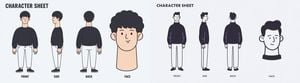
Goal: Create a wide minimalist character sheet illustration for {argument name="character name" default="a young man with curly black hair"}, showing two separate character sheet designs side by side on one horizontal canvas. Canvas: Very wide panoramic aspect ratio, about 4:1, pale light gray background, clean empty margins, no borders, no shadows, no watermark. Layout: Split the canvas into two equal halves. Each half is its own character sheet with the same basic layout: a bold title at the top, three full-body turnaround poses arranged left to right, and one larger face/head close-up on the far right. Use exactly 2 character sheet panels total. Left panel details: Use a soft flat cartoon style with warm skin tone and muted colors. Show exactly 4 character drawings: 1 front full-body view, 1 side full-body view, 1 back full-body view, and 1 large face close-up. The character has rounded curly black hair, a simple friendly face, a long neck in the close-up, a loose dark navy/black sweatshirt, cropped white pants, and black shoes. Place the full-body poses evenly spaced, with the face close-up larger than the body poses. Right panel details: Use a thinner, more monochrome sketch-like flat style with dark navy outlines and minimal color accents. Show exactly 4 character drawings: 1 front full-body view, 1 side full-body view, 1 back full-body view, and 1 large face close-up. The same character wears a dark oversized sweater, white straight pants, and dark shoes. Add subtle purple accent lines on the sweater sleeves. The face close-up is simplified, with short dark hair, ears visible, and a black collar shape beneath the head. Text content: Draw only the following text labels, each spelled exactly as written. In the left panel: CHARACTER SHEET, FRONT, SIDE, BACK, FACE. In the right panel: CHARACTER SHEET, FRONT, SIDE, BACK, FACE. Use bold uppercase hand-drawn sans-serif text for the titles and small uppercase labels under each view. Visual style: Clean vector-like illustration, simple rounded forms, slightly imperfect hand-drawn lines, limited palette of black, dark navy, white, pale peach skin, and light gray background. Keep the composition airy and balanced. Constraints: Do not add any other letters, symbols, logos, signatures, dates, URLs, watermarks, or decorative text. Keep exactly 8 character drawings total: 6 full-body turnaround views and 2 face close-ups.
Choose the primary action to open PicX Studio with the available template settings. Review the model and format, personalize the creative direction, and generate when ready.
Yes. You can change the subject, setting, lighting, mood, format, and available model controls before creating your image.
This template is free to open and customize. Generation usage is shown in PicX Studio before you create.
Start with GPT Image 2, which is the model associated with this template. You can compare another compatible model for a different finish.
Follow a topic to a crawlable collection of related PicX Studio templates.