How do I use the Surreal Sneaker Ad with Leaping Cat template?
Choose the primary action to open PicX Studio with the available template settings. Review the model and format, personalize the creative direction, and generate when ready.
A playful premium sportswear advertisement scene featuring giant sneakers, a fuzzy leaping cat silhouette, and a miniature person pulling shoelaces.
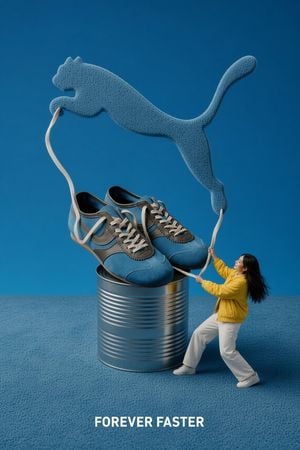
Create a surreal high-end advertising image for a sports shoe brand on a vertical 2:3 canvas. The scene shows exactly 1 giant metallic ribbed tin can centered near the bottom, with exactly 1 pair of oversized blue-and-gray athletic sneakers sitting on top of it, the sneakers facing forward with visible stitching, gray overlays, dark inner lining, and off-white laces. From the shoes, exactly 2 long off-white shoelaces extend upward and outward like ropes, forming a massive leaping cat logo silhouette above the shoes; the cat is textured like soft blue terry cloth or fuzzy carpet, stretched in a dynamic jump from left to right with front paws reaching left and tail curling upward on the right. On the lower right, include exactly 1 small human figure, a young woman with long black hair, wearing a bright {argument name="jacket color" default="yellow"} jacket, white pants, and white sneakers, leaning backward as she pulls the right shoelace with both hands as if controlling or tethering the giant logo. Use a monochrome blue studio environment with a seamless blue background and matching fuzzy blue carpet floor, realistic product photography lighting, crisp shadows, shallow depth of field, and a playful miniature-scale illusion. Add bold white uppercase slogan text centered at the bottom reading {argument name="slogan text" default="FOREVER FASTER"}. Keep the composition clean, premium, and poster-like, with no extra people, no extra shoes, no additional logos, and no watermark.
Choose the primary action to open PicX Studio with the available template settings. Review the model and format, personalize the creative direction, and generate when ready.
Yes. You can change the subject, setting, lighting, mood, format, and available model controls before creating your image.
This template is free to open and customize. Generation usage is shown in PicX Studio before you create.
Start with GPT Image 2, which is the model associated with this template. You can compare another compatible model for a different finish.
Follow a topic to a crawlable collection of related PicX Studio templates.