How do I use the Abstract Celestial Mountain Lake template?
Choose the primary action to open PicX Studio with the available template settings. Review the model and format, personalize the creative direction, and generate when ready.
Generates a tranquil watercolor mountain lake scene with delicate geometric overlays and celestial pendulum-like details for meditative wall art or concept visu
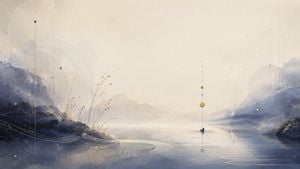
Create a serene wide-format abstract watercolor landscape, 16:9 aspect ratio, with a pale cream misty sky over a calm reflective lake between two blue-gray mountain ranges. The scene should feel like poetic Japanese ink wash mixed with delicate celestial geometry: soft atmospheric haze, muted indigo shadows, warm ivory light, subtle paper texture, and fine gold flecks. Place two main mountain masses, one dark layered range on the left and one softer blue range on the right, receding toward a bright empty center horizon. In the foreground, show glassy water with thin white concentric ripple lines and sweeping curved contour lines. Add sparse reeds and dry grasses near the left shoreline, with tiny golden seed heads. Overlay precise but faint geometric details: thin vertical guide lines, large transparent circular arcs, dotted orbital curves, and small node points. Include one central hanging vertical alignment above the water with exactly seven visible circular elements: a tiny dark dot at the top, two small pale ring nodes below it, one small ochre dot, one larger golden sphere, one pale ring node, and one dark blue sphere touching the water and creating ripples. Add a second subtle vertical line with small nodes on the upper left, including one dark blue dot and one pale yellow dot. Keep the composition spacious and meditative, with no people, no buildings, no text, no frame, and no watermark. Use {argument name="color palette" default="misty cream, indigo blue, slate gray, soft gold, and white"}, {argument name="landscape setting" default="calm mountain lake at dawn"}, {argument name="art style" default="abstract watercolor ink wash with celestial geometry"}, and {argument name="mood" default="quiet, ethereal, contemplative"}.
Choose the primary action to open PicX Studio with the available template settings. Review the model and format, personalize the creative direction, and generate when ready.
Yes. You can change the subject, setting, lighting, mood, format, and available model controls before creating your image.
This template is free to open and customize. Generation usage is shown in PicX Studio before you create.
Start with GPT Image 2, which is the model associated with this template. You can compare another compatible model for a different finish.
Follow a topic to a crawlable collection of related PicX Studio templates.