
Cute Chinese LLM Training Infographic
A pastel Chinese educational poster explaining the large language model training pipeline in 8 cute mascot-driven panels, ideal for social media explainers or beginner-friendly AI education.
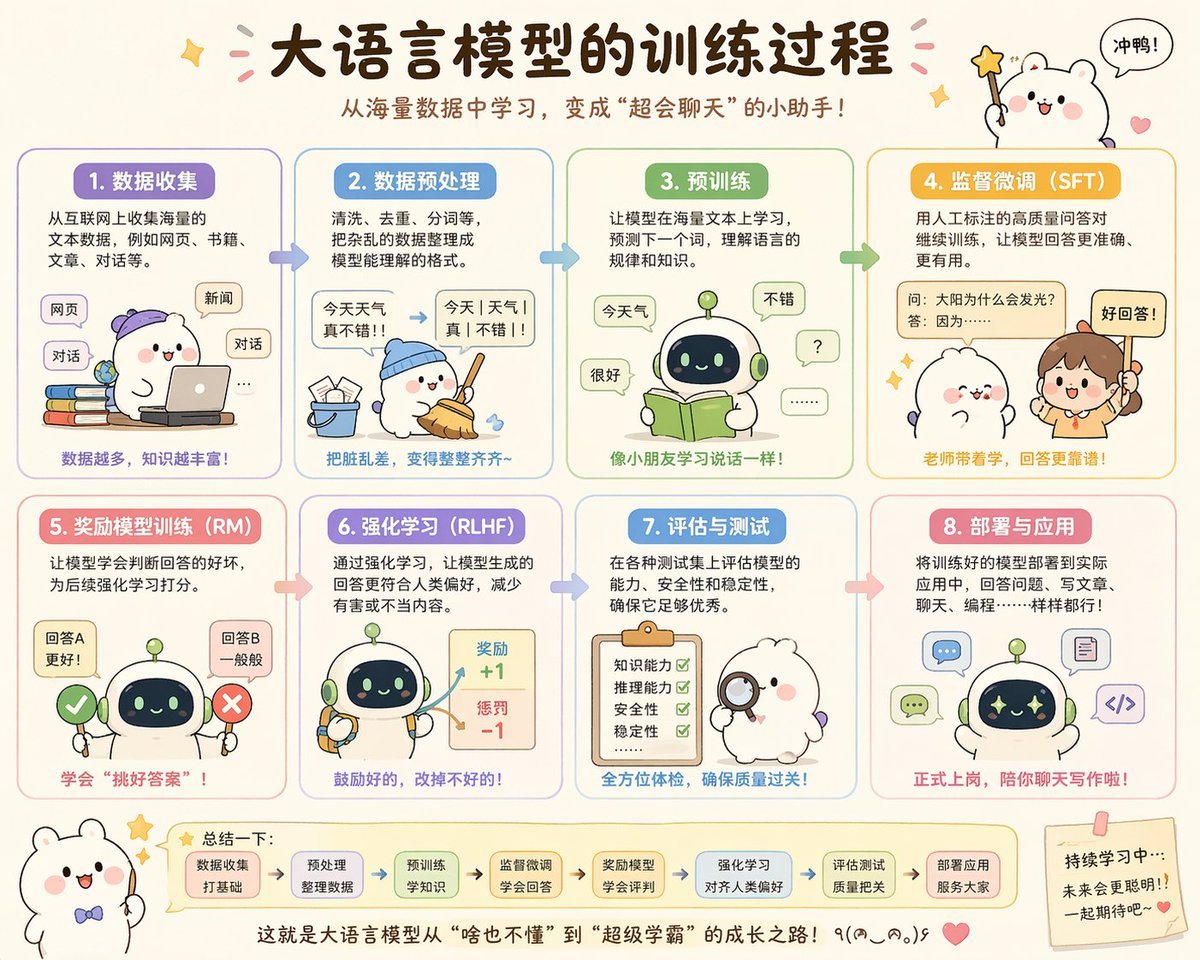
- Prompt included
- Model and format preset
- Free template
The prompt behind this image
Copy the exact prompt behind Cute Chinese LLM Training Infographic, or open it in the studio and make it yours.
- Type
- cute educational infographic poster
- Topic
- {argument name="headline text" default="大语言模型的训练过程"}
- Subtitle
- {argument name="subtitle text" default="从海量数据中学习,变成"超会聊天"的小助手!"}
- Style › Overall
- adorable Chinese explainer poster, pastel classroom infographic, rounded panels, soft cream background, hand-drawn cartoon aesthetic, clean vector-like illustration, warm friendly educational tone
- Style › Palette
- cream, lavender, sky blue, mint green, yellow-orange, pink, soft brown
- Style › Rendering
- high-quality flat illustration with subtle shading, crisp Chinese typography, sticker-like accents, tiny stars, hearts, arrows, and speech bubbles
- Layout › Format
- horizontal poster
- Layout › Grid › Rows
- 2
- Layout › Grid › Columns
- 4
- Layout › Grid › Count
- 8
- Layout › Sections › 0 › Title
- 1. 数据收集
- Layout › Sections › 0 › Position
- top-left
- Layout › Sections › 0 › Count
- 1
- Layout › Sections › 0 › Labels
- 网页, 新闻, 对话
- Layout › Sections › 1 › Title
- 2. 数据预处理
- Layout › Sections › 1 › Position
- top row, second column
- Layout › Sections › 1 › Count
- 1
- Layout › Sections › 1 › Labels
- 今天 天气 真不错!!, 今天|天气|真|不错!!
- Layout › Sections › 2 › Title
- 3. 预训练
- Layout › Sections › 2 › Position
- top row, third column
- Layout › Sections › 2 › Count
- 1
- Layout › Sections › 2 › Labels
- 今天气, 很好, 不错, ?, ......
- Layout › Sections › 3 › Title
- 4. 监督微调(SFT)
- Layout › Sections › 3 › Position
- top-right
Raw JSON
{"type":"cute educational infographic poster","topic":"{argument name=\"headline text\" default=\"大语言模型的训练过程\"}","subtitle":"{argument name=\"subtitle text\" default=\"从海量数据中学习,变成\"超会聊天\"的小助手!\"}","style":{"overall":"adorable Chinese explainer poster, pastel classroom infographic, rounded panels, soft cream background, hand-drawn cartoon aesthetic, clean vector-like illustration, warm friendly educational tone","palette":["cream","lavender","sky blue","mint green","yellow-orange","pink","soft brown"],"rendering":"high-quality flat illustration with subtle shading, crisp Chinese typography, sticker-like accents, tiny stars, hearts, arrows, and speech bubbles"},"layout":{"format":"horizontal poster","grid":{"rows":2,"columns":4,"count":8},"sections":[{"title":"1. 数据收集","position":"top-left","count":1,"labels":["网页","新闻","对话"]},{"title":"2. 数据预处理","position":"top row, second column","count":1,"labels":["今天 天气 真不错!!","今天|天气|真|不错!!"]},{"title":"3. 预训练","position":"top row, third column","count":1,"labels":["今天气","很好","不错","?","......"]},{"title":"4. 监督微调(SFT)","position":"top-right","count":1,"labels":["问:太阳为什么会发光?","答:因为……","好回答!"]},{"title":"5. 奖励模型训练(RM)","position":"bottom-left","count":1,"labels":["回答A 更好!","回答B 一般般"]},{"title":"6. 强化学习(RLHF)","position":"bottom row, second column","count":1,"labels":["奖励 +1","惩罚 -1"]},{"title":"7. 评估与测试","position":"bottom row, third column","count":1,"labels":["知识能力","推理能力","安全性","稳定性"]},{"title":"8. 部署与应用","position":"bottom-right","count":1,"labels":["聊天","写代码","写文章"]}],"topDecorations":{"count":4,"items":["small sparkle at upper left","pink confetti strokes around title","cute white mascot at upper right holding star wand","speech bubble saying 冲鸭!"]},"bottomDecorations":{"count":4,"items":["small white mascot with bow tie at lower left","summary strip with 7 rounded mini boxes and arrows","centered closing sentence at bottom","sticky note at lower right with encouraging text and heart"]}},"characters":{"main mascots":{"count":4,"types":["white chubby bear-like mascot with pink cheeks","small round robot with dark face screen and green antenna","human teacher girl with ponytail","fluffy white character with magnifying glass"]},"recurring_robot_design":"short cute robot, rounded body, pale green and cream shell, navy face display with glowing eyes, tiny limbs"},"sectionDetails":[{"title":"1. 数据收集","panelColor":"lavender","scene":"a white mascot wearing a purple cap uses a laptop while sitting beside a stack of colorful books; floating rounded labels represent internet sources","caption":"数据越多,知识越丰富!"},{"title":"2. 数据预处理","panelColor":"sky blue","scene":"the mascot in a blue cap sweeps scattered paper scraps into a bucket; a messy sentence is transformed into segmented clean text with an arrow","caption":"把脏乱差,变得整整齐齐~"},{"title":"3. 预训练","panelColor":"mint green","scene":"the robot reads an open green book while speech bubbles around it show simple tokens and responses, suggesting language learning","caption":"像小朋友学习说话一样!"},{"title":"4. 监督微调(SFT)","panelColor":"golden yellow","scene":"a teacher points to a labeled QA card while a cute mascot listens; emphasis on human-labeled high-quality question-answer pairs","caption":"老师带着学,回答更靠谱!"},{"title":"5. 奖励模型训练(RM)","panelColor":"pink","scene":"the robot stands between a green check mark and a red X, comparing two answer options to learn which is better","caption":"学会\"挑好答案\"!"},{"title":"6. 强化学习(RLHF)","panelColor":"lavender-blue","scene":"the robot holds tools while a reward board shows positive and negative score feedback with arrows","caption":"鼓励好的,改掉不好的!"},{"title":"7. 评估与测试","panelColor":"blue","scene":"a fluffy white examiner character holds a magnifying glass beside a clipboard checklist with four green check marks","caption":"全方位体检,确保质量过关!"},{"title":"8. 部署与应用","panelColor":"soft red-pink","scene":"the robot appears surrounded by application icons for chat, writing, coding, and documents, showing real-world deployment","caption":"正式上岗,陪你聊天写作啦!"}],"bottomSummary":{"title":"总结一下:","count":7,"steps":["数据收集 打好基础","预处理 整理数据","预训练 学知识","监督微调 学会回答","奖励模型 学会评判","强化学习 对齐人类偏好","评估测试 质量把关"],"closingText":"{argument name=\"closing sentence\" default=\"这就是大语言模型从\"啥也不懂\"到\"超级学霸\"的成长之路!٩(๑^o^๑)۶\"}"},"language":"Simplified Chinese","quality":"polished social-media-ready infographic, balanced spacing, legible Chinese text, charming and highly shareable"}How to use Cute Chinese LLM Training Infographic in 3 steps
- 1Upload ImagePNG, JPG or paste
Add your photo
Upload the photo the template builds on. The prompt, model and format are already set.
- 2…a portrait of your subject in softgolden-hour light, 85mm…
Personalize
Edit the subject and creative details for your destination.
- 3Generate
Generate
Press Generate — your image is created in PicX Studio, so you can compare it with the original and refine one variable at a time.
More like this
Templates with the same subject, style or setup. Open one to see its prompt.

博物馆图鉴式汉服拆解图 — GPT-image-2
Chinese Gym Training Plan Infographic

Minecraft Homage Illustrious Style

Japan Travel Brochure Poster

Isometric Process Educational Diorama

Isometric Vehicle Teardown Infographic Template
Chinese Alzheimer’s Infographic Poster
Chinese Alzheimer’s Awareness Infographic
Codex Training Poster Workflow Infographic
Cute Popmart Chinese New Year Llama

Gpt2 E Commerce Main Image Earbuds E Commerce Infographic

Gpt2 Infographic Edu Visual Alishan One Day Travel Poster
Make it yours
Cute Chinese LLM Training Infographic works as-is. These are the safest ways to change it without losing the look.
Change one field
Copy a single group, rewrite it, and generate again so you can see what that field is doing.
Keep the frame, change the subject
Hold the composition and light of Cute Chinese LLM Training Infographic, then swap wardrobe, props or the person for a new take.
| If the result… | Why | Fix |
|---|---|---|
| The result drifts from the preview | Too many fields changed at once. | Reuse Cute Chinese LLM Training Infographic as-is first, then change one group — subject, light, or setting. |
| GPT Image 2 ignores part of the JSON | Some models flatten or skip nested keys. | Keep the same values and paste them as a short paragraph instead. |
More GPT Image 2 templates
Other prompts made for GPT Image 2.

Six VTuber Japanese Logo Sheet

Realistic Portrait of Woman and Deer

The Vista Modular Condo Poster

AI Model Routing Comparison Infographic

2.5D Anime Art Board

Isometric Productivity Desk Scene

New York Double Exposure Poster

Four-Panel AI Landscape Comparison

Japanese Tatami Lifestyle Magazine Cover

NESCAFÉ Coffee Map Poster
More image prompts
Fresh picks from across the catalog.

Sunkissed Glamour Tight Crop Selfie at Golden Hour
High-End Fashion 'Stride' Poster

Luxury Fitness Campaign

Scenic Travel Ad Banner Generator

X Bubblebrain Soft Backlight By Gpt Image 2
Restored pyramids and Sphinx

Cinematic Portrait with Dramatic Rim Lighting

Retro Namba Osaka Travel Poster

Luxury Leather Fashion Ad Poster

Painterly Steampunk Girl Portrait
Browse template categories
Cute Chinese LLM Training Infographic questions
How do I use the Cute Chinese LLM Training Infographic template?
Add your photo if the template asks for one, edit the prompt if you like — the template's model and format are already selected — and press Generate. Your version opens in PicX Studio.
Can I customize the Cute Chinese LLM Training Infographic template?
Yes. You can change the subject, setting, lighting, mood, format, and available model controls before creating your image.
Is the Cute Chinese LLM Training Infographic template free?
Opening and editing this template is free. Generating uses credits, shown on the Generate button when you are signed in.
Which AI model should I use?
Start with GPT Image 2, which is the model associated with this template. You can compare another compatible model for a different finish.
Looking for something else? Browse all templates.

Your photo, any look
Thousands of ready templates for every top image and video model, from one credit balance.