How do I use the Purple Floral Wa-Modern Idol Dress template?
Choose the primary action to open PicX Studio with the available template settings. Review the model and format, personalize the creative direction, and generate when ready.
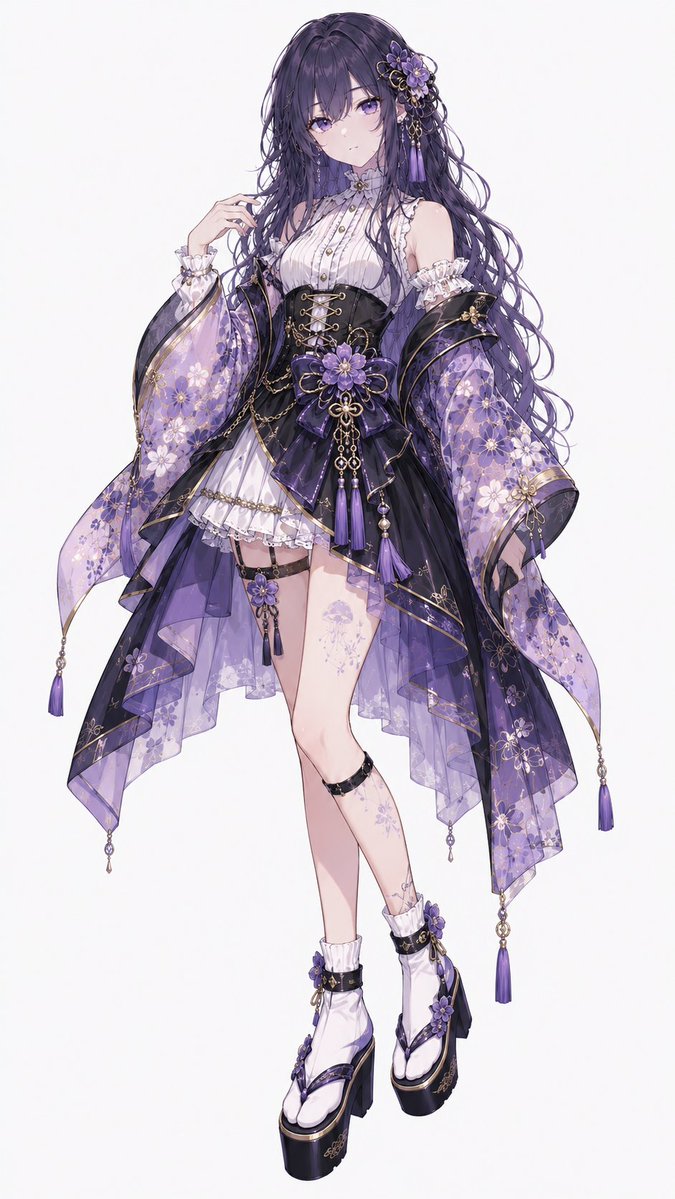
Generates a full-body anime fashion illustration of an ornate purple floral kimono-corset idol outfit for character design or costume concept art. (free to use) — Free AI image template on PicX Studio.
Create a full-body anime character fashion illustration of {argument name="character name" default="a young woman"} wearing a glamorous floral Japanese-modern idol dress in a refined purple, black, white, and gold palette. The character stands on a clean white background in a graceful three-quarter pose, one hand lifted near the face, long wavy {argument name="hair color" default="deep violet"} hair flowing down past the waist. Keep the face hidden by a soft square blur or blank censor block, while preserving the elegant silhouette and hairstyle. Outfit: combine a kimono-inspired floral robe with a corset and layered idol skirt. Use exactly 9 main outfit components: 1 white high-neck sleeveless blouse with vertical pleats, frills, and small gold buttons; 1 black underbust corset with gold eyelet lacing; 1 short white ruffled inner skirt; 1 layered sheer asymmetrical overskirt in smoky violet and black organza; 1 pair of detached wide kimono sleeves made of translucent purple floral fabric; 1 black-and-purple obi-style waist bow with a large purple flower centerpiece; 1 black thigh garter with dangling floral charm; 1 pair of white ankle boots; and 1 set of black platform geta-style soles integrated into the boots. Visible accessories and ornaments: include exactly 2 large detached sleeves, each decorated with pale cherry-blossom and chrysanthemum patterns, gold edging, and dangling purple tassels. Add exactly 4 long purple tassels hanging from the robe corners and waist area, exactly 2 smaller tassels on the boots, and multiple fine gold chains draped from the corset and waist. Place 1 ornate floral hair ornament on the right side of the head with purple flowers, gold filigree, beads, and hanging purple tassels. Add delicate pale purple floral tattoo-like motifs on one thigh and one lower leg. Style: highly detailed Japanese anime illustration, delicate line art, soft watercolor-like shading, elegant idol costume design sheet quality, translucent fabrics, ornate gold trim, floral embroidery, layered fabric depth, glossy black platform soles, subtle highlights, clean white studio background, no text, no watermark. Emphasize {argument name="motif flower" default="purple chrysanthemum and cherry blossom"} patterns and a luxurious {argument name="accent color" default="gold"} trim throughout.
Use Purple Floral Wa-Modern Idol Dress to plan an AI image around gpt-image-2 generation, themes such as en and gpt-image-2. Match the preview's composition first, then personalize the subject, setting, and mood for your own project.
Use the primary action to load the template settings in PicX Studio.
Adjust the subject and creative details for your destination.
Create the image, compare the result with the preview, and refine one variable at a time.
A continuous mix — similar concepts first, woven with same-model prompts and fresh picks from the catalog.
Choose the primary action to open PicX Studio with the available template settings. Review the model and format, personalize the creative direction, and generate when ready.
Yes. You can change the subject, setting, lighting, mood, format, and available model controls before creating your image.
This template is free to open and customize. Generation usage is shown in PicX Studio before you create.
Start with gpt-image-2, which is the model associated with this template. You can compare another compatible model for a different finish.
Follow a topic to a crawlable collection of related PicX Studio templates.
39,157 public templates available. Verified via the PicX Studio public templates API; refreshed hourly.
A continuous mix — similar concepts first, woven with same-model prompts and fresh picks from the catalog.