
Japanese Eco-Community Promo Poster
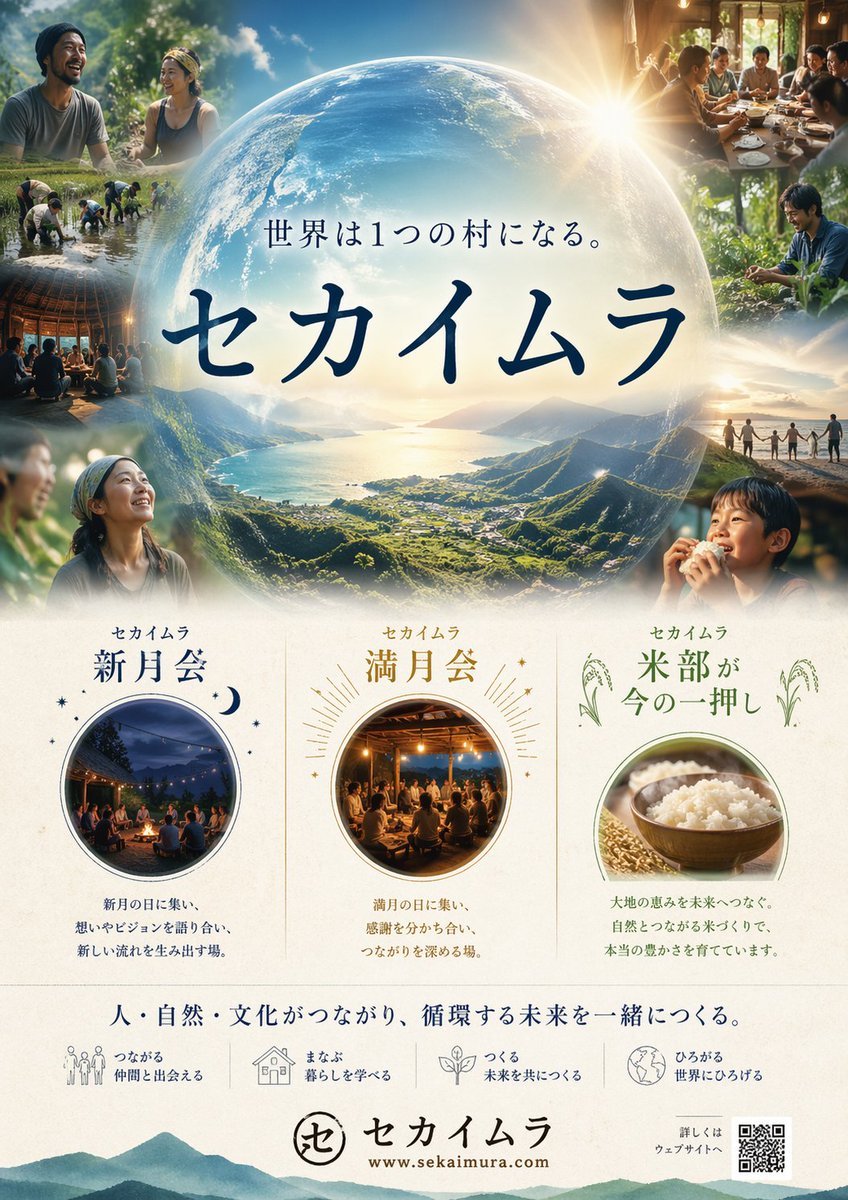
This prompt generates a polished Japanese-style promotional poster for a sustainability or community project, suitable for flyers, campaign visuals, and nonprofit branding.
- Prompt included
- Model and format preset
- Free template
The prompt behind this image
Copy the exact prompt behind Japanese Eco-Community Promo Poster, or open it in the studio and make it yours.
A polished Japanese promotional poster for a community and sustainability project called {argument name="project name" default="セカイムラ"}, designed like a premium eco-lifestyle campaign flyer. Vertical layout, clean and elegant, with a soft cream paper background and a luminous, aspirational mood. The top half is dominated by a giant translucent globe centered in the composition, glowing with warm sunrise light from the upper right. Inside the globe is a breathtaking aerial landscape of a green mountain valley opening to a calm blue bay or lake, with tiny villages and fields below, cinematic and utopian. Over the globe, place a smaller Japanese slogan line reading {argument name="tagline text" default="世界は1つの村になる。"} and beneath it the large main title in bold dark navy Japanese calligraphic lettering: {argument name="main title text" default="セカイムラ"}. Around the globe, create a collage of exactly 8 candid lifestyle photos fading into the edges: 1) top left, two people in conversation outdoors under trees; 2) upper left-mid, several people working together in a rice paddy; 3) left middle, a circle gathering inside a rustic wooden structure at night; 4) lower left, two portrait-style figures in nature; 5) top right, a group sharing a meal at a long table in warm indoor light; 6) right middle, a person tending plants or crops; 7) right lower-mid, a line of people holding hands on a ridge at sunset; 8) lower right, a close portrait of a person eating or holding food. The photographic style should feel human, communal, slightly idealized, with soft depth of field, natural skin tones, golden-hour highlights, and smooth ad-poster compositing. The bottom half contains 3 evenly spaced feature cards on a light cream background, separated by subtle vertical dividers. Card 1 on the left has the heading "セカイムラ 新月会" in dark blue, a circular photo of a nighttime campfire circle, and a short block of Japanese descriptive text below. Card 2 in the center has the heading "セカイムラ 満月会" in warm gold, a circular photo of an indoor evening gathering under string lights, decorative radiating sunburst lines around the circle, and a short block of Japanese descriptive text below. Card 3 on the right has the heading "セカイムラ 米部が今の一押し" in green, small rice plant illustrations near the title, a circular photo of a wooden bowl of white rice, and a short block of Japanese descriptive text below. Under these cards, add a centered Japanese statement line in dark blue: {argument name="footer slogan" default="人・自然・文化がつながり、循環する未来を一緒につくる。"}. Beneath that, place 4 small icon-and-text items in a horizontal row, each with a simple thin-line icon and two-line Japanese label: 1) people icon with "つながる 仲間と出会える"; 2) house icon with "まなぶ 暮らしを学べる"; 3) sprout icon with "つくる 未来を共につくる"; 4) globe icon with "ひろがる 世界にひろげる". At the very bottom center, include a circular logo mark followed by the project name in Japanese, and underneath a website URL: {argument name="website URL" default="www.sekaimura.com"}. Add a small QR code at the bottom right with tiny Japanese text indicating details are on the website. Use a refined palette of deep navy, forest green, gold, cream, and sky blue. Overall style: high-end Japanese nonprofit poster, eco-community branding, inspirational, harmonious, photoreal collage with subtle graphic design elements, balanced typography, soft glows, and magazine-quality print finish.
How to use Japanese Eco-Community Promo Poster in 3 steps
- 1Upload ImagePNG, JPG or paste
Add your photo
Upload the photo the template builds on. The prompt, model and format are already set.
- 2…a portrait of your subject in softgolden-hour light, 85mm…
Personalize
Edit the subject and creative details for your destination.
- 3Generate
Generate
Press Generate — your image is created in PicX Studio, so you can compare it with the original and refine one variable at a time.
More like this
Templates with the same subject, style or setup. Open one to see its prompt.

Trendy Cafe Drink Promo Poster

Gpt2 Youtube Thumbnail Anime Music Bootcamp Promo Poster
Japanese Inventory App Promo Poster

Minecraft Japanese Research Lab Exploration

Japan Travel Brochure Poster
Excel VBA Community Promo Banner

Cartoon TV Show Poster Pack

Urban Fashion Editorial Collage Streetwear Poster

Japanese Architectural Concrete Studio Fashion Campaign

Premium Fashion Editorial Cover Layout System

Polo Ralph Lauren Luxury American Heritage Fashion Campaign

Monochrome Halftone Editorial Fashion Poster
Make it yours
Japanese Eco-Community Promo Poster works as-is. These are the safest ways to change it without losing the look.
Change one field
Copy a single group, rewrite it, and generate again so you can see what that field is doing.
Keep the frame, change the subject
Hold the composition and light of Japanese Eco-Community Promo Poster, then swap wardrobe, props or the person for a new take.
| If the result… | Why | Fix |
|---|---|---|
| The result drifts from the preview | Too many fields changed at once. | Reuse Japanese Eco-Community Promo Poster as-is first, then change one group — subject, light, or setting. |
| The model over-stylizes the scene | The prose prompt leaves finish and camera underspecified. | Add one camera or lighting sentence and stay on GPT Image 2. |
More GPT Image 2 templates
Other prompts made for GPT Image 2.

Six VTuber Japanese Logo Sheet

Realistic Portrait of Woman and Deer

The Vista Modular Condo Poster

AI Model Routing Comparison Infographic

2.5D Anime Art Board

Isometric Productivity Desk Scene

New York Double Exposure Poster

Four-Panel AI Landscape Comparison

Japanese Tatami Lifestyle Magazine Cover

NESCAFÉ Coffee Map Poster
More image prompts
Fresh picks from across the catalog.
Concrete Wall with ASR Map Cracking

Beach Selfie Portrait
Panel Portrait Abstraction Study

Fantasy GPT Image Skills Banner
Korean-Inspired Avatar Pandora Floating Mountain Landscape

Retro Robot Powering Illo with Codex

Cosmic Ink Dragon Roar

Kaiju Kitten Destroying Sydney Waterfront

Fantasy Tide Priestess Character Sheet
Lava Stone Texture Cube
Browse template categories
Japanese Eco-Community Promo Poster questions
How do I use the Japanese Eco-Community Promo Poster template?
Add your photo if the template asks for one, edit the prompt if you like — the template's model and format are already selected — and press Generate. Your version opens in PicX Studio.
Can I customize the Japanese Eco-Community Promo Poster template?
Yes. You can change the subject, setting, lighting, mood, format, and available model controls before creating your image.
Is the Japanese Eco-Community Promo Poster template free?
Opening and editing this template is free. Generating uses credits, shown on the Generate button when you are signed in.
Which AI model should I use?
Start with GPT Image 2, which is the model associated with this template. You can compare another compatible model for a different finish.
Looking for something else? Browse all templates.

Your photo, any look
Thousands of ready templates for every top image and video model, from one credit balance.