How do I use the Cinematic Silver Night Street Fashion template?
Choose the primary action to open PicX Studio with the available template settings. Review the model and format, personalize the creative direction, and generate when ready.
A detailed fashion portrait prompt set in a European street at night, featuring a subject in a liquid silver dress with dramatic lighting. Change the subject, setting, or lighting one variable at a time.
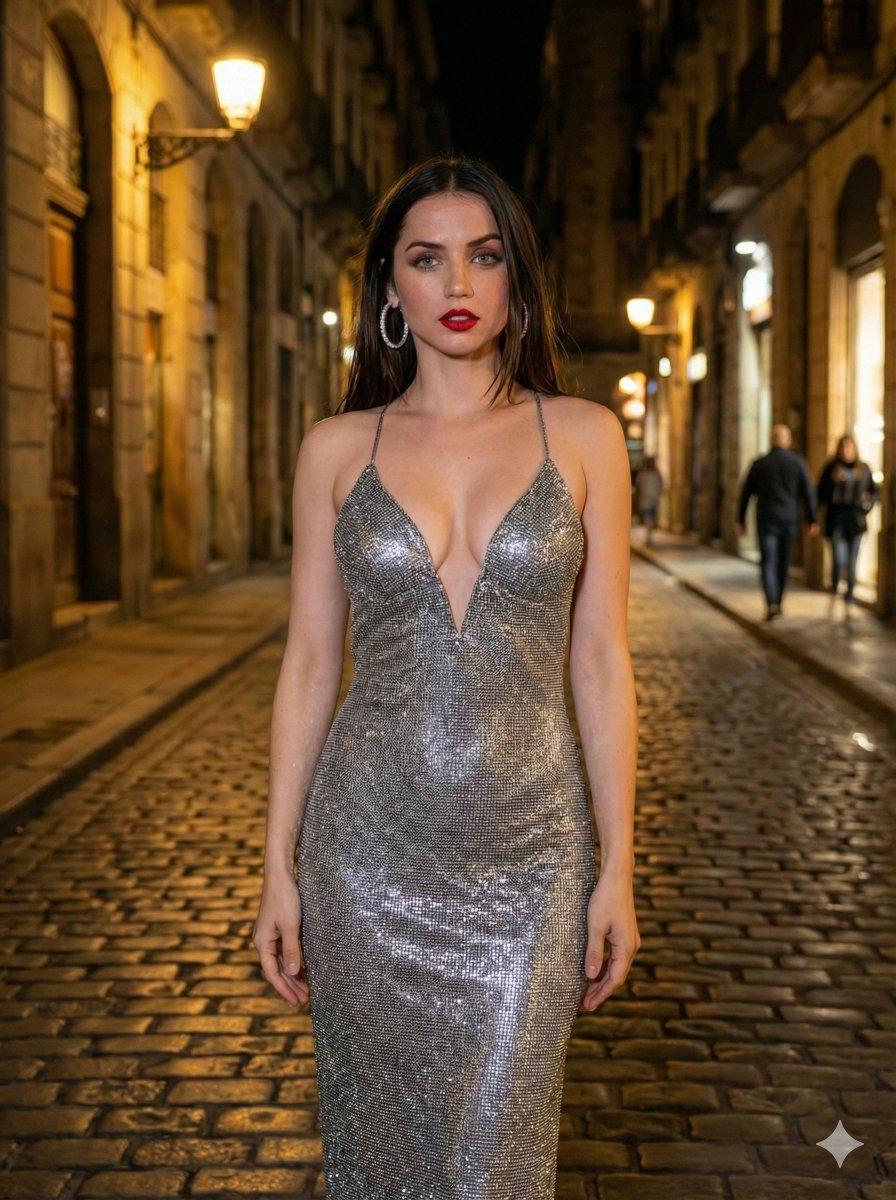
Create a photorealistic cinematic fashion portrait in a 3:4 vertical frame, ultra high definition, using {argument name="identity" default="Ana de Armas"} as the visual identity reference. Preserve her recognizable facial structure, deep hazel-green eyes, natural pore detail, soft skin sheen, dark chocolate-brown long loose waves, and an alluring mysterious expression as she looks back over her shoulder. Style the subject with {argument name="makeup" default="classic matte red lipstick"}, sharp eye focus, silky voluminous hair cascading down her back, and a curvy hourglass silhouette. She wears a {argument name="outfit" default="floor-length metallic silver bodycon maxi dress"} with a liquid-metal shine, second-skin fit, dramatic open back, thin criss-cross lace-up straps, and a deep thigh-high side slit. Add oversized sparkling crystal hoop earrings and partially visible strappy silver heels. Set the scene on a luxurious old European street at night, with Baroque architecture, cobblestone pavement, vintage facades, blurred city lights, and romantic nightlife atmosphere. Use warm golden street lamps as the key light, soft city glow as ambient fill, and rim lighting along her hair, shoulder, and jawline. Keep the background shallow-depth-of-field with cinematic bokeh and historic buildings falling into shadow. Color palette: reflective silver, warm gold, deep midnight blue, and crimson red. Shoot it like a fashion editorial glamour campaign on an 85mm portrait lens at f/1.8, ISO 400, 1/125 shutter, with sharp focus on the eyes, cinematic contrast, ray-traced reflections, glossy fabric highlights, and premium 8K realism.
Choose the primary action to open PicX Studio with the available template settings. Review the model and format, personalize the creative direction, and generate when ready.
Yes. You can change the subject, setting, lighting, mood, format, and available model controls before creating your image.
This template is free to open and customize. Generation usage is shown in PicX Studio before you create.
Start with GPT Image 2, which is the model associated with this template. You can compare another compatible model for a different finish.
© 2026 PicX Studio. All rights reserved.

Follow a topic to a crawlable collection of related PicX Studio templates.
43,474 public templates available. Verified via the PicX Studio public templates API; refreshed hourly.













![Minimalist Flat Vector Travel Poster — Premium minimalist flat-vector travel poster for {argument name="city name" default="[CITY_NAME]"}, 3:4 vertical format.](https://cms-assets.youmind.com/media/1787917359711_3ug846_HQX205cbMAA6F6S-300x400.jpg)