How do I use the Dunhuang Dance Sequence Poster template?
Choose the primary action to open PicX Studio with the available template settings. Review the model and format, personalize the creative direction, and generate when ready.
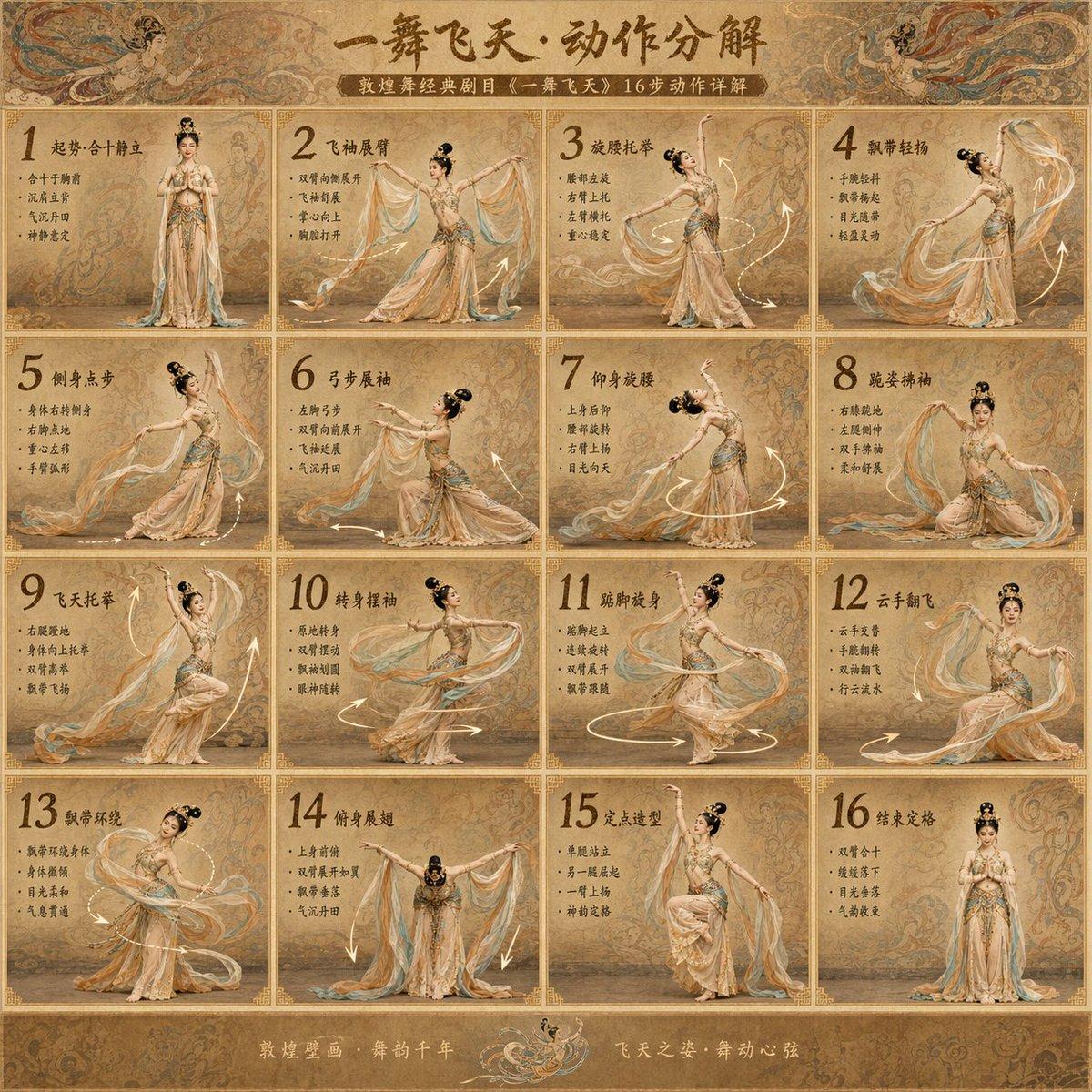
A high-quality 16-grid poster prompt for the classical 'Flying to Heaven' Dunhuang dance, featuring a traditional mural aesthetic and professional choreography breakdown. (free to use) — Free AI image template on PicX Studio.
古典美女 敦煌舞《一舞飞天》动作分解海报 生成一张高完成度的「16宫格{argument name="主题" default="敦煌舞《一舞飞天》"}动作分解海报」,核心要求: - 画面为 4×4 的16宫格排版,每一格对应一个连续舞蹈动作步骤,编号 1-16,贴合敦煌舞《一舞飞天》原版编舞逻辑。 - 整体不是普通教学图,而是带有敦煌壁画氛围感、古典雅致感和视觉冲击力的舞蹈动作分镜海报,兼具古典美学与专业质感。 - 舞者为{argument name="人物形象" default="古典气质美女"}形象(眉眼温婉、身形纤细舒展、气质清雅灵动),全程保持同一人物,复刻《一舞飞天》经典舞姿神态,不要替换人物。 - 风格为敦煌舞,贴合《一舞飞天》原版编舞,动作兼具柔美舒展、轻盈飘逸与力量感,融入敦煌飞天的“飘带灵动、体态舒展、神情温婉”特质,还原经典托举、旋腰、飞袖等动作。 - 服装为{argument name="服装风格" default="敦煌飞天经典形制"},以裸色、浅驼色为基底,点缀金色、石青色纹样(祥云、卷草、飞天图案),面料轻盈飘逸(纱质为主),搭配古典头饰、飘带,整体雅致高级,贴合敦煌壁画美学,还原《一舞飞天》原版舞服精髓。 - 背景为敦煌壁画风格,浅土黄、赭石色基调,融入壁画纹理、祥云、飞天剪影等元素,点缀柔和暖光,营造古朴空灵的氛围,不杂乱,突出舞者主体与动作细节。 - 每一格都要有:大号步骤编号、中文动作标题(贴合敦煌舞术语)、简洁中文要点说明(标注动作核心发力点、体态要求)、动作方向箭头/轨迹线(标注飘带运动轨迹、身体转动方向)。 - 箭头和排版要清晰,像专业古典舞蹈动作说明板,飘带轨迹线柔和流畅,贴合动作韵律。 - 动作顺序要有连贯感,贴合敦煌舞《一舞飞天》原版编舞流程,包含:起势(合十静立)、飞袖展臂、旋腰托举、飘带轻扬、侧身点步、弓步展袖、仰身旋腰、跪姿拂袖、飞天托举、转身摆袖、踮脚旋身、云手翻飞、飘带环绕、俯身展翅、定点造型、结束定格(还原原版收尾姿态)。 - 每个动作要明显不同,精准复刻《一舞飞天》核心动作,不做轻微姿势调整;要像一整段完整编舞被拆解成16步,还原古典敦煌舞的舞蹈韵律与体态细节。 - 画面整体精致、统一、雅致,兼具“敦煌舞教程感 + 古典海报感 + 原版编舞还原感”,贴合古典美女的舞蹈气质与敦煌美学。 版式要求: - 16宫格整齐分布,边框采用浅金色细边框,贴合敦煌古典质感 - 字体简洁雅致,中文清晰可读,标题采用古典书法字体(适配敦煌风格),要点说明采用清晰宋体,颜色与背景、服装协调 - 每格人物全身清楚可见,飘带、手部、脚部动作完整,不裁剪,重点突出动作细节与飘带灵动性 - 同一人物(古典气质美女形象)、同一套敦煌舞服、同一系列敦煌壁画风格,整体色调统一、质感高级 整体效果参考:敦煌壁画风、雅致空灵、古典美女舞姿、《一舞飞天》编舞、古典舞蹈分镜说明海报。
Use Dunhuang Dance Sequence Poster to plan an AI image around gpt-image-2 generation, themes such as zh and gpt-image-2. Match the preview's composition first, then personalize the subject, setting, and mood for your own project.
Use the primary action to load the template settings in PicX Studio.
Adjust the subject and creative details for your destination.
Create the image, compare the result with the preview, and refine one variable at a time.
A continuous mix — similar concepts first, woven with same-model prompts and fresh picks from the catalog.
Choose the primary action to open PicX Studio with the available template settings. Review the model and format, personalize the creative direction, and generate when ready.
Yes. You can change the subject, setting, lighting, mood, format, and available model controls before creating your image.
This template is free to open and customize. Generation usage is shown in PicX Studio before you create.
Start with gpt-image-2, which is the model associated with this template. You can compare another compatible model for a different finish.
A continuous mix — similar concepts first, woven with same-model prompts and fresh picks from the catalog.
Follow a topic to a crawlable collection of related PicX Studio templates.
36,410 public templates available. Verified via the PicX Studio public templates API; refreshed hourly.