
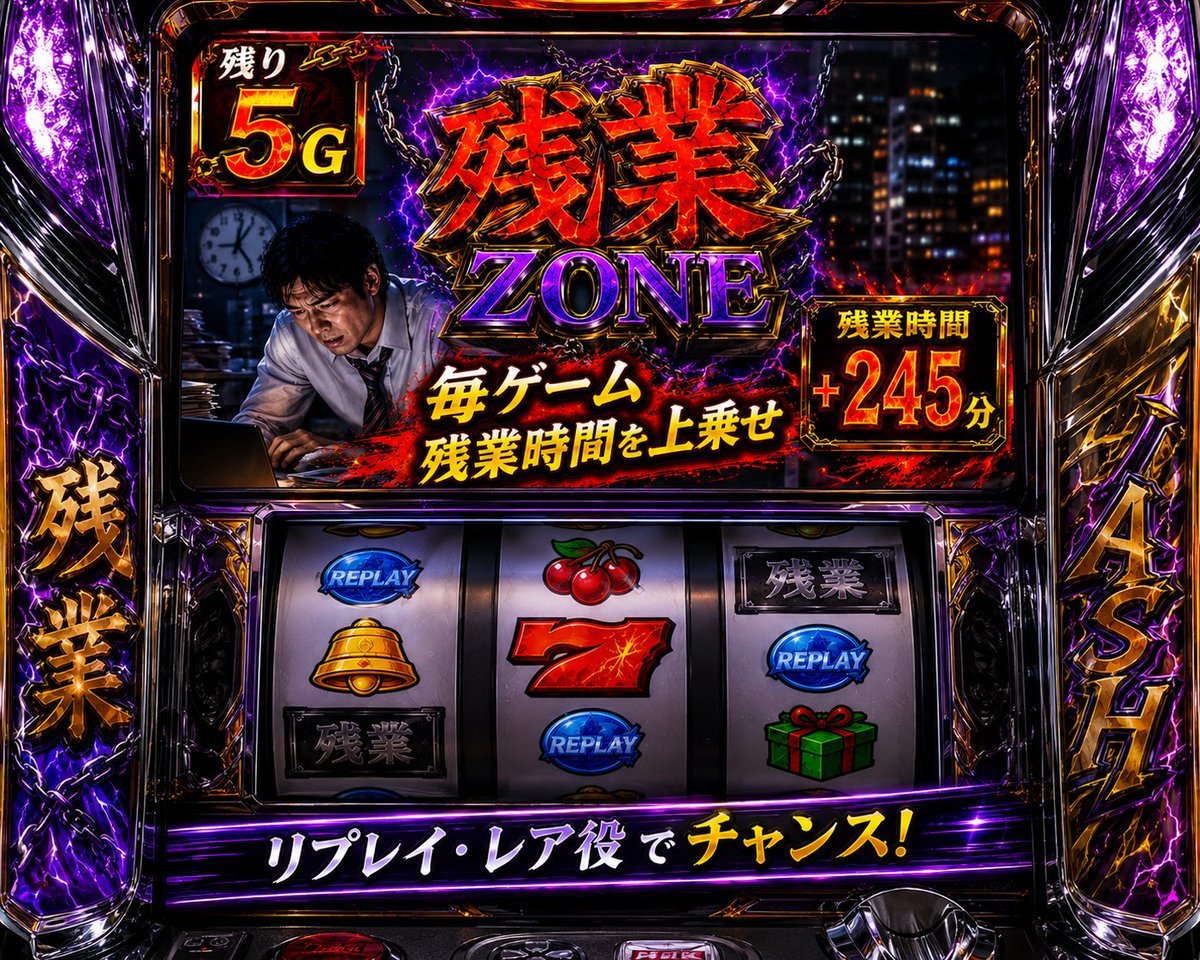
Overtime Zone Pachislot Machine
A detailed prompt for generating a neon Japanese pachislot cabinet themed around overtime work, useful for arcade parody visuals or game UI concepts.
- Prompt included
- Model and format preset
- Premium template
The prompt behind this image
Copy the exact prompt behind Overtime Zone Pachislot Machine, or open it in the studio and make it yours.
Goal: Create a hyper-detailed photorealistic Japanese pachislot machine screen themed around overtime work, rendered like a high-energy casino arcade cabinet with glossy chrome, black glass, purple lightning, red flames, gold trim, and dramatic glowing typography. Canvas: 4:3 horizontal image, front-facing view of the machine, filling the frame edge to edge. Use a dark arcade environment with reflections, neon highlights, and intense contrast. No people outside the screen; the only human figure appears inside the top display. Main top display: Show a dramatic game bonus screen with a tired Japanese office worker in a white shirt and tie leaning over a laptop at night, face intentionally blurred, with a city office window background and a wall clock behind him. The central headline must be huge metallic Japanese text 「残業」 with a purple English subtitle “ZONE” underneath, surrounded by chains, purple electricity, sparks, and smoky red-black effects. Add the slogan 「毎ゲーム 残業時間を上乗せ」 in bold white and yellow Japanese text across the lower center of the top display. In the upper-left corner, add a framed counter reading 「残り」 above a large “5G”. On the right, add a framed red-and-gold bonus time panel reading 「残業時間 +245分」. Make all text look embossed, fiery, glossy, and arcade-like. Machine frame and side decorations: Build a luxurious pachislot cabinet frame with transparent molded plastic, chrome edges, gold ornamental accents, black lacquer, and bright purple LED lightning. Add exactly 2 large vertical side title panels: the left panel reads 「残業」 in gold Japanese characters, and the right panel reads 「4スロ」 in gold characters. Include purple lightning effects behind both side panels. Reel section: Include exactly 3 vertical slot reels in the middle-lower area, each showing exactly 3 visible symbols for a total of 9 visible reel symbols. Left reel symbols from top to bottom: blue “REPLAY” emblem, golden bell, black plaque with 「残業」. Middle reel symbols from top to bottom: red cherries, red number 7, blue “REPLAY” emblem. Right reel symbols from top to bottom: black plaque with 「残業」, blue “REPLAY” emblem, green gift box with red ribbon. Reels should be glossy, slightly reflective, and sharply lit. Bottom banner: Add a glowing purple-black banner below the reels with large Japanese text 「リプレイ・レア役でチャンス!」, with the final word 「チャンス!」 in bright yellow and the preceding text in white. Add small chrome buttons and machine hardware barely visible at the very bottom edge. Visual style: Ultra-realistic pachislot photography mixed with exaggerated game UI art, intense neon purple and red palette, gold beveled type, lightning bolts, sparks, chains, reflections, and high dynamic range arcade lighting. Make it look like a real premium Japanese slot machine cabinet photographed straight on. Customizable details: The main Japanese title is {argument name="main Japanese title" default="残業"}; the English subtitle is {argument name="English subtitle" default="ZONE"}; the remaining game count is {argument name="remaining game count" default="5G"}; the bonus time value is {argument name="bonus time value" default="+245分"}; the bottom banner text is {argument name="bottom banner text" default="リプレイ・レア役でチャンス!"}. Constraints: Keep the exact visible count of 3 reels, 9 reel symbols, 2 side title panels, 1 top-left counter, 1 right bonus-time panel, and 1 bottom banner. Preserve the Japanese text accurately. Do not add extra logos, watermarks, subtitles, or additional characters.
How to use Overtime Zone Pachislot Machine in 3 steps
- 1Upload ImagePNG, JPG or paste
Add your photo
Upload the photo the template builds on. The prompt, model and format are already set.
- 2…a portrait of your subject in softgolden-hour light, 85mm…
Personalize
Edit the subject and creative details for your destination.
- 3Generate
Generate
Press Generate — your image is created in PicX Studio, so you can compare it with the original and refine one variable at a time.
More like this
Templates with the same subject, style or setup. Open one to see its prompt.
Starry Night Overtime City
Tactical Duo in Burning War Zone
Empty Japanese Pachislot Parlor Row
NEONVEIL AR Photo Zone
Pepsi Vending Machine Ad
Anime Girl at Claw Machine
Vending Machine Alley at Night
Neo Goku in the Machine City
Technical Vehicle with Machine Gun
Knitted Yarn Space Machine
Sci-Fi Coffee Machine Boss Battle
Gumball Machine Chrome
Make it yours
Overtime Zone Pachislot Machine works as-is. These are the safest ways to change it without losing the look.
Change one field
Copy a single group, rewrite it, and generate again so you can see what that field is doing.
Keep the frame, change the subject
Hold the composition and light of Overtime Zone Pachislot Machine, then swap wardrobe, props or the person for a new take.
| If the result… | Why | Fix |
|---|---|---|
| The result drifts from the preview | Too many fields changed at once. | Reuse Overtime Zone Pachislot Machine as-is first, then change one group — subject, light, or setting. |
| The model over-stylizes the scene | The prose prompt leaves finish and camera underspecified. | Add one camera or lighting sentence and stay on GPT Image 2. |
More GPT Image 2 templates
Other prompts made for GPT Image 2.

Six VTuber Japanese Logo Sheet

Realistic Portrait of Woman and Deer

The Vista Modular Condo Poster

AI Model Routing Comparison Infographic

2.5D Anime Art Board

Isometric Productivity Desk Scene

New York Double Exposure Poster

Four-Panel AI Landscape Comparison

Japanese Tatami Lifestyle Magazine Cover

NESCAFÉ Coffee Map Poster
More image prompts
Fresh picks from across the catalog.
Nano Banana Pro Candid Escalator
Cyberpunk Elf Android Reference Sheet
Black and White Documentary Couple in Rain (Image-to-Image)
Pop-Art Urban Photography Fusion

Hyper-Realistic Surreal High Fashion Editorial
Mumbai Rainy Street Photography
Elf Girl Thank-You Sticker Sheet
Luxury Macro Commercial Render of a Velvet Red Rose
Realistic Cinematic Fashion Portrait
Sci-Fi Western Lunar Rider
Browse template categories
Overtime Zone Pachislot Machine questions
How do I use the Overtime Zone Pachislot Machine template?
Add your photo if the template asks for one, edit the prompt if you like — the template's model and format are already selected — and press Generate. Your version opens in PicX Studio.
Can I customize the Overtime Zone Pachislot Machine template?
Yes. You can change the subject, setting, lighting, mood, format, and available model controls before creating your image.
Is the Overtime Zone Pachislot Machine template free?
Opening and editing this template is free. Generating uses credits, shown on the Generate button when you are signed in.
Which AI model should I use?
Start with GPT Image 2, which is the model associated with this template. You can compare another compatible model for a different finish.
Looking for something else? Browse all templates.

Your photo, any look
Thousands of ready templates for every top image and video model, from one credit balance.