How do I use the Kimono Figure with Blue Umbrella template?
Edit the prompt in the box under the preview — the template's model and format are already selected — and press Generate. Your version appears right on this page.
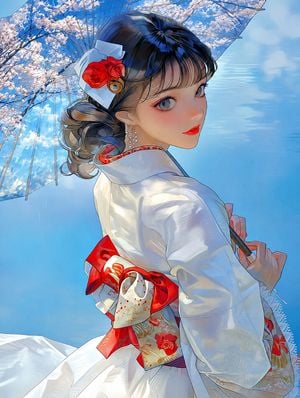
A cinematic anime fantasy scene of a kimono-clad figure holding a blue umbrella on reflective water at sunset, ideal for illustration contest artwork.

This template uses your photo — add one with the + button.
Create a highly detailed vertical anime-style illustration of {argument name="character name" default="a young Japanese man"} standing on a perfectly reflective shallow water surface at sunset, viewed from a low angle with a vast dramatic sky filling most of the frame. He wears an elegant {argument name="kimono color" default="white"} kimono with subtle silver floral embroidery near the hem and sleeves, a vivid red patterned obi sash with tassels hanging at his back, white tabi socks, and traditional wooden geta sandals. His short dark hair is swept by the wind, and his face is softly indistinct and unfeatured, turned downward in a calm contemplative pose. He holds a large traditional Japanese paper umbrella, {argument name="umbrella color" default="deep blue"}, by a long black handle; the umbrella is open but tilted downward so its rim touches the mirrorlike water, creating a clear reflection. Include exactly 1 person, exactly 1 open umbrella, exactly 1 red obi sash, exactly 2 tassel ornaments, and exactly 2 geta sandals, all mirrored below in the water. The background is an expansive luminous blue sky with scattered glowing clouds, golden sun rays bursting from the low horizon on the left, distant mountains and a thin lake horizon line. Emphasize breathtaking reflections of the sky, sun, figure, kimono, and umbrella on the water, with crisp highlights and ripples only where the umbrella touches. Use vibrant saturated blues, warm golden backlight, cinematic composition, intricate fabric folds, delicate umbrella ribs, painterly anime fantasy realism, ultra-clean linework, high resolution, no text, no watermark, no border.
Create a highly detailed vertical anime-style illustration of {argument name="character name" default="a young Japanese man"} standing on a perfectly reflective shallow water surface at sunset, viewed from a low angle with a vast dramatic sky filling most of the frame. He wears an elegant {argument name="kimono color" default="white"} kimono with subtle silver floral embroidery near the hem and sleeves, a vivid red patterned obi sash with tassels hanging at his back, white tabi socks, and traditional wooden geta sandals. His short dark hair is swept by the wind, and his face is softly indistinct and unfeatured, turned downward in a calm contemplative pose. He holds a large traditional Japanese paper umbrella, {argument name="umbrella color" default="deep blue"}, by a long black handle; the umbrella is open but tilted downward so its rim touches the mirrorlike water, creating a clear reflection. Include exactly 1 person, exactly 1 open umbrella, exactly 1 red obi sash, exactly 2 tassel ornaments, and exactly 2 geta sandals, all mirrored below in the water. The background is an expansive luminous blue sky with scattered glowing clouds, golden sun rays bursting from the low horizon on the left, distant mountains and a thin lake horizon line. Emphasize breathtaking reflections of the sky, sun, figure, kimono, and umbrella on the water, with crisp highlights and ripples only where the umbrella touches. Use vibrant saturated blues, warm golden backlight, cinematic composition, intricate fabric folds, delicate umbrella ribs, painterly anime fantasy realism, ultra-clean linework, high resolution, no text, no watermark, no border.
Edit the prompt in the box under the preview — the template's model and format are already selected — and press Generate. Your version appears right on this page.
Yes. You can change the subject, setting, lighting, mood, format, and available model controls before creating your image.
Opening and editing this template is free. Generating uses credits, shown on the Generate button when you are signed in.
Start with GPT Image 2, which is the model associated with this template. You can compare another compatible model for a different finish.
Follow a topic to a crawlable collection of related PicX Studio templates.