How do I use the Full-Body Silver Anime Girl Design template?
Choose the primary action to open PicX Studio with the available template settings. Review the model and format, personalize the creative direction, and generate when ready.
A clean full-body anime character prompt for generating a centered front-view design sheet of a cute monochrome girl in a frilly dress. Change the subject, setting, or lighting one variable at a time.
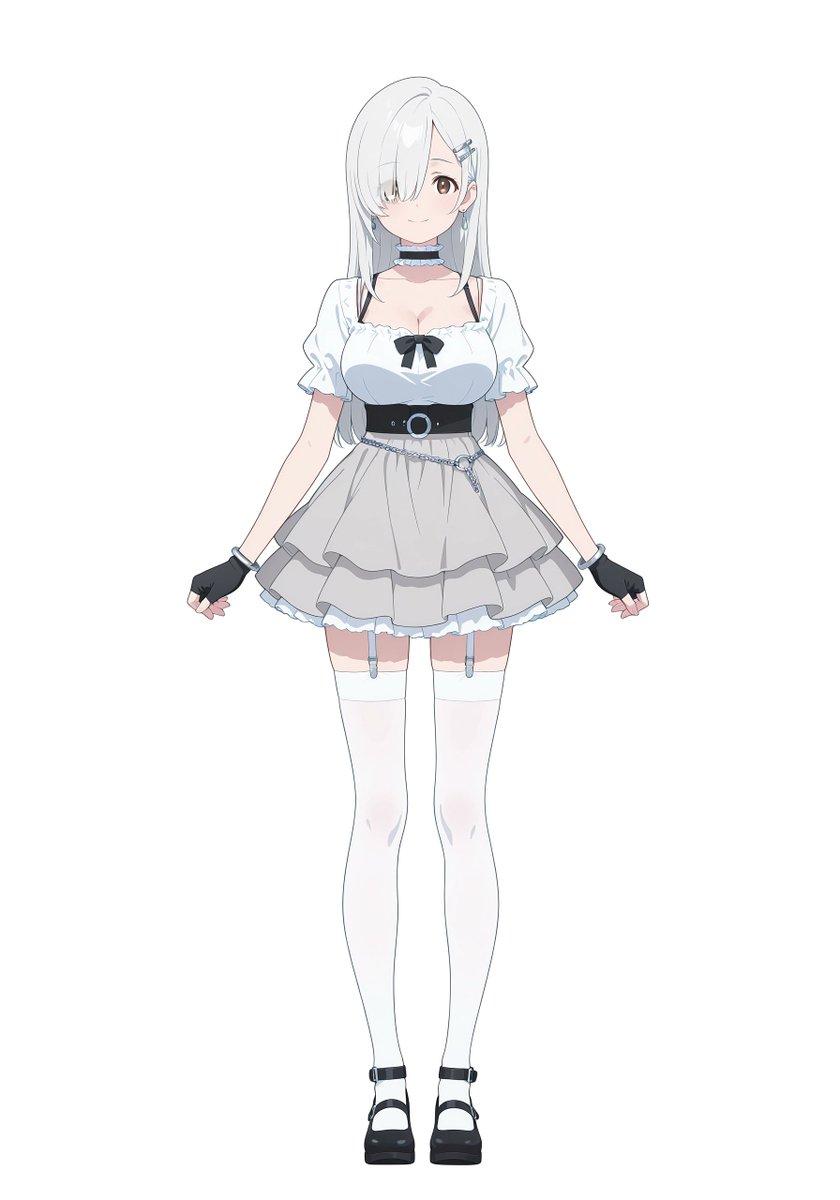
A full-body anime girl character design standing centered on a plain light gray background, facing forward in a neutral symmetrical pose with both arms slightly lowered and hands relaxed outward. She has a soft youthful face, fair skin, large warm brown eyes, and a gentle small smile. Her hair is {argument name="hair color" default="silver white"}, very long and straight, falling past her waist, with heavy side-swept bangs covering her right eye and 2 metallic hairpins clipped on the visible left side. She wears 1 dangling earring on each ear. Her outfit is a cute monochrome idol-inspired dress with subtle pale blue accents: a white short puff-sleeve blouse bodice with a ruffled square neckline and a small black ribbon bow at the center of the chest, a fitted black waist corset belt with a circular silver ring buckle, and a layered short skirt in light gray with ruffled trim and soft volume. Add a thin silver waist chain draped diagonally over the skirt. Around her neck is 1 black choker with a pale blue frill. She wears 2 black fingerless gloves with pale frilled cuffs, 2 white thigh-high stockings held by 2 visible garter straps, and 2 black Mary Jane platform shoes with ankle straps. Use clean cel-shaded anime linework, soft pastel tones, minimal shading, crisp design-sheet presentation, front character reference style, no props, no scenery, no text.
Choose the primary action to open PicX Studio with the available template settings. Review the model and format, personalize the creative direction, and generate when ready.
Yes. You can change the subject, setting, lighting, mood, format, and available model controls before creating your image.
This template is free to open and customize. Generation usage is shown in PicX Studio before you create.
Start with GPT Image 2, which is the model associated with this template. You can compare another compatible model for a different finish.
© 2026 PicX Studio. All rights reserved.

Follow a topic to a crawlable collection of related PicX Studio templates.
43,474 public templates available. Verified via the PicX Studio public templates API; refreshed hourly.


![A standing full-body near the edge of the frame, slightly to the left — A [person type] standing full-body near the edge of the frame, slightly to the left, in](https://images.meigen.ai/tweets/2002826415939682584/0.jpg)



![Ultra-realistic 8K full body portrait wearing a clean and pressed white — Ultra-realistic 8K full body portrait of [PERSON’S FULL NAME], wearing a clean and pre](https://images.meigen.ai/tweets/2011898760650170378/0.jpg)


![Miniature, full-body, isometric, ultra-realistic figurine wearing their — Miniature, full-body, isometric, ultra-realistic figurine of [CHARACTER], wearing thei](https://images.meigen.ai/tweets/2011074818524029242/0.jpg)
![Ultra-realistic 8K full body portrait wearing a clean and pressed white — Ultra-realistic 8K full body portrait of [PERSON’S FULL NAME], wearing a clean and pre](https://images.meigen.ai/tweets/2018389139826037141/0.jpg)


![Minimalist Flat Vector Travel Poster — Premium minimalist flat-vector travel poster for {argument name="city name" default="[CITY_NAME]"}, 3:4 vertical format.](https://cms-assets.youmind.com/media/1787917359711_3ug846_HQX205cbMAA6F6S-300x400.jpg)





























![2000s Indie Cartoon Illustration — Chaotic indie cartoon illustration of {argument name="characters" default="[HUMAN] and [ANTHROPOMORPHIC ANIMAL]"} inside {arg](https://cms-assets.youmind.com/media/1780130267195_00f70u_HJdp_WubkAA85Xg.jpg)