

How do I use the Goth Girl by City Window template?
Choose the primary action to open PicX Studio with the available template settings. Review the model and format, personalize the creative direction, and generate when ready.
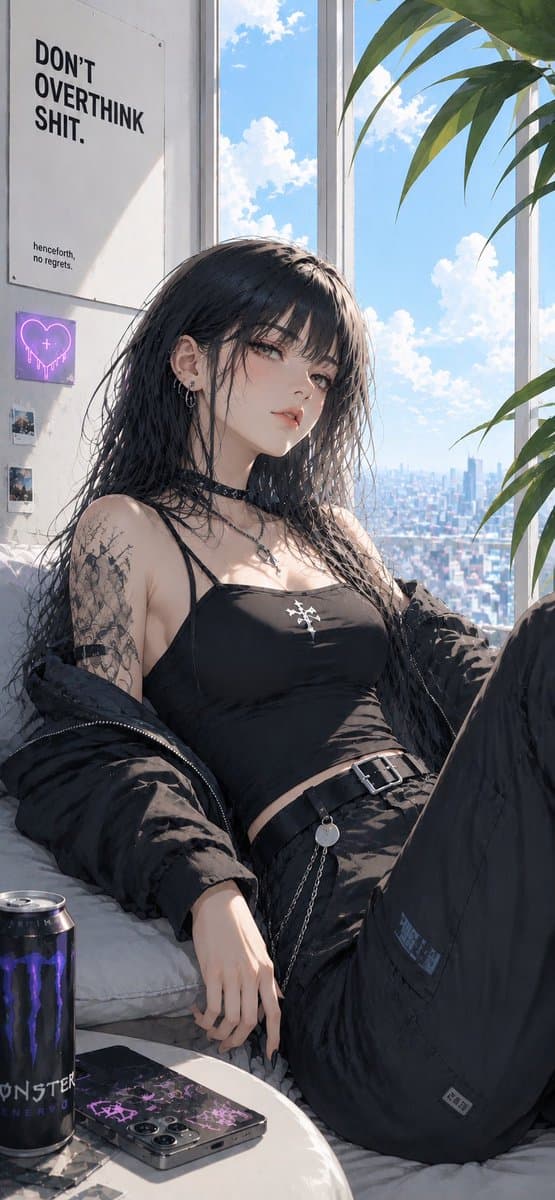
A vertical semi-realistic anime fashion portrait of an alt goth girl lounging in a sunlit high-rise apartment with urban decor. (free to use) — Free AI image template on PicX Studio.
Create a vertical 9:16 semi-realistic anime-style illustration of a goth/alt young woman lounging in a bright high-rise apartment by tall floor-to-ceiling windows, with a sunny blue sky, fluffy clouds, and a distant city skyline outside. The woman has {argument name="hair color" default="long wet-looking black hair"}, very detailed but not overly frizzy strands, pale skin, and her face intentionally covered by a soft rectangular blur/censor block. She wears a black crop camisole with a small white cross-like emblem, loose black cargo pants, a black belt with a silver buckle and dangling chain, a black choker with a small pendant, multiple ear piercings, black nail polish, and an oversized black puffer jacket slipping off her shoulders. Her pose is relaxed and slightly reclined on a white couch, one knee raised close to the camera, one hand resting near a small round table. Add a large intricate black tattoo sleeve on her visible upper arm. The room is sunlit with strong natural light, soft shadows, and crisp highlights. Include exactly 6 notable background/foreground objects: 1 large wall poster reading “DON’T OVERTHINK SHIT.” with tiny text below, 1 small pink-purple neon heart sign on the wall, 2 small square photo prints below the neon sign, 1 black Monster Energy can on the table, and 1 smartphone with a black-and-purple graphic case on the table. Add large green plant leaves entering from the upper right. Use a stylish Japanese digital-art look, high-detail fabric folds, glossy hair, clean linework, realistic lighting, and a cool urban bedroom atmosphere. Keep the composition cropped like a candid fashion portrait, no watermark, no extra characters, no extra text beyond the poster and tiny wall details.
Use Goth Girl by City Window to plan an AI image around gpt-image-2 generation, themes such as en and gpt-image-2. Match the preview's composition first, then personalize the subject, setting, and mood for your own project.
Use the primary action to load the template settings in PicX Studio.
Adjust the subject and creative details for your destination.
Create the image, compare the result with the preview, and refine one variable at a time.
A continuous mix — similar concepts first, woven with same-model prompts and fresh picks from the catalog.
Choose the primary action to open PicX Studio with the available template settings. Review the model and format, personalize the creative direction, and generate when ready.
Yes. You can change the subject, setting, lighting, mood, format, and available model controls before creating your image.
This template is free to open and customize. Generation usage is shown in PicX Studio before you create.
Start with gpt-image-2, which is the model associated with this template. You can compare another compatible model for a different finish.
A continuous mix — similar concepts first, woven with same-model prompts and fresh picks from the catalog.
Follow a topic to a crawlable collection of related PicX Studio templates.
36,410 public templates available. Verified via the PicX Studio public templates API; refreshed hourly.