How do I use the Cherry Blossom Garden Evening Portrait template?
Choose the primary action to open PicX Studio with the available template settings. Review the model and format, personalize the creative direction, and generate when ready.
This prompt generates a photorealistic fashion portrait of a woman in a backless satin dress standing in a Japanese cherry blossom courtyard, ideal for elegant spring-themed editorial imagery. Change the subject, setting, or lighting one variable at a time.
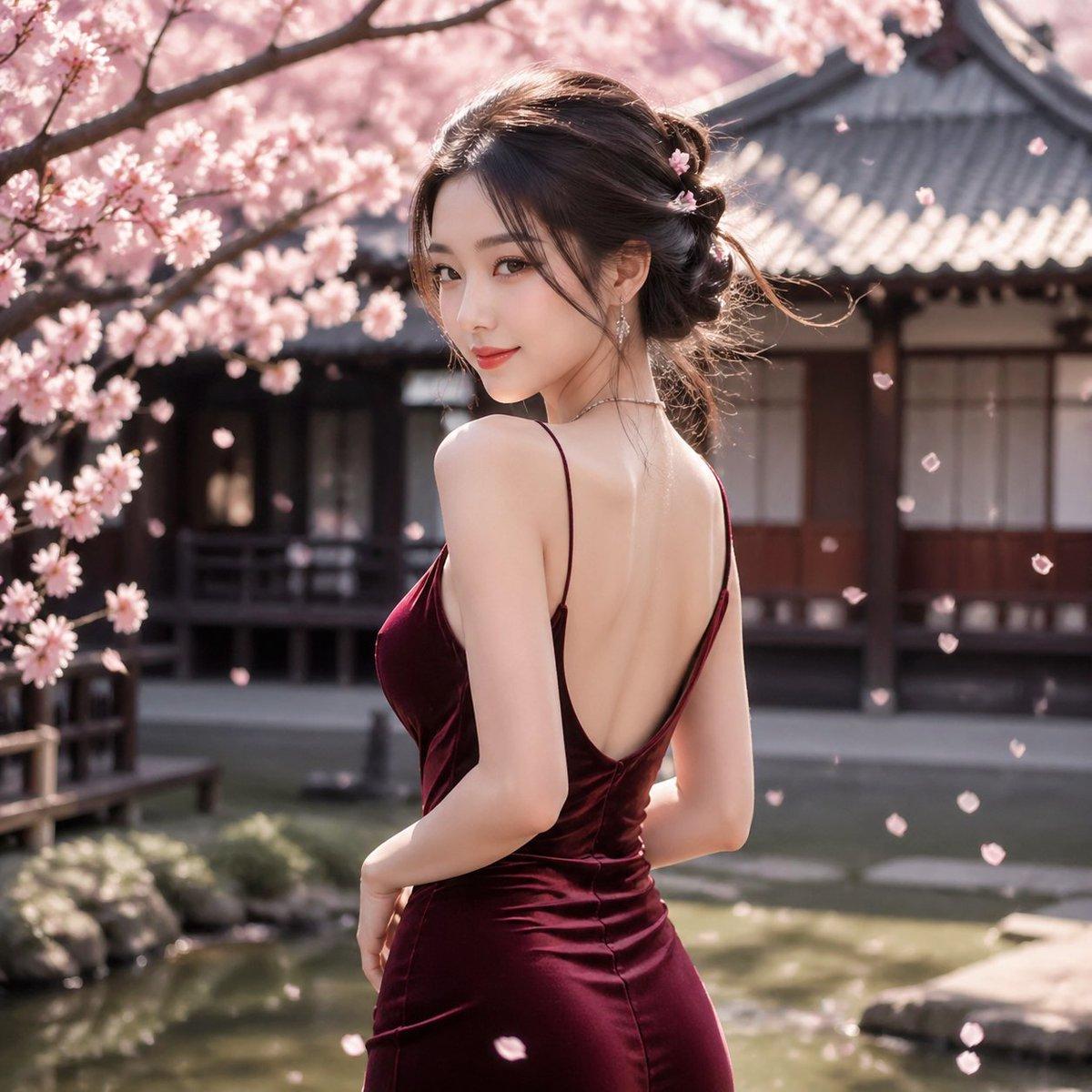
A photorealistic outdoor portrait of an elegant young East Asian woman standing in a traditional Japanese courtyard garden during cherry blossom season. She is shown from a three-quarter back view, turning slightly toward the camera, with her face mostly obscured by her angle. She wears a deep wine-red satin evening dress with thin spaghetti straps and a dramatic low open back, fitted closely through the waist and hips with soft reflective fabric highlights. Her hair is styled in a loose, romantic updo with a few wispy strands, decorated with 3 small pink blossom hair ornaments, and she wears delicate dangling earrings and a fine necklace. Surround her with blooming sakura branches heavy with pale pink flowers, with many individual petals drifting through the air. In the background, place a traditional Japanese wooden building with dark beams, shoji-style windows, and a gray tiled roof, softly blurred with shallow depth of field. Include a calm garden pond and stone edging in the lower background. Use warm spring sunlight, soft cinematic bokeh, high detail skin and fabric rendering, graceful posture, refined luxury fashion photography, natural colors, serene atmosphere, square composition.
Choose the primary action to open PicX Studio with the available template settings. Review the model and format, personalize the creative direction, and generate when ready.
Yes. You can change the subject, setting, lighting, mood, format, and available model controls before creating your image.
This template is free to open and customize. Generation usage is shown in PicX Studio before you create.
Start with GPT Image 2, which is the model associated with this template. You can compare another compatible model for a different finish.
© 2026 PicX Studio. All rights reserved.

Follow a topic to a crawlable collection of related PicX Studio templates.
43,474 public templates available. Verified via the PicX Studio public templates API; refreshed hourly.












![Minimalist Flat Vector Travel Poster — Premium minimalist flat-vector travel poster for {argument name="city name" default="[CITY_NAME]"}, 3:4 vertical format.](https://cms-assets.youmind.com/media/1787917359711_3ug846_HQX205cbMAA6F6S-300x400.jpg)























![Luxury Osechi (New Year's Food) Key Visual Generation Prompt — キャラクター名:[{argument name="character name" default="☆ここにキャラ名をセット☆"}]
広告・ポスター・宣材用キービジュアル生成プロンプト
0.](https://pbs.twimg.com/media/G9KxElubgAA3PWE.jpg)