
One Piece Manga Coloring Cover Page
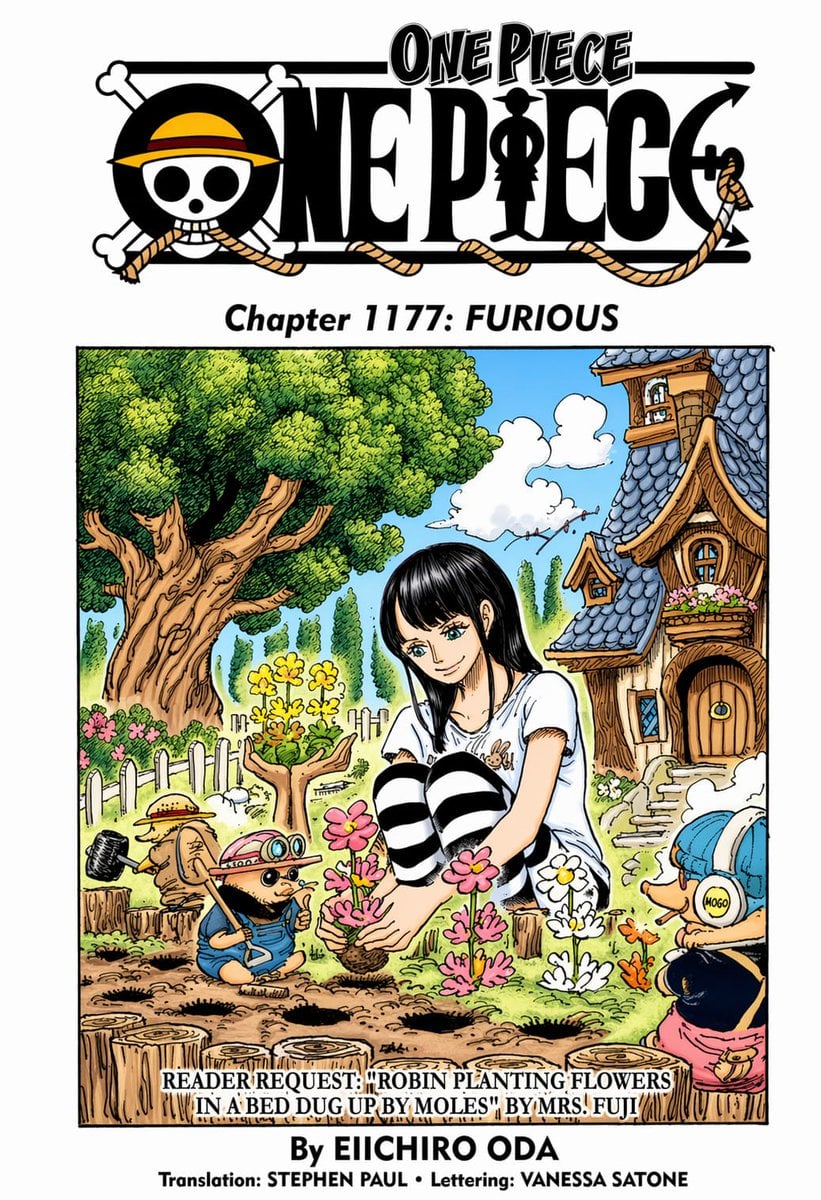
This prompt generates a colored manga-style One Piece chapter page with logo, chapter heading, credits, and a whimsical garden illustration centered on Robin planting flowers.
- Prompt included
- Model and format preset
- Free template
The prompt behind this image
Copy the exact prompt behind One Piece Manga Coloring Cover Page, or open it in the studio and make it yours.
A clean manga-coloring test page styled like an official One Piece chapter cover on a light gray background. At the very top, place the large black-and-white ONE PIECE logo with the skull wearing a yellow straw hat with a red band, integrated rope elements, and the silhouette inside the lettering. Centered beneath it, add the subtitle text {argument name="chapter title" default="Chapter 1177: FURIOUS"} in bold black serif italics. Below that, create one large rectangular full-color illustration framed by a thin black border. The scene shows Nico Robin, a young woman with long straight {argument name="hair color" default="black"} hair and pale skin, seated in a garden with her knees drawn up, planting flowers. Her face is obscured by a soft rectangular blur censor block. She wears a loose white short-sleeve shirt and black-and-white horizontal striped thigh-high socks, giving a casual, slightly playful look. Around her are 3 small One Piece characters helping or watching: on the left, Tony Tony Chopper in a straw hat and blue overalls holding a small shovel near freshly dug soil; in the right foreground, another small chibi-like Chopper figure wearing a blue cap with round yellow ear covers labeled “MOGO” and pink shorts, turned partly away; near the center-left foreground, a tiny helper with goggles and a hat standing by the flower bed. The garden is whimsical and storybook-like: a huge old tree with a thick twisting trunk fills the left side, a white picket fence runs behind the flower beds, and a crooked cozy cottage with blue scalloped roof tiles, dormer windows, flower boxes, and a round wooden door stands on the right. The sky is bright blue with a few puffy white clouds. In the flower bed, show exactly 3 distinct flower clusters being planted: 1 pink cluster in Robin’s hands, 1 white cluster to the right, and 1 orange cluster farther right, with several dug holes in the brown soil and chopped tree stumps in the foreground. Add a caption strip overlapping the bottom of the illustration with uppercase serif text: {argument name="caption text" default="READER REQUEST: \"ROBIN PLANTING FLOWERS IN A BED DUG UP BY MOLES\" BY MRS. FUJI"}. Beneath the image, center the credit line {argument name="author text" default="By EIICHIRO ODA"} in bold black type, and below it a smaller line reading {argument name="credit line" default="Translation: STEPHEN PAUL • Lettering: VANESSA SATONE"}. Use crisp inked manga linework with vibrant hand-colored fills, slightly textured shading, and an authentic colored manga cover-page aesthetic.
How to use One Piece Manga Coloring Cover Page in 3 steps
- 1Upload ImagePNG, JPG or paste
Add your photo
Upload the photo the template builds on. The prompt, model and format are already set.
- 2…a portrait of your subject in softgolden-hour light, 85mm…
Personalize
Edit the subject and creative details for your destination.
- 3Generate
Generate
Press Generate — your image is created in PicX Studio, so you can compare it with the original and refine one variable at a time.
More like this
Templates with the same subject, style or setup. Open one to see its prompt.
One Piece Final Battle Manga Page
Explosive Shonen Manga Cover

Chaotic Shonen Manga Cover

Quiet Hamster Manga Page

Whimsical Coloring Page Illustration
Hot Air Balloon Coloring Page

One Piece Pirate Wanted Poster

Late-Night Hamster Manga Page

Surreal Noir Hamster Manga Page

Shojo Horror Manga Corridor Page

Cute AI Manga Lesson Comic Page

Hamster Summons Sol Manga Page
Make it yours
One Piece Manga Coloring Cover Page works as-is. These are the safest ways to change it without losing the look.
Change one field
Copy a single group, rewrite it, and generate again so you can see what that field is doing.
Keep the frame, change the subject
Hold the composition and light of One Piece Manga Coloring Cover Page, then swap wardrobe, props or the person for a new take.
| If the result… | Why | Fix |
|---|---|---|
| The result drifts from the preview | Too many fields changed at once. | Reuse One Piece Manga Coloring Cover Page as-is first, then change one group — subject, light, or setting. |
| The model over-stylizes the scene | The prose prompt leaves finish and camera underspecified. | Add one camera or lighting sentence and stay on GPT Image 2. |
More GPT Image 2 templates
Other prompts made for GPT Image 2.

Six VTuber Japanese Logo Sheet

Realistic Portrait of Woman and Deer

The Vista Modular Condo Poster

AI Model Routing Comparison Infographic

2.5D Anime Art Board

Isometric Productivity Desk Scene

New York Double Exposure Poster

Four-Panel AI Landscape Comparison

Japanese Tatami Lifestyle Magazine Cover

NESCAFÉ Coffee Map Poster
More image prompts
Fresh picks from across the catalog.

Luxury Spa Day on a Yacht Group Portrait Prompt (Duplicate)
Grungy Flash Mirror Selfie with Tattoos
Line Art Correction Prompt for Nano Banana Pro
Neumorphic Glass UI Kit Board
Ultra-Realistic Beverage Advertising Photography

Luxury Black and Gold Korean Brand Identity Collage

Futuristic Smart Mirror Website Mockup
Cartoon Doodle Transformation
Pastel Retro Seaside Car
Cinematic Tokyo Street at Night
Browse template categories
One Piece Manga Coloring Cover Page questions
How do I use the One Piece Manga Coloring Cover Page template?
Add your photo if the template asks for one, edit the prompt if you like — the template's model and format are already selected — and press Generate. Your version opens in PicX Studio.
Can I customize the One Piece Manga Coloring Cover Page template?
Yes. You can change the subject, setting, lighting, mood, format, and available model controls before creating your image.
Is the One Piece Manga Coloring Cover Page template free?
Opening and editing this template is free. Generating uses credits, shown on the Generate button when you are signed in.
Which AI model should I use?
Start with GPT Image 2, which is the model associated with this template. You can compare another compatible model for a different finish.
Looking for something else? Browse all templates.

Your photo, any look
Thousands of ready templates for every top image and video model, from one credit balance.